How to automate prospecting with Claude Cowork
TL;DR
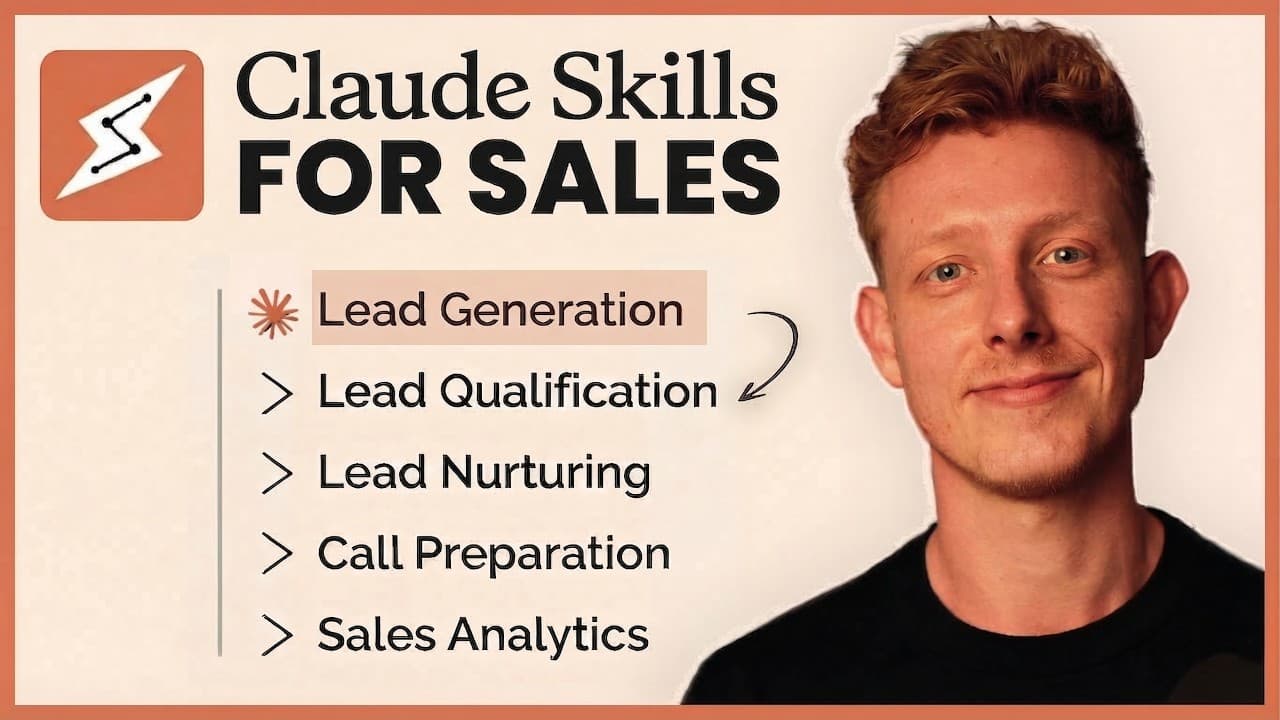
Claude Cowork enables building automated workflows for prospecting, lead nurturing, and call prep by prompting Claude. You can connect Claude to your folders, CRM, email, and calendar, and install the Entropic sales plugin to access pre made skills. The video shows examples of skills for CRM, LinkedIn scraping, outreach, and lead prioritization, plus guidance on creating your own custom workflows.
Transcript
Claude Co has completely changed the way me and my team do sales. We can now automate anything from prospecting to lead nurturing to sales analytics by simply prompting Claude. So, in this video, I'll show you how to use Co-work to automate any prospecting, research, or outreach task. Show you how to automate lead nurturing and follow-ups, and show... Read More
Key Insights
- Claude Cowork lets you create and run skills that automate sales tasks from prospecting to analytics.
- A skill is built by prompting Claude through a real workflow and saved for reuse in future tasks.
- Connectors like Appy, Apollo, and Uniow are essential for data access and outbound messaging.
- Sub agents allow parallel execution of bulk tasks to prevent context overload and speed up processing.
- Lead enrichment includes scraping engagement data, ICP matching, and company details for better targeting.
- Lead nurturing can re engage lost leads by automating CRM checks, research, and follow ups.
- The system supports creating personalized outreach workflows and storing them as reusable skills in a library.
- Entropic sales plugin provides pre made skills that can be customized for specific sales processes.
Install to Summarize YouTube Videos and Get Transcripts
Explore YouTube Video Summarizer or Get YouTube Transcript Extractor
Questions & Answers
Q: What is Claude Cowork used for in sales automation
Claude Cowork is used to automate repetitive sales tasks by building skills that encapsulate workflows for prospecting, qualification, enrichment, outreach, and analytics. By connecting to data sources like social networks and CRMs, users can scrape, filter, and enrich leads, then automate outreach messages or call prep. The system allows scaling with sub agents for bulk tasks and parallel processing to improve speed and consistency.
Q: How do you start building a skill in Claude Cowork
To build a skill, you go through a workflow with Claude to identify the steps, data inputs, and outputs. You then instruct Claude to save this as a skill or MD file in your library, specifying the tools and scrapers to use. After the initial run, you can reuse the skill for similar workflows and optionally create sub agents to handle portions of the task in parallel.
Q: Which connectors are recommended for lead generation in Claude Cowork
Recommended connectors include Appy for scraping social data such as LinkedIn profiles and posts, Apollo for lead databases, Uniow for outbound messaging, and CRM connectors like Ato. Using these connectors ensures Claude can access the necessary data and perform outreach, with apps like Fireflies for meeting transcription and calendar and email integration for follow ups.
Q: What is the role of sub agents in Claude Cowork
Sub agents allow parts of a bulk task to run in parallel, reducing context window overload and speeding up processing. When you have 100 to 200 leads or multiple concurrent steps, sub agents execute independently on separate contexts, enabling faster workflow completion while preserving accuracy and organization of results.
Q: What kinds of skills are demonstrated in the video
The video demonstrates skills for CRM prospect mining, account research, call prep, call summary, competitive intelligence, pipeline review, lead qualification, LinkedIn post engager outreach, and win loss analysis. It also shows how to customize these skills, connect them to data sources, and chain them into automated workflows for ongoing sales operations.
Q: How does the speaker propose using the Entropic sales plugin
The speaker explains that the Entropic sales plugin provides pre made skills that can be installed and then customized for specific workflows. These ready made skills reduce setup time, and when tailored, they support CRM data handling, prospect mining, email personalization, and lead intelligence tasks within Claude Cowork.
Q: What is the purpose of scheduling tasks in Claude Cowork
Scheduling tasks in Claude Cowork allows automated workflows to run at set times, enabling regular lead reviews, follow ups, and analytics without manual intervention. This capability helps ensure consistent outreach, timely responses, and up to date information in the CRM and reporting dashboards, improving overall sales efficiency.
Q: What kind of training or programs does the video promote
The video promotes access to an AI accelerator program offering templates, blueprints, unlimited one on one tech help, and workshops that dive deeper into tools and workflows. It also invites viewers to join for more comprehensive training and access to the speaker's library of customized skills for broader deployment across their sales processes.
Summary & Key Takeaways
-
Claude Cowork unlocks automation across prospecting, lead enrichment, and outreach by creating reusable skills that run via prompts. The speaker demonstrates building a custom workflow from a live example, connecting apps like Appy and Apollo, and using sub agents to execute bulk tasks efficiently.
-
The video emphasizes the importance of connectors to access data from social networks and CRMs, enabling automated lead research, qualification, and personalized messaging. It also covers scheduling tasks and using a dedicated sales plugin for faster setup and execution.
-
Finally, the tutorial promises access to templates, blueprints, and one on one support through an AI accelerator program, inviting viewers to explore deeper training and custom workflows that fit their sales processes.
Read in Other Languages (beta)
Share This Summary 📚
Summarize YouTube Videos and Get Video Transcripts with 1-Click
Try YouTube Summary with ChatGPT & Claude or YouTube Transcript Generator
Explore More Summaries from Ben AI 📚



Summarize YouTube Videos and Get Video Transcripts with 1-Click
Try YouTube Summary with ChatGPT & Claude or YouTube Transcript Generator