How to Build a Human in the Loop Email System for Sales
TL;DR
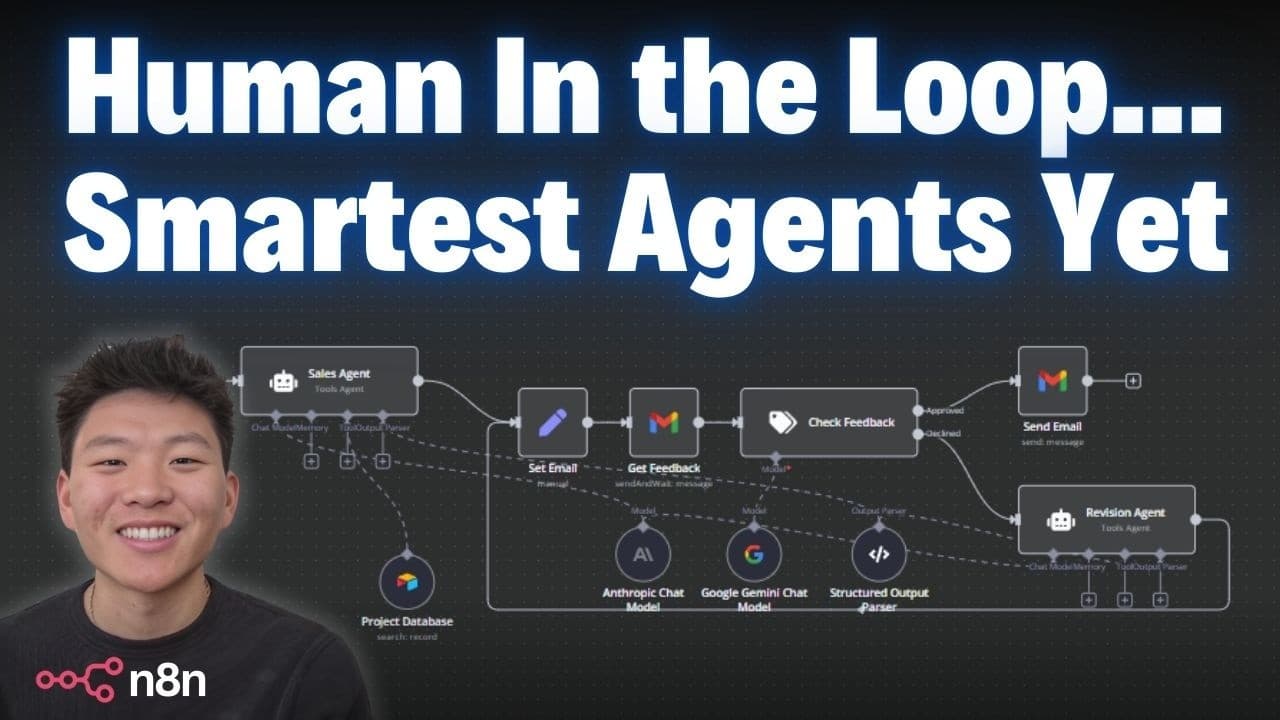
The system uses a human in the loop to approve and revise AI generated sales emails. A lead form triggers an email draft by a sales agent, which is reviewed by a human, revised by a revision agent, and sent when approved. It enables unlimited revisions until the output meets the user’s standards.
Transcript
today I'm going to be breaking down this awesome team of sales agents that uses humanin thee Loop functionality for feedback and approval so every time a lead form is submitted and captured an air table it's going to send that to this sales agent that's going to write an email and then send it off to us the human not only just for approval but also... Read More
Key Insights
- The system uses a human in the loop to approve AI generated emails, ensuring quality control. The process starts with a lead form in AirTable and uses a sales agent to draft emails for human review.
- The Revision Agent modifies drafts based on human feedback, enabling iterative improvements until the content meets approval criteria. This loop can repeat indefinitely until satisfaction is reached.
- Structured output parsing separates email subject and body, allowing precise routing to the right fields for review and sending in the final step.
- A project database provides context that helps tailor email content to each lead, enhancing relevance and potential conversion.
- The workflow leverages Claude 3.5 for natural language email drafting, chosen for its writing style and reliability in this use case.
- The system demonstrates a no code approach to building automated sales outreach, focusing on human oversight rather than fully autonomous AI.
- The video offers a free download of the workflow and promotes a Skool community for additional resources and live sessions.
- Users can download and import the workflow into n8n and customize it for their own sales processes.
- More videos from this channel:
- More from this channel: Nate Herk | AI Automation
Install to Summarize YouTube Videos and Get Transcripts
Explore YouTube Video Summarizer or Get YouTube Transcript Extractor
Questions & Answers
Q: How to initiate the human in the loop email workflow in n8n?
The workflow starts with an AirTable trigger that watches for new lead submissions. When a lead is captured, the Sales Agent drafts a personalized email using a Claude 3.5 based model. This draft is then sent to a human for approval and feedback before any sending occurs. The process is designed to support unlimited revisions until approval.
Q: What role does the Revision Agent play in this setup?
The Revision Agent takes the original draft and applies the feedback provided by the human reviewer. It creates a revised email, which then moves back to the human for another round of approval or further edits. This loop continues until the content meets the desired standards before sending.
Q: How is the final email content structured in the workflow?
The system uses a Structured Output Parser to define two separate fields: subject and email. The Sales Agent outputs a JSON with a subject string and an email string, enabling precise review and routing of each component before sending the email.
Q: What sources provide the data for the email content?
The Sales Agent pulls data from the form captured in AirTable and from a project database to tailor the content. This context helps craft the email to reference relevant past work and align with the lead’s described needs and timeline.
Q: Can this workflow be downloaded and used by viewers?
Yes, the video offers a free download of the workflow. Viewers can download the JSON and import it into n8n by selecting import from file, then customize the workflow for their own automation and outreach needs.
Q: What is the purpose of the human feedback in this process?
Human feedback guides the AI in refining the email to be more concise, remove unwanted specifics, and adjust scheduling details. The feedback ensures the tone, relevance, and call to action align with the lead’s context and the sender’s goals.
Q: What platforms are integrated with this workflow besides n8n?
AirTable is used as the trigger and leads source, a project database provides context, and the email is delivered via the user’s typical email system. The workflow is designed to be implemented within n8n with no code required beyond setup.
Q: What extra resources are promoted alongside the workflow?
The video promotes joining a free Skool community for more workflows and downloads, as well as a paid Skool community for deeper hands on learning, live calls, and ongoing support, ensuring users can expand their automation and AI capabilities.
Summary & Key Takeaways
-
A lead form submission triggers a collaborative email drafting workflow that involves human feedback and AI revision. The process ensures emails are refined through multiple rounds before sending. Users can download the workflow for free and implement it in n8n.
-
The workflow integrates AirTable for leads, a project database for context, and a Claude 3.5 based agent to generate email content. Output is structured with a subject and email body to facilitate precise approvals.
-
The video emphasizes a no code approach within n8n and invites viewers to join a Skool community for more workflows and live sessions, while offering a paid option for deeper learning and ongoing support.
Read in Other Languages (beta)
Share This Summary 📚
Summarize YouTube Videos and Get Video Transcripts with 1-Click
Try YouTube Summary with ChatGPT & Claude or YouTube Transcript Generator
Explore More Summaries from Nate Herk | AI Automation 📚






Summarize YouTube Videos and Get Video Transcripts with 1-Click
Try YouTube Summary with ChatGPT & Claude or YouTube Transcript Generator