How to Build an MCP Agent Team with n8n
TL;DR
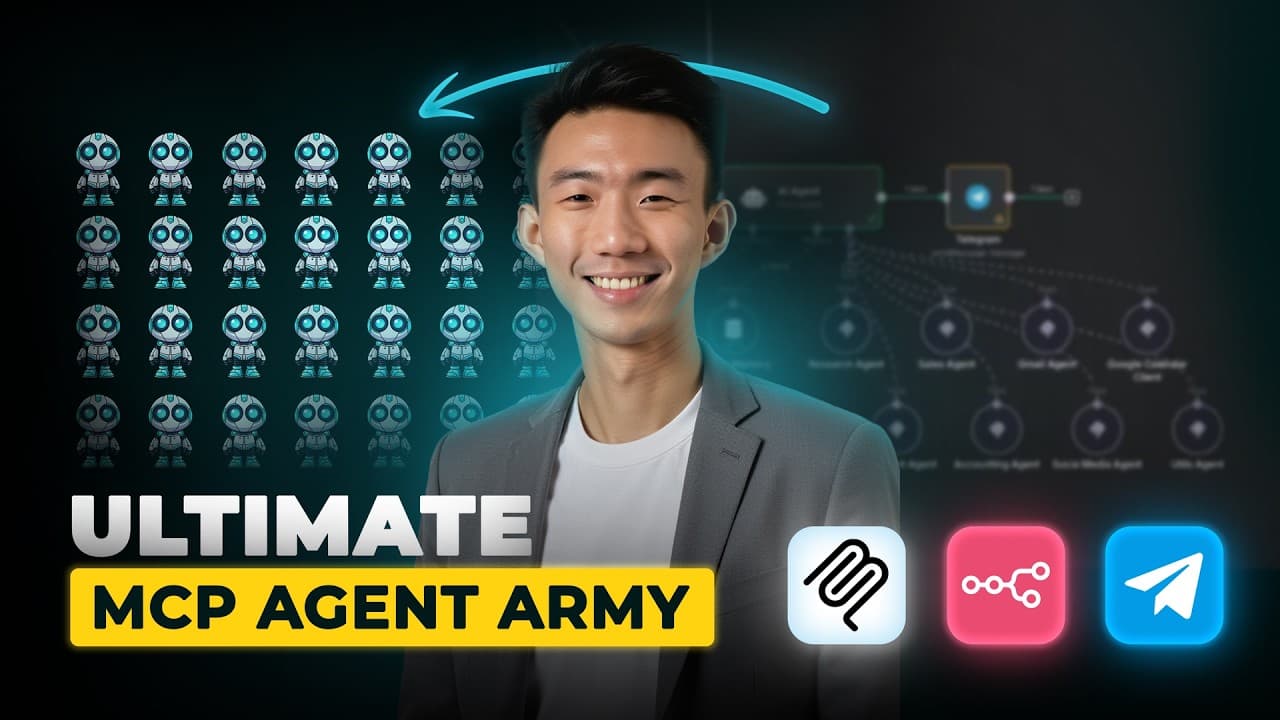
Build a central n8n agent that receives Telegram messages, identifies the requested task, and delegates it to specialized MCP workflows. The demonstrated system can research prospects, update sales sheets, draft Gmail messages, schedule calendar events, create documents, record receipt data, and publish social posts, while separate routing paths process text, voice, images, and files.
Transcript
I just built this MCP AI agent army with NN and I'm going to share this template for free. This MCP agent army can manage your emails, social media, calendars, research, accounting or even your CRM all on autopilot and it's now much easier with MCP. Let me show you how this works. So if I send a simple message on telegram like find me top restauran... Read More
Key Insights
- The central n8n agent is a task coordinator that interprets Telegram requests and selects the appropriate MCP workflow. Its connected specialists cover research, sales, Gmail, calendars, documents, accounting, social media, and utilities, keeping each automation focused on a defined category of work.
- Telegram is the conversational entry point for the automation system. A Telegram trigger receives messages, while a switch node examines whether each incoming message contains text, voice, an image, or a file and routes that content through the corresponding processing path.
- The research and sales agents can form a connected prospecting workflow. The research agent finds business details such as names, websites, phone numbers, and email information, after which the sales agent places relevant fields into a designated Google Sheet.
- The Gmail agent creates outreach copy from conversational instructions and can save the result as a draft. The demonstration also shows that users can refine the output before saving it, such as requesting that a phone number be omitted from the message.
- The calendar agent converts a natural-language scheduling request into a Google Calendar event. The request can include the meeting topic, duration, date, time, and time zone, allowing the agent to create the event without manual calendar entry.
- The document agent gathers missing context before preparing a proposal. In the demonstration, it asks about purpose and audience, then creates a proposal for AI agency owners and stores the resulting document in Google Drive.
- The accounting agent extracts receipt information from an uploaded image and records the result in Google Sheets. The demonstration verifies fields such as the amount and date after the agent analyzes the image and reports that the record was created.
- A local n8n installation needs a publicly reachable webhook endpoint for the Telegram trigger. The tutorial uses an ngrok domain, forwards traffic to the local n8n port, and supplies the public webhook address through the webhook URL environment variable.
Install to Summarize YouTube Videos and Get Transcripts
Explore YouTube Video Summarizer or Get YouTube Transcript Extractor
Questions & Answers
Q: How do you build an MCP agent team in n8n?
Create a main n8n workflow with Telegram as the trigger and an AI agent as the coordinator. Connect that coordinator to separate MCP workflows for research, sales, Gmail, Google Calendar, documents, accounting, social media, and utilities. Import the provided templates, configure credentials for every service, activate the specialist workflows, and activate the main workflow when you want continuous Telegram communication.
Q: How does the main n8n agent choose the correct MCP workflow?
The main AI agent receives the user's request and calls the specialist whose tools match the task. A restaurant search goes to the research agent, saving prospect data goes to the sales agent, drafting an email goes to Gmail, and scheduling goes to the calendar agent. This arrangement lets one conversational interface coordinate several focused workflows without requiring the user to select each agent manually.
Q: How are Telegram text, voice, images, and files routed in n8n?
A Telegram trigger receives the message, and a switch node checks which message property exists. The workflow defines separate routing rules for files, images, voice messages, and text. Each detected content type is sent to its own processing path and given a renamed output, such as text or voice, so later nodes can handle the content in an appropriate form.
Q: How can the research and sales agents add leads to Google Sheets?
Ask the research agent to find a business and collect relevant details, including its name, website, phone number, contact name, and available email information. Then ask the system to save or complete the information in the sales Google Sheet. The sales workflow maps the researched fields into the sheet, although values beginning with a plus sign may require attention because the sheet can display them as errors.
Q: How can the Gmail agent create and save an outreach draft?
Send a request describing the recipient, purpose, and subject of the outreach message. The Gmail agent generates draft copy and a subject line, which can be reviewed or revised through another prompt. Once the wording is acceptable, instruct the agent to save it as a draft. Additional constraints, such as excluding a phone number, can be included before the draft is stored.
Q: How does the calendar agent schedule meetings from a message?
Provide the meeting topic, desired duration, date, time, and relevant time zone in a natural-language request. The calendar agent interprets those details and creates the corresponding event in Google Calendar. The demonstration schedules an AI automation discussion and then checks the calendar to confirm that the event appears, removing the need to enter the event fields manually.
Q: How does the accounting agent record a receipt image?
Upload the receipt image through Telegram and ask the system to record it. The accounting agent analyzes the image, extracts available transaction details, and writes those values into its connected Google Sheet. The demonstration checks the newly created entry and confirms that the extracted amount and date match the receipt, showing how image input can become a structured accounting record.
Q: How do you run the Telegram webhook with a local n8n installation?
Install the demonstrated n8n version through Docker, create an ngrok domain, and start a tunnel using the command supplied by ngrok. Configure the tunnel to forward traffic to the local n8n host port, then add the public address as the webhook URL environment variable. This public endpoint allows Telegram webhook requests to reach an n8n instance running on localhost.
Summary & Key Takeaways
-
The system uses Telegram as its main interface and an Anthropic chat model as the central decision maker. Incoming requests are routed to specialized MCP agents for research, sales, Gmail, calendar management, document creation, accounting, social media, and utility tasks, allowing users to control several automations through ordinary messages.
-
The demonstrations connect tasks across multiple services. Research results can be enriched and saved to a sales Google Sheet, outreach emails can be drafted and stored in Gmail, meetings can be added to Google Calendar, proposals can be written to Google Drive, and receipt details can be extracted from uploaded images.
-
Setup requires an n8n release that includes the demonstrated MCP client nodes, imported workflow templates, and credentials for every connected service. Cloud users select the supported version, while local users configure Docker, expose the instance through an ngrok domain, provide the webhook URL as an environment variable, and connect Telegram through BotFather.
Read in Other Languages (beta)
Share This Summary 📚
Summarize YouTube Videos and Get Video Transcripts with 1-Click
Try YouTube Summary with ChatGPT & Claude or YouTube Transcript Generator
Explore More Summaries from Andy Lo 📚

Summarize YouTube Videos and Get Video Transcripts with 1-Click
Try YouTube Summary with ChatGPT & Claude or YouTube Transcript Generator