How to build an AI voice agent that calls new leads
TL;DR
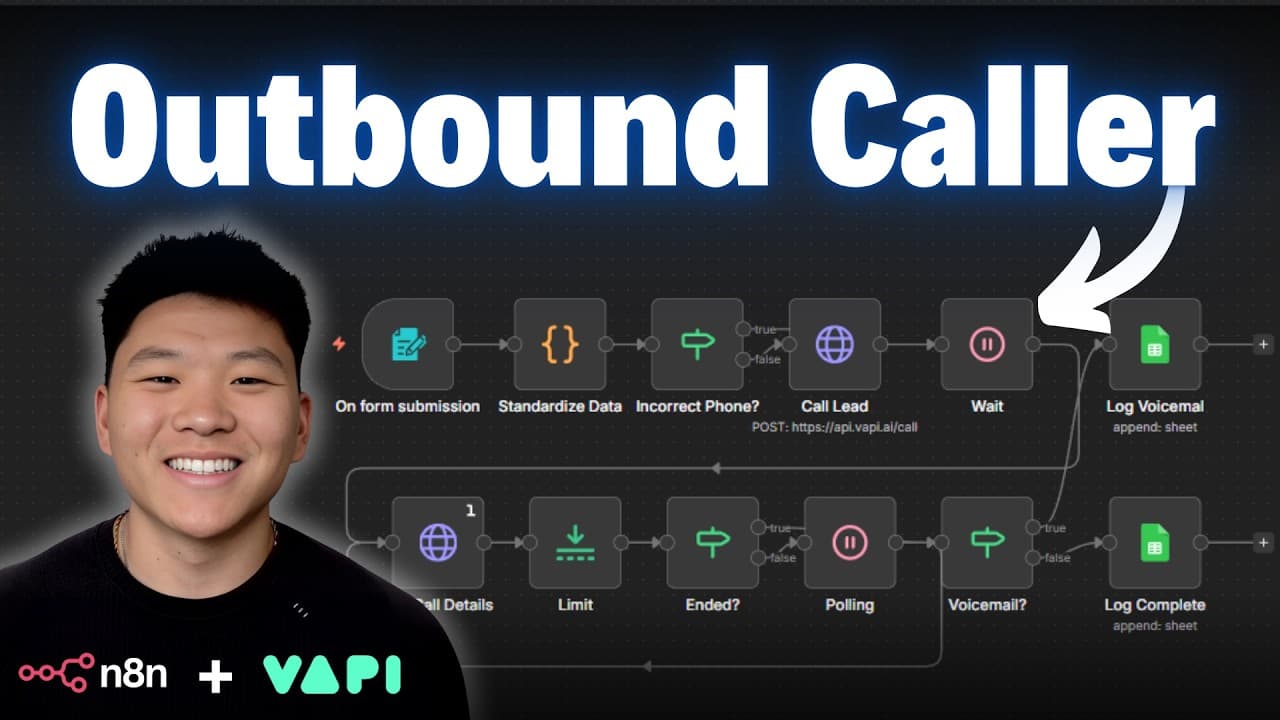
An AI voice agent automatically dials new leads after a form submission, asks qualification questions, and logs the results for follow up. The system uses n8n for automation and Vappy for the voice agent, with live demos showing data normalization and polling to retrieve call details before recording results.
Transcript
Today I'm going to be showing you guys how we can build an AI agent that can make phone calls for you while you sleep. We're going to be using nodn for the automation logic and we're going to be using Vappy for the voice agent and I'm going to be giving you guys everything that you need to replicate the system for completely free. The workflow, the... Read More
Key Insights
- The system starts from a form submission that captures name, phone, email, company, role, request, and company size, triggering an automated call workflow.
- Data normalization is essential to convert phone numbers into a consistent 10-digit format to prevent call failures.
- Vappy uses a two-step process: one call to initiate the lead and a polling step to fetch call details once completed.
- Polling continues until the call is finished so the final data can be logged only after completion.
- The workflow logs qualified data including intent, motivation, urgency, past experience, and budget to a results sheet for easy follow up.
- The approach demonstrates how outbound automation can qualify leads and pre-collect information before outreach begins.
- The talk includes a practical tip about gating or guiding the user input on the form to improve data quality.
- The tutorial emphasizes replicability by providing templates, resources, and a ready-to-use workflow for free.
Install to Summarize YouTube Videos and Get Transcripts
Explore YouTube Video Summarizer or Get YouTube Transcript Extractor
Questions & Answers
Q: How does the outbound lead qualification workflow begin?
The workflow begins when a form submission provides lead details such as name, phone, email, company, and requested service. This data triggers an automated call to the new lead, with the Vappy voice agent using the information to guide the conversation and ask follow up questions. This initial trigger sets the loop in motion.
Q: What role does data normalization play in the system?
Data normalization standardizes phone numbers into a consistent 10 digit format without punctuation. This is important because numbers may be entered with country codes or special characters, leading to failed calls. The normalization step ensures that every outgoing call uses a clean, dialable number.
Q: How is the call outcome captured in the workflow?
The system makes a call and then uses a polling mechanism to check for call completion. If the call has not finished, it waits and checks again, ensuring the final data is available before logging. This guarantees accurate logging of the outcome and details.
Q: What information is logged after a successful qualification?
After a successful call, the system logs details such as the lead’s name, company, the reason for interest, motivation, urgency, past automation experience, budget, intent, and status. This rich data helps the team decide next steps and tailor outreach.
Q: Why is a polling step necessary in this workflow?
Polling is necessary because the voice agent requires time to complete the call and gather data. The polling loop waits for the final call data and only then proceeds to logging, ensuring that incomplete or partial information is not saved.
Q: What technologies are used for automation and the voice agent?
The automation is built with n8n, while the voice agent utilizes Vappy to handle outbound calls. The combination allows end to end automation from form submission to voice engagement and data capture.
Q: How can a user replicate this system for free?
The video provides templates, resources, and the workflow necessary to replicate the system. Viewers can copy the setup, use the included form and workflow configuration, and deploy their own outbound lead qualification automation using the tutorials and resources shared.
Q: What is the intended business benefit of this AI agent?
The intended benefit is to save time, improve lead context, and increase conversion rates by enabling timely, informed outreach. The agent begins the qualification process automatically after form submission, delivering richer data before human outreach and follow up.
Summary & Key Takeaways
-
This video demonstrates an outbound lead qualification workflow that triggers when a form is submitted, and uses a voice agent to call the lead, ask predefined questions, and capture responses for qualification. The data is normalized, the call is polled for completion, and results are stored in a Google Sheet for follow up.
-
The speaker walks through a wireframe and a node by node breakdown of the n8n workflow, explaining why data normalization and polling are needed to ensure reliable calls and accurate logging.
-
The overall goal is to save time, improve lead context, and increase conversion by ensuring outreach happens with informed context and complete lead data.
Read in Other Languages (beta)
Share This Summary 📚
Summarize YouTube Videos and Get Video Transcripts with 1-Click
Try YouTube Summary with ChatGPT & Claude or YouTube Transcript Generator
Explore More Summaries from Nate Herk | AI Automation 📚






Summarize YouTube Videos and Get Video Transcripts with 1-Click
Try YouTube Summary with ChatGPT & Claude or YouTube Transcript Generator