How to Build Practical n8n Automations in 2026
TL;DR
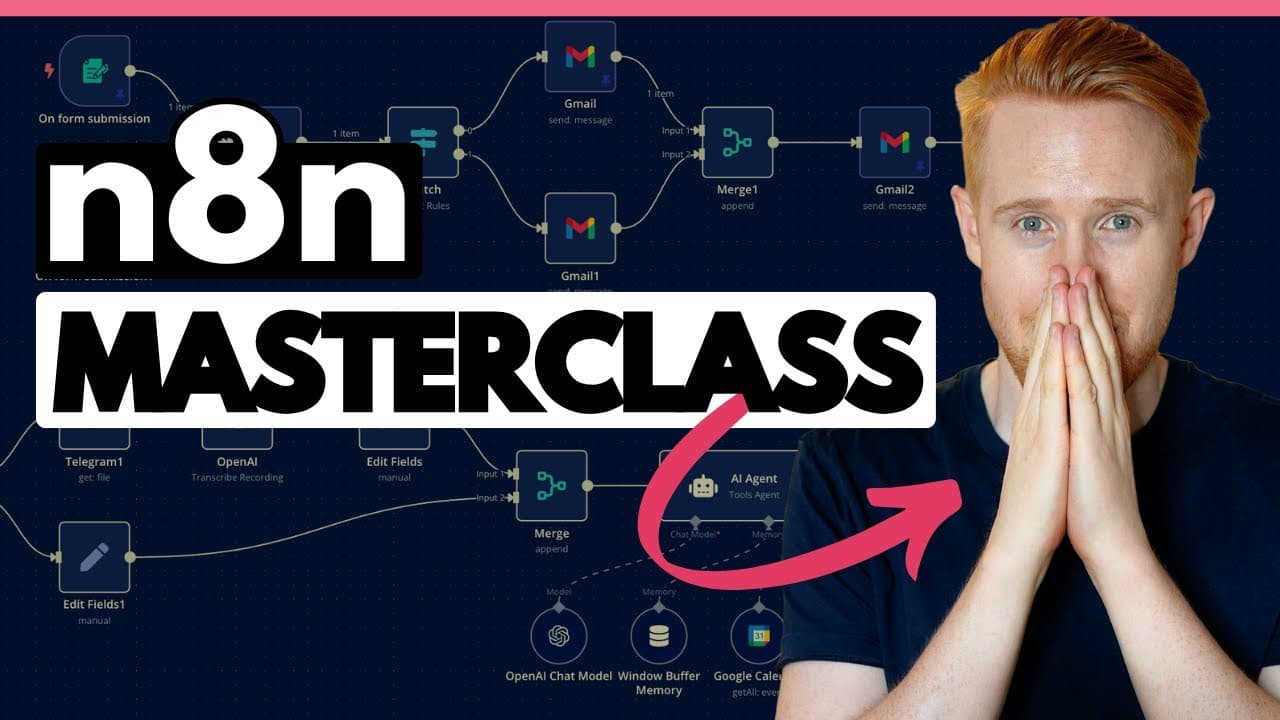
n8n connects applications so routine business tasks can run automatically, including lead follow-up, calendar management, email handling, reporting, document generation, and web scraping. Beginners can learn it by importing the provided workflow blueprints, rebuilding five practical scenarios, and solving errors directly, with an optional ChatGPT API balance required only for the language-model modules.
Transcript
what is going on guys it is jonno I'm so excited because today we're going to be talking about n8n this is a full crash course on this platform to take you from a beginner to a professional in a matter of just a few hours even if you've literally never come across this platform before you're scratching your head you're like I've never seen this bef... Read More
Key Insights
- n8n is an automation platform that connects multiple applications, allowing information from forms, email, calendars, spreadsheets, Slack, documents, social platforms, and other services to move through workflows without repetitive manual handling.
- The lead-response workflow is designed to add each website inquiry to Google Sheets, email the prospect, and alert the team to call within 60 seconds. The transcript claims that calling within that period can increase conversion by 391 percent.
- The personal AI assistant is designed to retrieve a user's calendar and upcoming tasks, provide a morning reminder, and create or update relevant items. Its purpose is to handle part of the user's routine daily administrative workload.
- The sub-agent is designed to review incoming leads and send a daily report identifying people whom the user or sales team has not called. This creates a recurring follow-up mechanism for leads that might otherwise be overlooked.
- Webhooks are described as a common way to receive data into n8n, functioning like workflow inputs. HTTP requests are often used to send data outside n8n, although the transcript notes that they can support additional functions as well.
- The advanced AI workflow uses retrieval-augmented generation and a database built by the user. It appears as the fifth automation in the course, following the lead workflow, personal assistant, reporting sub-agent, and webhook and HTTP request material.
- n8n pricing is described as starting at 20 pounds per month, with charges based on workflow executions rather than each individual module. The transcript presents this structure as more economical than platforms that charge repeatedly across operations in a workflow.
- Self-hosting is presented as a free alternative for technically capable users, with Fiverr or Upwork suggested as possible sources of setup help. The course itself does not teach self-hosting and instead focuses on constructing and understanding workflows.
Install to Summarize YouTube Videos and Get Transcripts
Explore YouTube Video Summarizer or Get YouTube Transcript Extractor
Questions & Answers
Q: How does n8n automate routine business tasks?
n8n connects applications inside workflows so data can trigger actions without repeated manual effort. The examples include moving form submissions into Google Sheets, sending emails, notifying a sales team in Slack, extracting information from documents, managing calendars and Gmail, scheduling social posts, generating documents, scraping internet listings, and combining performance analytics across marketing, sales, and fulfillment.
Q: How can n8n improve lead follow-up for a service business?
The demonstrated lead workflow begins when a prospect submits an inquiry through a website form. It automatically records that person in a Google Sheet, sends an email, and alerts the team to make a call within 60 seconds. The transcript states that calling within 60 seconds can increase conversion by 391 percent, making response speed the central objective.
Q: What can the personal n8n AI assistant manage?
The personal AI assistant can retrieve information about the user's calendar and upcoming tasks, then provide a morning reminder that summarizes the day. It can also create and update relevant items. The broader examples mention calendar management, email handling, document uploads and extraction, social posting, and even calling people to make bookings on the user's behalf.
Q: Why build a sub-agent for missed sales calls?
The sub-agent checks whether leads produced by the earlier inquiry workflow were actually called. It then sends a daily report listing the people whom the user or sales team still needs to contact. This recurring review is intended to prevent submitted leads from being forgotten and to highlight sales opportunities that remain unaddressed at the end of the day.
Q: What are webhooks and HTTP requests in n8n?
Webhooks are described as a way to receive data into n8n, effectively acting as inputs to a workflow. HTTP requests are described as frequently sending data from n8n to another destination, while also supporting other functions. The course treats both as important advanced capabilities, and the presenter says webhooks are among the features he uses most often.
Q: What five n8n automations are built in the course?
The course builds a website lead-response workflow, a personal AI assistant, and a sub-agent that reports leads that were not called. It also covers a workflow using webhooks and HTTP requests, followed by an advanced retrieval-augmented generation system that uses a database built by the user. Free downloadable blueprints are offered for all five scenarios.
Q: How much does n8n and the course setup cost?
The transcript says n8n pricing starts at 20 pounds per month and increases from there. It also says technically capable users can self-host the platform for free, although self-hosting is not covered in the course. The applications used are described as free except for the ChatGPT API, which requires a minimum balance of $5 for relevant modules.
Q: How should a beginner follow the n8n course effectively?
A beginner should download the free workflow blueprints from the description, import each file through the three-dot menu in an n8n account, and build alongside the demonstration. The presenter emphasizes that meaningful learning comes from encountering errors and bugs, working through them, and adapting the practical workflows for personal use, business implementation, or services sold to other people.
Summary & Key Takeaways
-
n8n is presented as an automation platform that connects applications and replaces repetitive manual work. Example uses include extracting document data, managing tasks and social posts, handling calendars and email, calling people, scraping business listings into Google Sheets, generating variable-rich documents, and consolidating current sales, marketing, and fulfillment analytics.
-
The course builds five practical scenarios: rapid lead follow-up, a personal AI assistant, a sub-agent that reports uncalled leads, workflows using webhooks and HTTP requests, and a retrieval-augmented generation system with its own database. The examples are designed for real business implementation rather than demonstrations with little practical value.
-
Viewers are encouraged to download and import the free workflow blueprints, follow each build, and troubleshoot errors themselves. Most applications used in the lessons are described as free. The exception is the ChatGPT API, which requires a minimum $5 balance for the language-model modules, although those sections can be skipped.
Read in Other Languages (beta)
Share This Summary 📚
Summarize YouTube Videos and Get Video Transcripts with 1-Click
Try YouTube Summary with ChatGPT & Claude or YouTube Transcript Generator
Explore More Summaries from Jono Catliff 📚



Summarize YouTube Videos and Get Video Transcripts with 1-Click
Try YouTube Summary with ChatGPT & Claude or YouTube Transcript Generator