How to Build an AI Agent That Scrapes Websites
TL;DR
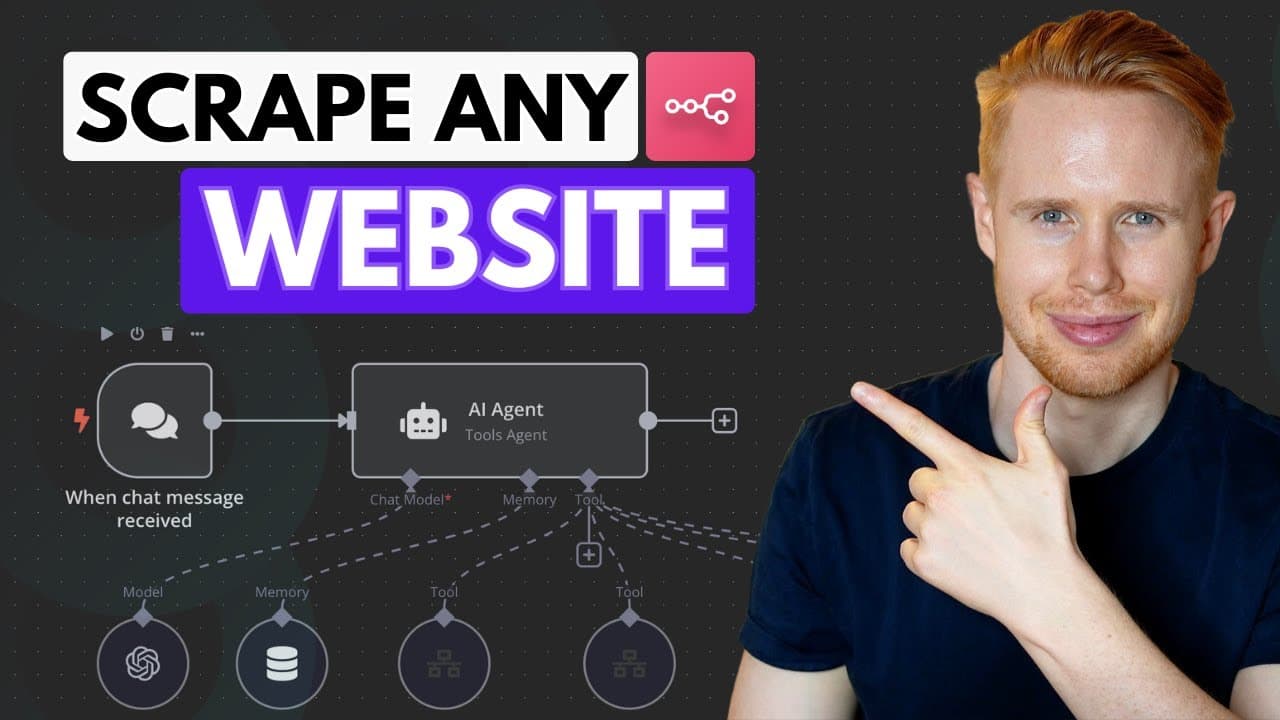
Build the scraper by connecting an n8n chat trigger to an AI agent, an OpenAI chat model, window buffer memory, and separate scraping workflows exposed as tools. The agent collects required details such as industry and location, selects the appropriate source, runs one or several scraper modules, combines the returned records, and writes them into Google Sheets.
Transcript
today we're building an AI agent that will literally scrape anything for you like the entire internet it really doesn't matter take for example Google Maps or you can scrape Yellow Pages or Apollo Instagram Tik Tok and you can add on as many of these modules as you want to scrape really anything it is out there so take a look at this here's an exam... Read More
Key Insights
- The AI agent is a routing layer that interprets each request and sends it to the appropriate scraping tool. Its system prompt lists the available tools, their purposes, and the information that must be collected before a selected scraper can run.
- The chat-message trigger provides a built-in conversational interface for the main workflow. A request entered there reaches the AI agent, which can ask follow-up questions when required fields such as industry, city, state, or country have not yet been supplied.
- The OpenAI chat model serves as the agent's reasoning component. It processes the user's language, determines what the request means, chooses how to respond, and helps the agent decide whether to invoke the Google Maps tool or another configured source.
- Window buffer memory preserves recent conversation context so follow-up answers remain connected to the original request. The demonstrated configuration remembers five past messages, allowing a response such as "landscaping" to complete an earlier Google Maps scraping request.
- Each scraper is built as a separate workflow that is executed by another workflow. This design lets the main AI agent call a specialized Google Maps workflow only when needed, while other sources can be added as additional tools using a similar structure.
- Tool names and descriptions guide the agent's routing decisions. The Google Maps tool is described as the tool to call when a user wants to scrape Google Maps, giving the agent an explicit keyword and purpose for selecting it.
- Structured JSON input carries the required search information from the parent agent into a scraper sub-workflow. The demonstrated fields describe the target industry and location, including the city, state or province, and country needed to conduct the requested search.
- Multiple scraper tools can run for one broad request and return results from Google Maps, Yellow Pages, Apollo, Instagram, and TikTok. The workflow aggregates those records into a response while also sending the collected data to a Google Sheet in real time.
Install to Summarize YouTube Videos and Get Transcripts
Explore YouTube Video Summarizer or Get YouTube Transcript Extractor
Questions & Answers
Q: How do you build an AI scraping agent in n8n?
Start a new n8n workflow with the built-in chat-message trigger, then connect it to an AI agent. Add a system prompt that defines the agent as a scraping assistant and explains how it should select tools. Attach an OpenAI chat model, window buffer memory, and one or more specialized scraper workflows that the agent can call as tools.
Q: How does the AI agent choose which website scraper to use?
The agent uses instructions in its system prompt together with each tool's name and description. For example, the Google Maps tool is explicitly described as the tool to call when a user wants to scrape Google Maps. When a request mentions that source, the agent can route the supplied search details to the corresponding sub-workflow.
Q: Why does the scraping agent ask follow-up questions?
The agent asks follow-up questions because a scraping request may omit information required by the selected tool. For a Google Maps search, the workflow may need an industry, city, state or province, and country. The agent collects those missing fields conversationally before it sends a structured request to the scraper workflow for processing.
Q: What does window buffer memory do in the n8n agent?
Window buffer memory keeps recent chat messages available to the agent. The demonstrated setup uses a context window length of five messages. This allows the user to request a Google Maps scrape first and provide an answer such as "landscaping" later, while the agent still understands that the new detail belongs to the earlier request.
Q: How are scraper workflows connected to the main AI agent?
Each scraper is created as a separate workflow with a trigger that runs when another workflow executes it. The scraper workflow is then selected inside a tool attached to the main agent. This connection allows the AI agent to invoke the specialized workflow when its tool description matches the user's requested source and scraping objective.
Q: What information is passed into the Google Maps scraper?
The parent workflow passes structured search information into the Google Maps sub-workflow using a JSON example. The demonstrated inputs include a search term representing the industry, plus location details such as the city, state or province, and country. These fields give the scraper the critical information needed to target the requested businesses and geographic area.
Q: Can the agent scrape several sources in one request?
Yes. The demonstration asks the agent to scrape every configured source simultaneously. It processes results from Google Maps, Yellow Pages, Apollo, Instagram, and TikTok, then aggregates the collected records into one chat response. The same results are also sent to a Google Sheet as the individual scraping workflows complete their assigned tasks.
Q: How are scraped results stored and returned to the user?
The specialized workflows send their scraped records back into the AI agent, which produces a combined message listing the results by source. At the same time, the workflow writes the records into a connected Google Sheet in real time. The demonstration shows entries arriving from sources including TikTok, Instagram, Google Maps, and Yellow Pages.
Summary & Key Takeaways
-
The demonstrated n8n agent accepts conversational scraping requests and asks for missing details before taking action. A user can specify an industry and location, after which the agent selects a matching scraper tool. Results are returned through the chat interface and simultaneously placed into a connected Google Sheet for later use.
-
The main workflow begins with n8n's chat-message trigger and an AI agent. Its system prompt defines the agent as a personal scraping assistant and explains when each available tool should be selected. An OpenAI chat model interprets requests, while window buffer memory preserves recent context across follow-up messages from the user.
-
Each scraping source is implemented as a separate sub-workflow that runs only when called by another workflow. The parent agent identifies the appropriate tool from its name and description, then passes structured inputs such as industry, city, state, and country. Additional tools can follow the same pattern to expand the agent's coverage.
Read in Other Languages (beta)
Share This Summary 📚
Summarize YouTube Videos and Get Video Transcripts with 1-Click
Try YouTube Summary with ChatGPT & Claude or YouTube Transcript Generator
Explore More Summaries from Jono Catliff 📚
Summarize YouTube Videos and Get Video Transcripts with 1-Click
Try YouTube Summary with ChatGPT & Claude or YouTube Transcript Generator