How Does the Linux File System Work?
TL;DR
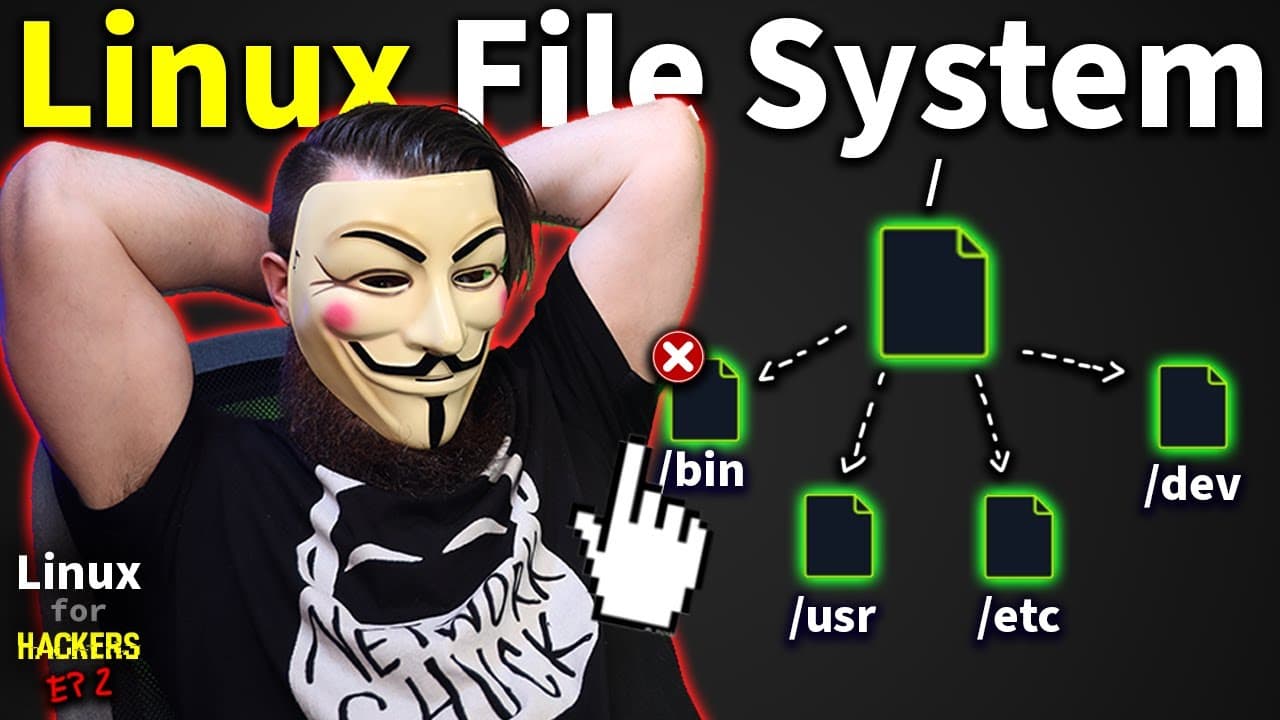
The Linux file system is a hierarchical structure where everything is treated as a file, including commands and devices. Key directories like /bin, /sbin, and /usr serve specific purposes, while commands such as 'whoami', 'cp', and 'rm' are essential for system navigation and management. Explore these concepts with practical exercises in the free Hack the Box Academy lab.
Transcript
welcome to linux for hackers and everyone because everyone needs to learn linux in episode one we learned a lot if you haven't seen it yet go check it out but that sucker just scratched the surface in episode two which is right now we're going deeper we're going crazy no time to waste let's start right now now just l... Read More
Key Insights
- The Linux file system is structured and hierarchical, with everything being represented as a file, including commands and devices.
- Key directories include /bin for essential command binaries, /sbin for admin commands, and /usr for user applications and libraries.
- The /etc directory contains configuration files, such as network settings, which can be modified to change system configurations.
- The /dev directory houses device files, representing hardware components like hard drives and printers.
- Commands like 'whoami', 'cp', 'rm', and 'adduser' are fundamental for navigating and manipulating the Linux environment.
- The /mnt and /media directories are used for mounting drives, with /media handling automatic mountings.
- Using 'sudo' grants temporary admin privileges, allowing users to perform actions that require higher permissions.
- Hack the Box Academy provides a free Linux lab environment to practice Linux commands and concepts safely.
Install to Summarize YouTube Videos and Get Transcripts
Explore YouTube Video Summarizer or Get YouTube Transcript Extractor
Questions & Answers
Q: What is the significance of the /bin directory in Linux?
The /bin directory in Linux contains essential command binaries necessary for the system's operation. These binaries include fundamental commands like 'ls', 'cp', and 'rm', which are used for basic file management and navigation. The directory is crucial for the system to function properly, as it houses commands that are frequently used by both users and scripts.
Q: How does the 'sudo' command enhance user capabilities in Linux?
The 'sudo' command allows users to execute commands with elevated privileges, typically those of the root or superuser. This is essential for performing administrative tasks that require higher permissions, such as modifying system files or installing software. By using 'sudo', users can temporarily gain the necessary access to perform specific actions without permanently changing their user status.
Q: What role does the /etc directory play in the Linux file system?
The /etc directory is a critical component of the Linux file system, containing configuration files for the system and installed applications. It includes settings for network interfaces, user authentication, and system services. Administrators often modify files in /etc to change system configurations, making it a central location for managing the system's behavior and performance.
Q: Why are there two sets of /bin and /sbin directories in Linux?
Linux includes two sets of /bin and /sbin directories: one in the root directory and another in the /usr directory. Historically, this separation was due to limited hard drive space, with /bin and /sbin in the root containing essential commands for system boot and recovery, while /usr/bin and /usr/sbin housed additional user applications and utilities. This organization helps manage system resources and maintain functionality.
Q: What is the purpose of the /dev directory in Linux?
The /dev directory in Linux serves as a repository for device files, representing hardware components like hard drives, printers, and terminals. Each device file corresponds to a physical or virtual device, allowing the operating system and applications to interact with hardware through standard file operations. This abstraction simplifies device management and access within the Linux environment.
Q: How does the 'which' command assist users in Linux?
The 'which' command in Linux helps users locate the executable file associated with a given command. By indicating the directory path where the command's binary resides, 'which' assists in understanding the command's origin and verifying its presence in the system's PATH. This is particularly useful for troubleshooting and ensuring the correct version of a command is being used.
Q: What is the function of the /mnt and /media directories?
The /mnt and /media directories in Linux are used for mounting filesystems. /media is primarily for automatically mounted filesystems, such as USB drives and external storage, providing a convenient access point for users. In contrast, /mnt is typically used for manually mounted filesystems, allowing administrators to mount and access additional storage devices as needed. Both directories facilitate the integration of external storage into the system.
Q: Why is it important to understand the Linux file system hierarchy?
Understanding the Linux file system hierarchy is crucial for effective system administration and troubleshooting. It provides insights into where files and commands reside, aiding in navigation and management of the system. Knowledge of the hierarchy enables users to efficiently locate configuration files, execute commands, and understand system behavior, ultimately enhancing their ability to maintain and optimize Linux environments.
Summary & Key Takeaways
-
This episode explores the Linux file system, emphasizing that everything in Linux is a file, including commands and devices. It covers key directories like /bin, /sbin, and /usr, explaining their purposes and contents.
-
Essential Linux commands are introduced, such as 'whoami', 'cp', 'rm', and 'adduser', demonstrating how to navigate and manipulate the file system. The use of 'sudo' for admin privileges is explained.
-
The video also highlights the importance of directories like /etc for configuration files and /dev for device files. Hack the Box Academy offers a free lab for hands-on practice with Linux.
Read in Other Languages (beta)
Share This Summary 📚
Summarize YouTube Videos and Get Video Transcripts with 1-Click
Try YouTube Summary with ChatGPT & Claude or YouTube Transcript Generator
Explore More Summaries from NetworkChuck 📚


Summarize YouTube Videos and Get Video Transcripts with 1-Click
Try YouTube Summary with ChatGPT & Claude or YouTube Transcript Generator