How to Build an AI Personal Assistant 2.0 That Calls Other Agents (No Code) in n8n
TL;DR
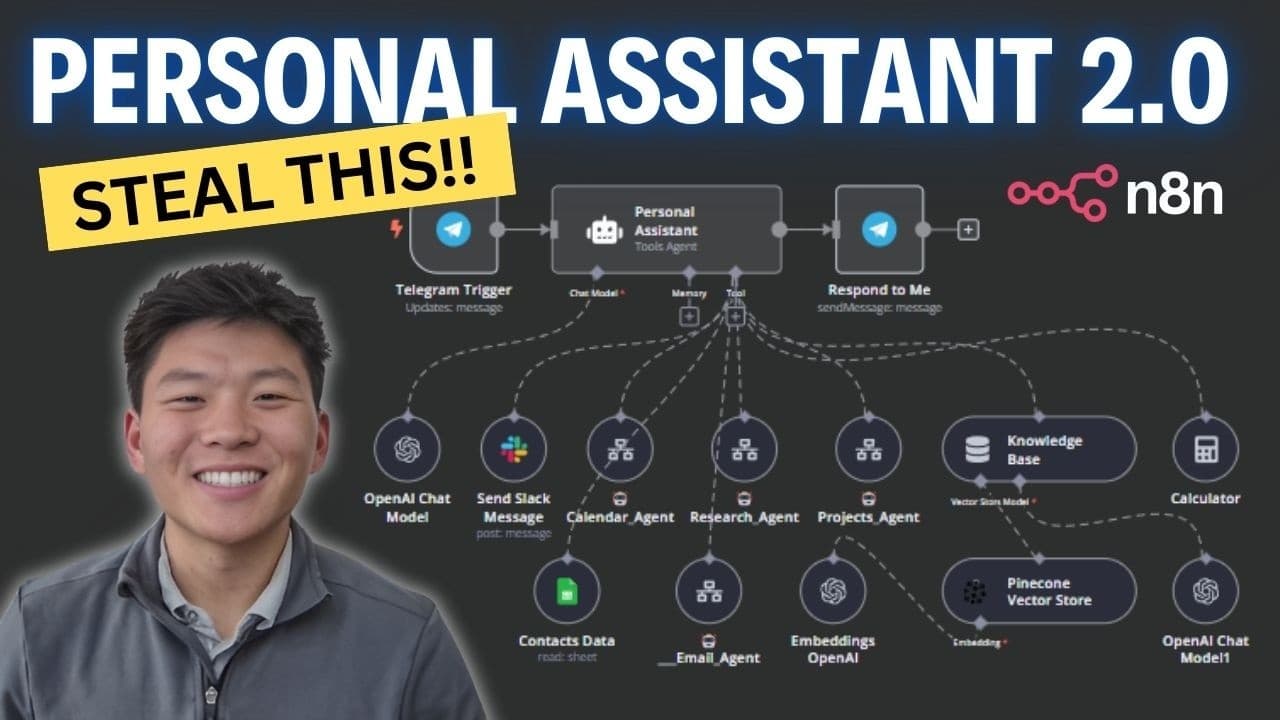
Build a multi-agent assistant in n8n by using one main agent to route Telegram requests to four specialized agents for email, calendar, research, and projects. This replaces six tools attached directly to the original assistant, reduces prompting complexity, and makes expansion easier. The calendar agent can choose among three actions, while contact data enables invitations and emails. Read on to see how routing, scheduling, and compound requests work.
Transcript
so I said can you schedule a meeting for tomorrow with Michael Scott at noon and then can you email him to confirm if that works so we're going to fire that off we'll see it take place real quick it just got Michael Scott's email information from the contact database now it's going to go back to the agent and then the agent is going to figure out w... Read More
Key Insights
- The upgraded architecture gives the main personal assistant access to four specialized agents instead of six individual tools. The four specialists handle email, calendar, research, and project requests, allowing the main agent to focus on interpreting each incoming message and routing it to the appropriate agent.
- The main agent works as a request router that receives messages through a Telegram trigger. When a request involves email or scheduling, it gathers required contact information and delegates the task to the relevant specialized agent, which understands how to choose and operate its own tools.
- The calendar agent has three available actions: getting events, creating events, and creating events with attendees. It receives a query from another workflow, determines the required action, executes it, and returns either a success message or an error that tells the main agent to try again.
- The contact database supplies email addresses needed for tasks involving named people. In the dinner demonstration, the system finds Michael Scott's stored address before calling the calendar agent, enabling the selected calendar tool to create the event and send an invitation to the correct attendee.
- The $fromAI function fills node parameters by interpreting the incoming natural-language query. A workflow builder provides a key, such as start time, and can add a description explaining the value, giving the AI enough context to extract the corresponding information from the request.
- Parameter descriptions provide additional context when a key alone may not be sufficient. The calendar workflow defines attendees as the person or people with whom the user wants to schedule the event, while the event name is described as the name displayed for the calendar entry.
- The demonstrated assistant can coordinate multiple specialized agents for one compound request. When asked to schedule a noon meeting with Michael Scott and email him for confirmation, it retrieves his contact information, calls both the calendar and email agents, creates the meeting, and sends the confirmation message.
- The multi-agent framework is presented as easier to expand because additional specialist agents can be added gradually. Instead of enlarging one agent's toolset and prompt, each specialist contains the instructions and tools for its own domain, while the main agent retains the narrower routing responsibility.
Install to Summarize YouTube Videos and Get Transcripts
Explore YouTube Video Summarizer or Get YouTube Transcript Extractor
Questions & Answers
Q: How do you structure a multi-agent personal assistant in n8n?
Give one main agent access to specialized agents rather than every individual tool. The main agent receives a message from a Telegram trigger, determines whether it involves email, calendar, research, or projects, and sends the relevant information to that specialist. Each specialized agent selects and executes the appropriate action.
Q: Why use specialized agents instead of attaching every tool to one n8n agent?
The original personal assistant had direct access to six tools: two database tools, two email tools, and two calendar tools. The upgraded version gives the main agent access to four specialized agents, reducing the information it must pass between steps and making its prompting less intense. More specialist agents can then be added gradually.
Q: Which specialized agents are included in AI Personal Assistant 2.0?
The main assistant can call four specialists: an email agent, calendar agent, research agent, and projects agent. Each specialist contains the actions for its own area, while the main agent focuses on interpreting and routing incoming requests.
Q: What tools can the n8n calendar agent use?
The calendar agent has three tools: get events, create events, and create an event with an attendee. It interprets the query received from the larger workflow, selects the required tool, and returns either a success message or an error telling the main agent to try again.
Q: How does the calendar agent create an event with an attendee?
The system first searches the contact database for the named person's email address. It then sends the scheduling request and contact information to the calendar agent, which chooses the create-event-with-attendee tool. In the demonstration, it scheduled dinner with Michael Scott for tomorrow at 6 p.m. and sent him an invitation.
Q: How can the assistant handle calendar and email actions in one request?
The main agent can route different parts of one instruction to multiple specialists. When asked to schedule a meeting with Michael Scott for tomorrow at noon and email him for confirmation, it called both the calendar and email agents. The resulting calendar event ran from 12:00 to 1:00 p.m., and Michael received a confirmation email.
Q: How does the n8n assistant decide where to send a request?
After receiving a Telegram message, the main agent identifies the type of work involved. For an email request, it can retrieve the recipient's information from the contact database and pass the task to the email agent; scheduling work goes to the calendar agent. The specialist then handles its own tool selection.
Q: How was the multi-agent calendar workflow tested?
The main workflow was placed in test mode so its Telegram trigger could listen for a message. A request to create dinner with Michael Scott for tomorrow at 6 p.m. caused the system to retrieve his email, call the calendar agent, create the event, and invite him. The event and attendee invitation were then checked in the calendar and workflow execution.
Summary & Key Takeaways
-
The upgraded personal assistant replaces six tools attached directly to one agent with four specialized agents for email, calendar, research, and projects. The main agent receives Telegram messages, determines which specialist should handle each request, and passes the relevant information to that agent for execution and a success or error response.
-
A calendar demonstration schedules dinner with Michael Scott for tomorrow at 6 p.m. The system retrieves Michael Scott's email address from the contact database, calls the calendar agent, selects the tool for creating an event with an attendee, creates the event, sends the invitation, and reports the successful result.
-
The $fromAI function lets an agent derive node parameters directly from a natural-language query. Keys and optional descriptions tell the AI to identify values such as start time, end time, attendees, and event name. This removes the previously described need for a separate OpenAI node to extract and map those values.
Read in Other Languages (beta)
Share This Summary 📚
Summarize YouTube Videos and Get Video Transcripts with 1-Click
Try YouTube Summary with ChatGPT & Claude or YouTube Transcript Generator
Explore More Summaries from Nate Herk | AI Automation 📚






Summarize YouTube Videos and Get Video Transcripts with 1-Click
Try YouTube Summary with ChatGPT & Claude or YouTube Transcript Generator