How to Build a Dynamic Bank Loan Excel Dashboard
TL;DR
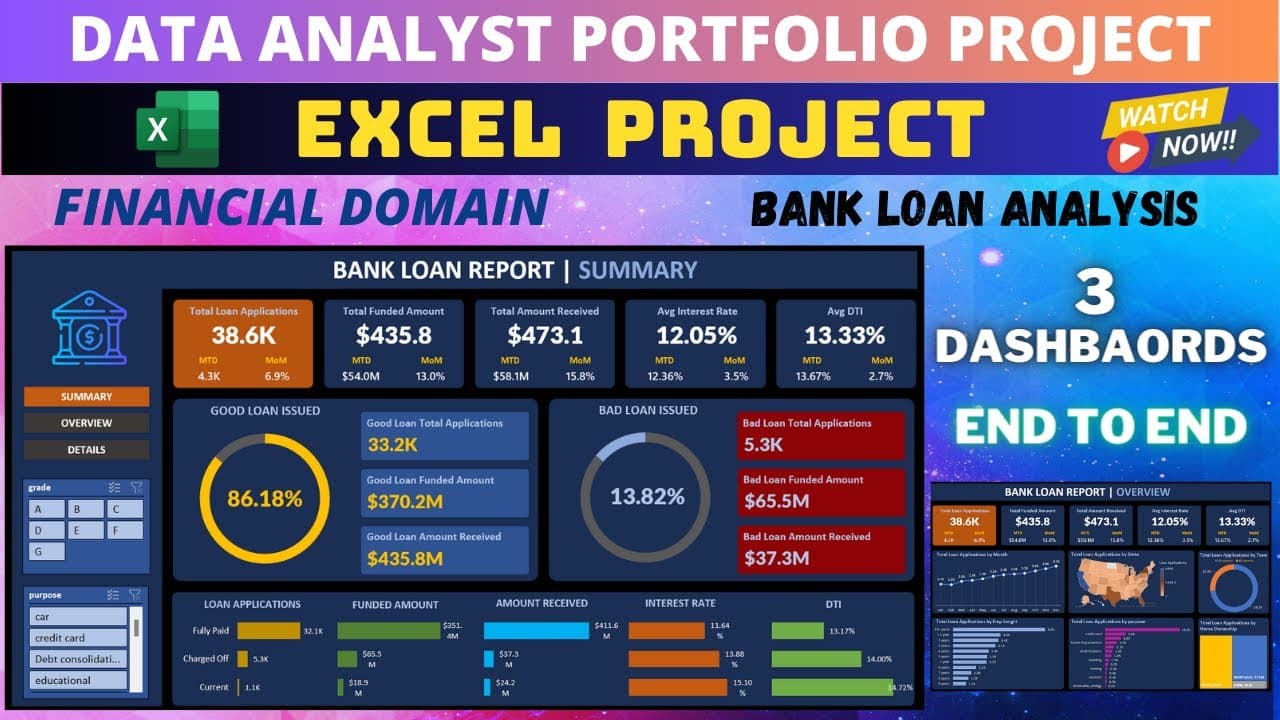
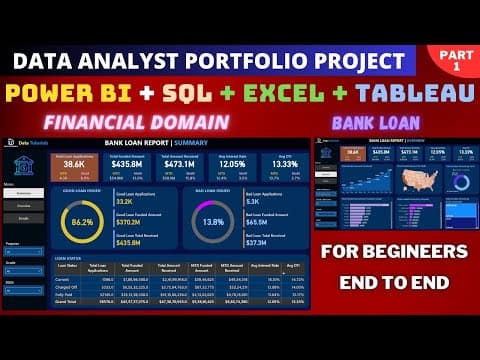
Build the bank loan dashboard with dynamic KPI cards, custom charts, and slicers that filter financial results by grade, purpose, and other dimensions. Create a summary page for overall performance, an overview page for granular analysis by month, state, term, employment length, purpose, and home ownership, plus a details tab for underlying records.
Transcript
hey guys welcome back to the next part of this particular video so we are into designing the data analyst portfolio project and in this we are designing the bankl report that is we are working on a financial domain data the data which we have is respect to the bank loan which is for one of our client and with respect to problem statement we have al... Read More
Key Insights
- The project is an Excel-based bank loan report designed as a finance-domain data analyst portfolio project. It follows earlier work involving problem statements, SQL queries, query documentation, and stored query results that can be used to check the dashboard’s calculations.
- The finished workbook is designed to be dynamic and interactive. Users can slice and dice the financial data through dashboard filters, causing the displayed KPIs and charts to change according to the selected records and analytical dimensions.
- The summary page is built around header KPIs that provide an overall view of business performance. Smaller indicators compare performance for the selected month and the previous month, giving users additional context beyond the report’s high-level totals.
- Good-loan and bad-loan reporting is separated into dedicated secondary KPIs. The planned measures include percentages, loan application counts, funded amounts, and total amounts received, with pie charts used to communicate parts of this comparison.
- Loan-purpose filtering shows why borrowers requested funds. The examples presented include debt consolidation, home improvement, medical expenses, car-related borrowing, and credit cards, allowing the dashboard user to inspect how report measures perform for a selected purpose.
- The overview page is intended for deeper analysis than the high-level summary page. It breaks total loan applications down by month, state, loan term, employment length, loan purpose, and home ownership while keeping the principal header KPIs visible.
- Consistent header KPIs are maintained across the report pages because the same overall business measures need to remain visible during different analyses. This design lets users move from summary reporting to granular exploration without losing the primary performance context.
- Excel 2021 is the version used for the project, and Excel 2019 or later is recommended because some required functions and options are unavailable in older versions. The project also covers fonts, color codes, custom calculations, chart formatting, and navigation buttons.
Install to Summarize YouTube Videos and Get Transcripts
Explore YouTube Video Summarizer or Get YouTube Transcript Extractor
Questions & Answers
Q: How do you structure a bank loan dashboard in Excel?
Structure the workbook around three reporting areas: a summary page, an overview page, and a details tab. Place overall header KPIs at the top, add current-month and previous-month indicators, and separate good-loan and bad-loan measures. Use the overview page for breakdowns by month, state, term, employment length, purpose, and home ownership, while the details tab exposes the underlying records.
Q: What KPIs should an Excel bank loan dashboard include?
The dashboard should include header KPIs that summarize overall business performance, smaller KPIs for the selected month and the previous month, and separate measures for good loans and bad loans. The planned good-loan and bad-loan sections show percentages, application counts, funded amounts, and total amounts received. Loan-status measures provide another way to assess how the financial portfolio is performing.
Q: How do slicers make an Excel loan dashboard interactive?
Slicers let users filter the bank loan records and immediately view the corresponding KPI and chart values. The demonstrated dashboard can be filtered by grade and loan purpose, with the results changing for selected categories. Purpose selections include debt consolidation, home improvement, medical expenses, car-related borrowing, and credit cards, helping users isolate records and derive focused business insights.
Q: What charts are included in the bank loan overview dashboard?
The overview dashboard includes charts showing total loan applications by month, state, loan term, employment length, loan purpose, and home ownership. These views move the analysis from high-level performance into more granular segments of the data. The page also retains the same header KPIs used elsewhere, and its charts respond dynamically to the available slicer selections.
Q: How are good loans and bad loans compared in Excel?
Good loans and bad loans are compared through separate secondary KPI areas that display their respective percentages and operational measures. The planned dashboard shows the number of applications, funded amount, and total amount received for both categories. Pie charts support the percentage comparison, while the associated measures give users more detail about the financial results behind each classification.
Q: How can SQL results validate an Excel dashboard?
The project uses SQL queries created from the defined problem statements, along with query documentation and stored results. Those saved results provide reference values for checking each dashboard measure. Because the same financial report is also designed in Power BI and Tableau, comparing every dashboard against the prepared SQL results helps maintain consistent outputs across the three reporting tools.
Q: Which Excel version is used for the bank loan project?
The project is demonstrated with Microsoft Office Excel 2021. Excel 2019 or a later version is recommended because some functions and options required for the report are not available in older Excel releases. Using a supported version is important for following the dashboard design, calculations, chart customization, formatting, slicers, and other interactive features shown in the project.
Q: What Excel dashboard design skills does the project cover?
The project covers the design and development of every visible dashboard element, including KPI cards, font choices, font styles, color codes, custom charts, chart formatting, custom calculations, pie charts, filters, and navigation buttons. It also demonstrates how to keep important KPIs consistent across report pages and how to make the complete workbook dynamic and interactive for client analysis.
Summary & Key Takeaways
-
The project recreates a bank loan reporting solution in Excel after the problem statements, SQL queries, query documentation, and benchmark results have already been prepared. Those stored results are intended to help validate every dashboard, including versions developed in Power BI, Tableau, and Excel, against the same expected financial measures.
-
The summary dashboard combines overall header KPIs, monthly and previous-month indicators, good-loan and bad-loan measures, loan-status results, percentage charts, funded amounts, and received amounts. Interactive slicers allow users to examine selected grades and loan purposes, including debt consolidation, home improvement, medical expenses, and car-related borrowing.
-
The overview dashboard provides a more granular view while retaining the same header KPIs used across the reports. Its charts break total loan applications down by month, state, term, employment length, purpose, and home ownership. A separate details tab is also planned to expose the underlying bank loan data records.
Read in Other Languages (beta)
Share This Summary 📚
Summarize YouTube Videos and Get Video Transcripts with 1-Click
Try YouTube Summary with ChatGPT & Claude or YouTube Transcript Generator
Explore More Summaries from Data Tutorials 📚
Summarize YouTube Videos and Get Video Transcripts with 1-Click
Try YouTube Summary with ChatGPT & Claude or YouTube Transcript Generator