How to Use Claude AI for Work and Automation
TL;DR
Claude produces more useful results when prompts specify the task, context, constraints, and a request for clarifying questions. You can also personalize its instructions, organize recurring work in Projects, upload supporting files, and connect tools such as Gmail and Airtable so Claude can draft emails, access relevant information, and update business data.
Transcript
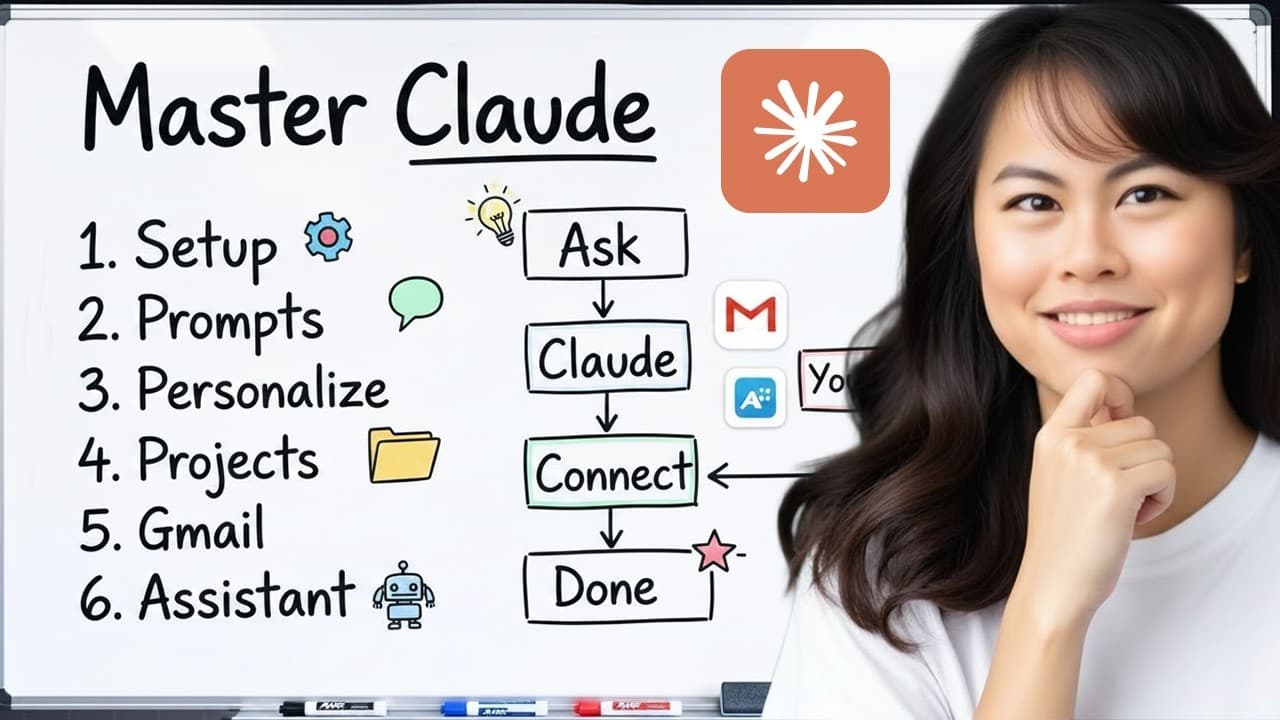
Today, here's what we're going to cover in this master class. We're going to learn claude.ai in 1 hour. Very similar to chat GPT. And this is really meant for beginners who are fairly new to AI or not confidence using AI. So, we're going to walk through setting it up. I'm going to point out some things in the product, where to click, etc. And then ... Read More
Key Insights
- Claude.ai is designed around a familiar chat interface where users write prompts, open new conversations, review earlier chats, and select a model. The plus button provides additional options, including uploading files, photos, and screenshots, as well as accessing skills and connectors.
- The TCCA framework is a prompting method built from Task, Context, Constraints, and Ask. It helps users state what Claude should do, explain the surrounding situation, identify boundaries, and invite clarifying questions when essential details are missing.
- Context is the information a capable teammate would need to complete an assignment successfully. For competitive research, useful context can include the company, its competitor, current growth or positioning problems, the target market, and the business reason for conducting the research.
- Constraints are boundaries that prevent Claude from making unsuitable assumptions. The example distinguishes a business serving prosumers, business owners, content creators, and entrepreneurs from competitors focused on agencies, helping the resulting research and recommendations match the intended audience.
- Clarifying questions are a practical way to improve an underspecified request. Asking Claude to seek clarification can reveal missing decisions about output format, primary goals, important research areas, pricing, markets, weaknesses, or the intended use of the completed work.
- Claude should be treated like a newly hired team member who lacks knowledge about the organization on the first day. Clear assignments, business background, operating boundaries, and answers to follow-up questions give it a stronger foundation for producing relevant work.
- Persistent instructions are a personalization method that Claude applies across conversations. Users can describe their company, audience, product, preferred writing style, and desired answer format, reducing the need to repeat the same background in every new chat.
- Connectors are tools that let Claude work with applications used by the user. The examples include Gmail, Canva, Airtable, and Notion, with possible actions such as reading or drafting emails, creating or editing designs, accessing data, and updating records.
Install to Summarize YouTube Videos and Get Transcripts
Explore YouTube Video Summarizer or Get YouTube Transcript Extractor
Questions & Answers
Q: How do you write better prompts for Claude AI?
Use the TCCA framework: define the Task, provide relevant Context, state any Constraints, and Ask Claude to pose clarifying questions. Describe the assignment as explicitly as you would for a new employee. Include the purpose of the work, the business situation, the intended audience, important boundaries, and the desired output so Claude can tailor its response.
Q: What is the TCCA prompt framework?
TCCA stands for Task, Context, Constraints, and Ask. Task identifies the work Claude should perform. Context supplies the background needed to understand the request. Constraints describe boundaries or requirements that must be respected. Ask means telling Claude to ask clarifying questions when it lacks information required to complete the assignment successfully.
Q: Why should Claude ask clarifying questions before answering?
Clarifying questions help Claude uncover information that a short initial prompt may omit. In the competitive research example, Claude asks about the report format, the primary goal, and the areas that matter most. The answers establish that the work should sharpen positioning and messaging while examining pricing, markets, and weaknesses, producing a more tailored result.
Q: How can you personalize Claude for your business?
Open the settings from the account menu and add persistent instructions for Claude. These instructions can identify your company, explain what it offers, describe its audience, and specify how you prefer answers to be formatted. The example requests bullet points or tables. Once saved, these preferences can guide responses across new conversations without repeated setup.
Q: What information should be added to Claude's instructions?
Useful instructions include who you are, what business you operate, which audience you serve, what your product or service does, and how you prefer Claude to respond. You can also provide more extensive context through an interview process in which Claude asks questions and uses the answers to build a better understanding of your habits and business.
Q: What are Claude Projects used for?
Projects are used to organize related work and retain context for repeated tasks. A project can represent a marketing department, a particular team, or another defined area of work. Users can load relevant background into that project, reducing the need to restate the same information whenever they begin another conversation connected to the same work.
Q: How can Claude work with Gmail and other apps?
Connectors allow Claude to access tools that users already rely on. The examples include Gmail, Canva, Airtable, and Notion. With the appropriate connection, Claude can read email, write or draft messages, create or edit Canva designs, access information stored in data systems, and update data in response to user instructions.
Q: How can a beginner get started with Claude.ai?
Create a Claude.ai account, open a new chat, and enter a prompt in the main input area. Use the plus button to upload files, photos, or screenshots when they provide useful context. Explore Projects for organization, settings for persistent instructions, and connectors for app access. Begin with TCCA prompts and answer Claude's follow-up questions clearly.
Summary & Key Takeaways
-
Claude.ai provides a familiar chat interface where users enter prompts, start new conversations, upload files, photos, and screenshots, and select models. Projects organize work and retain relevant context, while customization options include persistent instructions, skills, and connectors. The Design feature can help create slide decks, prototypes, and websites.
-
The TCCA framework improves prompts by defining the task, supplying relevant context, stating constraints, and asking Claude to request clarification. The presenter compares Claude with a new employee who needs explicit goals, background, boundaries, and opportunities to ask questions before producing work that fits a particular business or situation.
-
Claude can be personalized with instructions describing the user, business, customers, preferred writing style, and desired response format. Connectors extend Claude beyond conversation by giving it access to tools such as Gmail, Canva, Airtable, and Notion, enabling workflows that read information, draft content, create designs, or update stored data.
Read in Other Languages (beta)
Share This Summary 📚
Summarize YouTube Videos and Get Video Transcripts with 1-Click
Try YouTube Summary with ChatGPT & Claude or YouTube Transcript Generator
Explore More Summaries from Sabrina Ramonov 🍄 📚





Summarize YouTube Videos and Get Video Transcripts with 1-Click
Try YouTube Summary with ChatGPT & Claude or YouTube Transcript Generator