How to Automate Faceless Videos Without Code
TL;DR
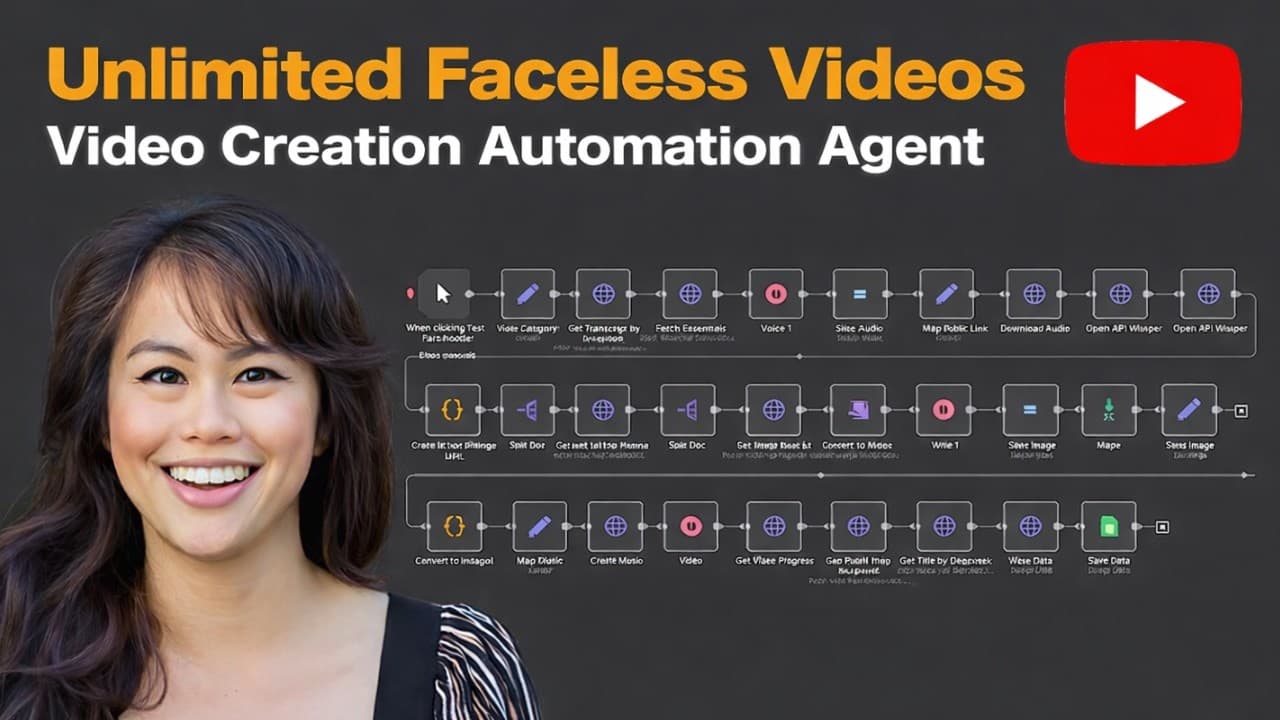
Automate faceless social videos by connecting an OpenAI model and Blotato to an n8n or Make workflow that writes a script, generates the visuals, voiceover, and captions, then publishes the finished video. Initial setup requires editing only two preparation nodes with a Blotato API key and one social account ID, while animated videos should receive at least 10 minutes of processing time.
Transcript
Faceless AI videos are blowing up on social media, getting millions and millions of views. And the best part is you can now create them in an automated way without having to sign up for five different tools for generating images, videos, audio, and captions. In this tutorial, I'm going to show you how to create an automation that makes faceless AI ... Read More
Key Insights
- The workflow is divided into three stages: writing the script, creating the faceless video, and publishing it to social media. This structure lets the automation move from an initial topic idea to a finished social post without requiring manual editing between each stage.
- The AI agent is responsible for brainstorming niche-specific ideas, selecting one idea, researching it, writing a 15-second script, and creating a caption. A structured output parser forces these results into JSON so later nodes can reliably use the script and caption.
- Blotato's create video endpoint combines image generation, video generation, voiceover, captions, and final assembly in one API request. This removes the need to connect separate services and API calls for each individual media-generation and editing task.
- The empty template preserves the submitted script while cleaning it up and producing a conventional AI voiceover video. The POV-oriented template interprets the script differently and includes additional parameters, so changing templates may require corresponding changes to the API request.
- The visual configuration can specify a cinematic or horror style, caption placement at the top, middle, or bottom, and whether the first image or every image should be animated. Disabling animation can make an initial workflow test finish faster.
- The available model choices can be mixed and matched for image and video generation. Recraft is recommended in the tutorial for realistic images featuring people, Flux Pro is presented as another image option, and FramePack is the default animation model because it is the cheapest.
- The waiting period must account for both clip generation and final rendering. Animating images into video clips can take 5 minutes by itself, followed by several more minutes for rendering, so the tutorial recommends waiting at least 10 minutes when animation is enabled.
- The safest initial publishing test uses only one connected platform, such as Instagram, TikTok, or Facebook. The workflow requires the matching account ID, and the other publishing branches should remain inactive until the selected connection and complete process have been verified.
Install to Summarize YouTube Videos and Get Transcripts
Explore YouTube Video Summarizer or Get YouTube Transcript Extractor
Questions & Answers
Q: How do you automate faceless video creation without code?
Use an n8n or Make workflow with three connected stages. First, schedule an AI agent to brainstorm a topic, research it, and produce a short script and caption as structured JSON. Next, send the script to Blotato's create video endpoint, which generates the visuals, animation, voiceover, captions, and final video. Finally, retrieve the completed file and publish it through one connected social account.
Q: What must be configured before running the workflow?
Connect an OpenAI account to the brainstorming agent and choose a model, with 4o described as sufficient in the tutorial. Create a Blotato API key from the API access area in settings, then add it to the prepare video node. In the prepare for publish node, enter the same API key and the account ID for one connected social platform. Leave only that platform active during the first test.
Q: How does the AI agent create a faceless video script?
A scheduled trigger starts the AI agent every day by default, although the schedule can be changed to run every hour. The agent brainstorms ideas based on a theme, such as little-known history facts about a famous person. It selects one idea, researches additional information, writes a 15-second script, creates a social caption, and sends both outputs through a structured parser that formats them as JSON.
Q: What does the Blotato create video API handle?
The create video endpoint combines several production tasks in one call. It accepts the generated script and settings for the template, voice, caption placement, visual style, image animation, text-to-image model, and image-to-video model. It then creates the visual assets, voiceover, captions, animated clips, and assembled video, avoiding separate API requests for each production step.
Q: How long should the workflow wait for an animated video?
The tutorial recommends a minimum wait of 10 minutes whenever images are being animated into video clips. Animation alone can take 5 minutes, and the final rendering process requires additional time. A longer script may need an even longer delay because more clips must be generated and assembled. If the retrieval node returns a ready status instead of a video URL, increase the waiting period.
Q: Which image and video models can the automation use?
The workflow allows separate choices for text-to-image and image-to-video generation, and those models can be mixed and matched. Recraft is recommended for realistic images that contain people, while Flux Pro is presented as another image option. FramePack is the default animation choice because it is the cheapest. Other listed video options include Runway, Luma, Kling 1.6, MiniMax, Hunyuan, and Google's Veo 2.
Q: How can the faceless video style be customized?
Customization begins with the AI agent's niche, prompt, and requested script duration. The video request can also change the template, voiceover, caption position, and visual style, including options such as cinematic or horror. Animation can be limited to the first image, applied to every image, or disabled for faster testing. Switching from the empty template to the POV-oriented template may require additional parameters.
Q: How do you troubleshoot failed generation or publishing?
Check Blotato's failed post area for an error log. An unauthorized response usually means the API key was copied incorrectly. If the get video node returns ready rather than a video URL, the export has not finished and the wait time should be increased. If social publishing fails, verify the copied account ID and refresh the platform connection in Blotato before testing again.
Summary & Key Takeaways
-
The automation has three main stages: researching and writing a video script, creating the faceless video, and publishing it to social media. A scheduled trigger starts an AI agent that brainstorms ideas within a chosen theme, researches one idea, writes a short script and caption, and returns structured JSON.
-
Blotato converts the generated script into a complete faceless video through one API endpoint. The request can control the template, voiceover, caption position, visual style, image animation, text-to-image model, and image-to-video model. The platform handles visuals, narration, captions, assembly, rendering, and preparation for social publishing.
-
The first test requires a Blotato API key in the prepare video node, then the same key and one connected social account ID in the prepare for publish node. Only one publishing platform should remain active during testing. Common failures involve incorrect credentials, unfinished rendering, insufficient waiting time, or a stale social connection.
Read in Other Languages (beta)
Share This Summary 📚
Summarize YouTube Videos and Get Video Transcripts with 1-Click
Try YouTube Summary with ChatGPT & Claude or YouTube Transcript Generator
Explore More Summaries from Sabrina Ramonov 🍄 📚




Summarize YouTube Videos and Get Video Transcripts with 1-Click
Try YouTube Summary with ChatGPT & Claude or YouTube Transcript Generator