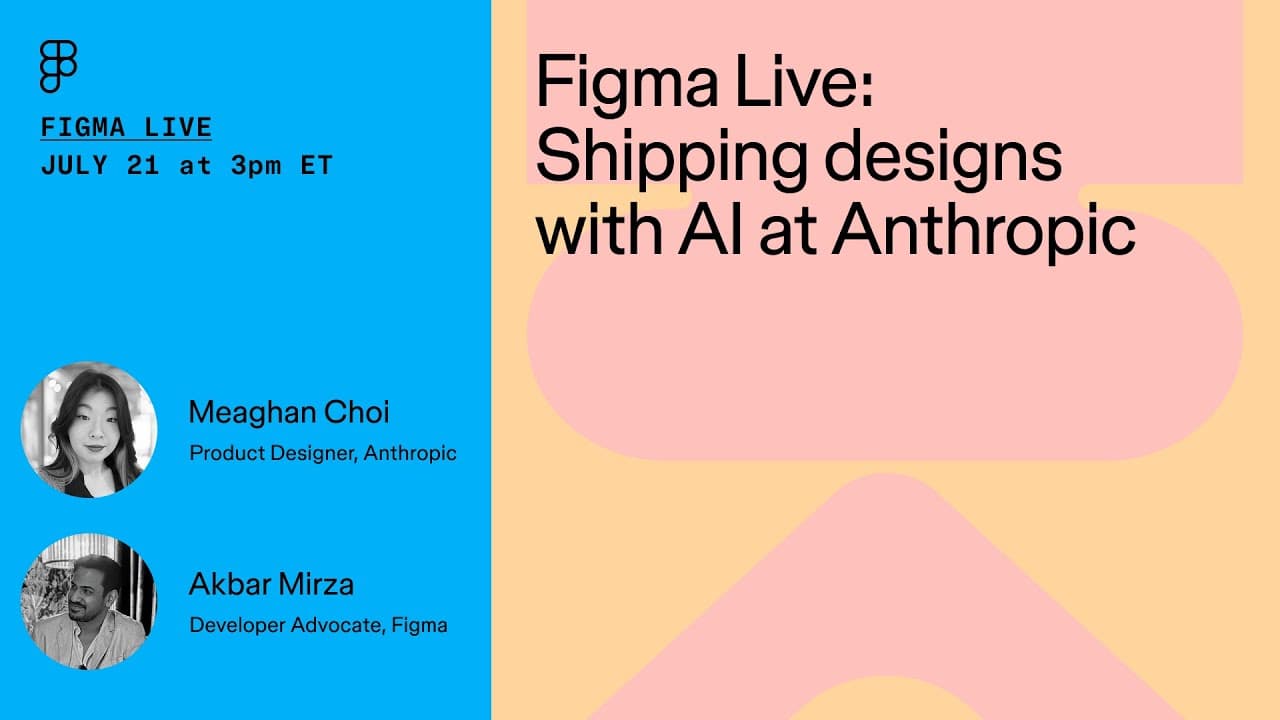
How Anthropic Ships Designs with Claude Code and Figma
TL;DR
Figma's Dev Mode MCP server feeds design context, such as components, variables, styles, and layer metadata, directly to AI coding tools so generated UI code matches both your codebase patterns and original Figma designs. At Anthropic, Claude Code runs in the terminal and IDEs, editing your local codebase directly and checking with you before major changes.
Transcript
Welcome, welcome everyone. This is Figma Live. My name is Akbar. I'm a developer advocate here at Figma and I'm really excited to be talking about shipping designs with AI at Anthropic. We have an amazing guest with us today, Megan Joy. Megan, uh, can you introduce yourself, please? Yes. Hi everyone. My name is Megan. I'm a product design lead here... Read More
Key Insights
- Claude Code is described as one of the thinnest wrappers around Anthropic's models, delivered as a terminal or command line interface tool that lets you access Claude's power directly on your computer with access to your entire local codebase.
- Claude Code exists as two products: a terminal product that acts as the front-end interface living locally on your computer, and an SDK that lets builders create their own custom agentic workflows using the full product built into Claude Code.
- The IDE integration is where the speaker uses Claude Code most, running the 'claude' command inside VS Code, Cursor, or JetBrains, with a custom extension for VS Code and JetBrains that adds context of open files, highlighted lines, and diff browsing.
- Claude Code understands your code by living inside your codebase, searching your monorepo and files to grasp existing systems and designs, rather than requiring you to train a model or run RAG over your codebase.
- Security is central: all Claude Code queries go immediately through Anthropic's API with no intermediary storage or code indexes, and because it lives in the terminal it always checks with you before making major changes to your codebase or computer.
- MCP stands for Model Context Protocol, an open standard introduced by Anthropic that allows simple, secure two-way connections between AI agents and the software tools you already use.
- The Dev Mode MCP server provides agents with design context including components, variables, styles, typography, layer names, metadata, annotations, and soon dev resources, so generated UI code matches initial Figma designs on the first try.
- The MCP server acts as a multiplier of existing best practices, extending everything teams already invest in Figma to align design and code so that context reaches LLMs instead of only people.
Install to Summarize YouTube Videos and Get Transcripts
Explore YouTube Video Summarizer or Get YouTube Transcript Extractor
Questions & Answers
Q: What is Claude Code and how do you access it?
Claude Code is an agentic coding tool that the speaker describes as one of the thinnest wrappers around Anthropic's models. It is a terminal or command line interface tool, so on Mac you access it through terminal. It lets you access the power of Anthropic's Claude models directly on your computer with access to your entire local codebase, taking a programmatic approach based on agent architecture where you ask Claude questions and it implements features directly in your codebase with far less copying and pasting.
Q: What are the two products that make up Claude Code?
Claude Code is two products. The first is the terminal product, considered the front-end or interface to Claude Code, which lives locally on your computer and lets you hit the ground running on development. The second is the SDK, described as a more superpowered tool for builders and tinkerers, which lets you use the power of the entire product built into Claude Code to create your own custom agentic workflows, such as running Claude Code in GitHub on a PR or issue.
Q: How does Claude Code work inside an IDE?
IDEs like VS Code, Cursor, and JetBrains all have the ability to access a terminal inside the development environment, so you can run the 'claude' command the same way you would in your terminal. For VS Code and JetBrains specifically there is a custom extension that does more exciting things, letting you leverage both the IDE and the agentic developer tool by giving Claude context of the files you are looking at, the lines of code you have highlighted, and browsing the diffs and changes Claude makes along the way.
Q: What is MCP and who created it?
MCP stands for Model Context Protocol. It is an open standard that Anthropic introduced which allows simple, secure two-way connections between AI agents and the software tools you are already using. In the context of design, Figma's Dev Mode MCP server uses this protocol to inform AI tools with design intent and Figma context so they can generate better code that matches your initial design intent, while also passing along the design context stored in a Figma file for various tasks.
Q: How does the Dev Mode MCP server improve AI-generated code?
The Dev Mode MCP server adds design context on top of codebase context, so an app not only functions like your codebase but also looks like the initial designs sketched in Figma. It provides components, variables, styles, typography, layer names, metadata, annotations, screenshots, assets, and a code representation of the design, and soon dev resources. With this information the outputs on the first try match a lot closer to final production code, acting as a multiplier of the best practices teams already use in Figma.
Q: Why does Anthropic emphasize security in Claude Code?
Anthropic cares about its values of security, privacy, and safety, so all queries through Claude Code go immediately through the Anthropic API with no intermediary for storage or code indexes, making requests and your codebase secure. On top of that, because Claude Code lives in the terminal, it will always check with you before it makes any major changes to your codebase or computer, which the speaker notes is extremely important, especially in a terminal environment.
Q: What happened in the live pricing card demo?
The demo used a design for a pricing card section of a web page selected in Figma, which currently requires the Figma desktop app in Dev Mode. In Copilot for VS Code, the presenter asked Copilot to implement the current Figma selection. The LLM read the design system files directly and implemented the components. The result handled state, switching between monthly and yearly and selecting different pricing cards, and rendered in dark mode using design tokens even though the design was in light mode.
Q: Why is running Claude Code in the terminal an advantage?
Although the terminal is a very technical tool, building into it means Claude Code can use all the same command line tools your computer has, including test scripts, git integrations, Kubernetes, and any database solutions, with access to everything your computer locally can reach. Running in the terminal also lets you launch it in context in other developer applications like an IDE. Anthropic believes in meeting users where they are without breaking their workflows, making the terminal the most natural way to support existing surfaces.
Summary & Key Takeaways
-
Megaan, a product design lead at Anthropic supporting the Claude Code team, joins Figma developer advocate Akbar on Figma Live to explain how designs are shipped with AI. Claude Code is a thin wrapper around Anthropic's models, delivered as a terminal tool with full local codebase access.
-
Claude Code has four tenets: it understands your code by living in the codebase, it uses the same command line tools your computer has such as tests, git, Kubernetes, and databases, it runs from anywhere including terminal and IDEs, and it is secure with requests going straight through the API.
-
Figma's Dev Mode MCP server, built on Anthropic's open Model Context Protocol, supplies design context like components, variables, styles, and metadata to coding agents. A live demo builds a pricing card in Copilot for VS Code, showing dark mode handling and interactive monthly-yearly state matching the codebase.
Read in Other Languages (beta)
Share This Summary 📚
Summarize YouTube Videos and Get Video Transcripts with 1-Click
Try YouTube Summary with ChatGPT & Claude or YouTube Transcript Generator
Explore More Summaries from Figma 📚
![How to Create a Responsive Button in Figma, Figma Design for Beginners [6 of 13] thumbnail](/_next/image?url=https%3A%2F%2Fi.ytimg.com%2Fvi%2FPZaBmmI0s4M%2Fhqdefault.jpg&w=750&q=75)
Summarize YouTube Videos and Get Video Transcripts with 1-Click
Try YouTube Summary with ChatGPT & Claude or YouTube Transcript Generator