How to recreate AI assisted Blender videos with Claude
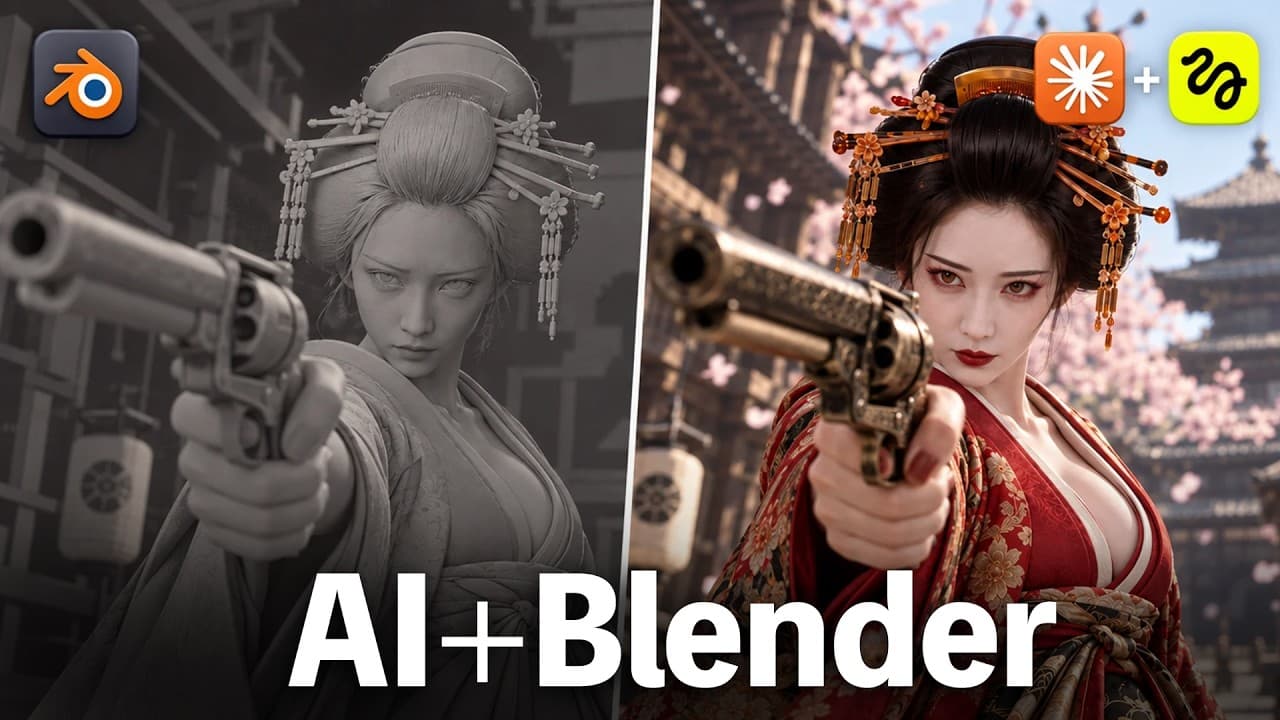
TL;DR
The video shows a workflow that couples Blender and Claude to produce camera driven video effects from reference photos, with a zero credit cost for pre viz iterations. It demonstrates three core roles, a three step setup, and multiple transitions while highlighting how Seedance 2.5 frames complex scenes efficiently.
Transcript
Hi, hello there. Today, I'll show you how to easily recreate cool videos you couldn't make with prompts alone, while saving on costs with Claude. This method involves linking Blender with Claude to generate videos by referencing photos based on an existing video as a base. I'll show you how to connect them at the end. First, let me show yo... Read More
Key Insights
- The method centers on a three part structure: base video in Blender, a reference photo for details, and a Seedance 2.5 prompt for motion and dynamics.
- Pre visualization is used to lock camera movement, composition, and character motion before any final render, and each iteration costs zero credits.
- Three roles must remain separate when guiding the AI, to avoid cross contamination between face, body, and environment prompts.
- Seedance 2.5 prompts reference weight distribution, joint movement, eye contact, hand contact, and landing reactions for realism.
- Video generation can reproduce complex cinematic sequences by combining AI with Blender without the high cost of traditional VFX pipelines.
- The workflow supports iterative refinement of the pre viz, enabling near perfect results before final render, increasing reliability and speed.
- The approach includes troubleshooting steps for camera composition and motion blur to improve the realism of the final sequence.
- The system encourages creating reusable skill cards that encapsulate a successful setup for future projects.
Install to Summarize YouTube Videos and Get Transcripts
Explore YouTube Video Summarizer or Get YouTube Transcript Extractor
Questions & Answers
Q: How can I start integrating Blender with Claude for video creation?
Begin by understanding the three roles: base Blender video, reference photo inputs for facial and background details, and the Seedance 2.5 prompt for motion and dynamics. Set up the Blender environment, install the required plugin, and connect to the Higgsfield Bridge. Use Claude to outline steps and then refine the pre viz iteratively until the camera work meets the reference.
Q: What is the purpose of pre viz in this workflow?
Pre viz serves to lock in camera movement, spatial layout, sequencing, timing, and character size before generating the final video. It acts as a low cost, high feedback stage where adjustments do not consume generation credits. By iterating on pre viz, you can achieve smooth transitions and believable motion without risking expensive renders.
Q: How are reference photos used in this method?
Reference photos are used to capture the face, clothing, and background atmosphere while the broader scene is shaped by the pre viz video. This separation ensures that facial likenesses and environmental mood stay consistent, while the underlying motion and camera work follow the pre viz guide for accuracy and cohesion.
Q: What does Seedance 2.5 contribute to the process?
Seedance 2.5 generates the final video by applying detailed prompts that encode physical dynamics like weight distribution, joint movement, eye contact, hand contact, and landing reactions. It builds upon the pre viz and reference photos to recreate complex motions and scenes, enabling efficient production of multi scene sequences.
Q: Why is it important to keep three roles separate and not mix them?
Separating the roles prevents prompts from conflicting, such as facial changes bleeding into body motion or scene composition. This clarity helps the AI assign the right constraints to each aspect of the video, producing more accurate and controllable results. It also makes troubleshooting more straightforward.
Q: Can you reproduce Hollywood level scenes with this workflow?
Yes, the workflow demonstrates recreating sophisticated scenes by combining Blender motion bases with Seedance 2.5 prompts. The process uses iterative pre viz refinement, character and prop adjustments, and environment matching to approach the visual complexity of major productions while controlling costs and iteration time.
Q: What are the setup steps mentioned for getting started?
The setup includes downloading Blender, installing a set of plugins, and connecting the MCP bridge to Higgsfield. After the environment is prepared, you generate a base pre viz, then feed a reference photo and a Seedance 2.5 prompt to create the final video. This sequence minimizes credits while maximizing control.
Q: How does the workflow handle revisions and fixes?
Revisions are performed during the pre viz stage where changes to camera paths and composition do not incur generation costs. If the final video misses details, you use feedback to adjust prompts or switch to a more suitable angle or timing, and re-run the pre viz until the desired result is achieved.
Summary & Key Takeaways
-
The video outlines a Blender and Claude workflow where pre viz fixes cost zero credits and final video generation uses reference photos and prompt prompts.
-
It demonstrates four example transitions including a Kabukicho to Okinawa scene, a sea to sky to Shinkansen sequence, and Hollywood level recreations.
-
The presenter explains skill cards, prompts, three distinct roles, and setup steps from Blender installation to MCP connection.
Read in Other Languages (beta)
Share This Summary 📚
Summarize YouTube Videos and Get Video Transcripts with 1-Click
Try YouTube Summary with ChatGPT & Claude or YouTube Transcript Generator
Explore More Summaries from RKJ VIDEO 【イケている動画を作りたいなら】 📚




Summarize YouTube Videos and Get Video Transcripts with 1-Click
Try YouTube Summary with ChatGPT & Claude or YouTube Transcript Generator