How to Automate Video Editing With Claude Code

TL;DR
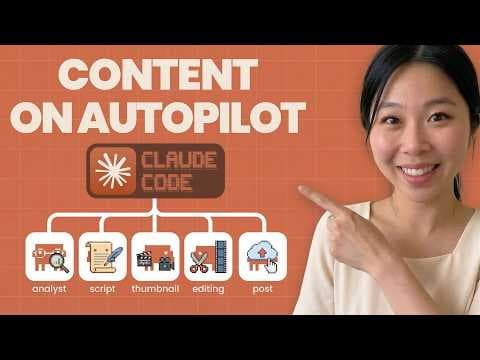
Claude Code can automate cuts, silence removal, branded captions, motion graphics, sound effects, and context-aware AI B-roll after a raw video is placed in a designated folder. The workflow combines Whisper, FFmpeg, Hyperframes, and Higgsfield, with editing covered by Claude subscription tokens and optional Higgsfield B-roll estimated at $2–$7 per video.
Transcript
The video you're watching right now was entirely edited by Cloud Code start to finish and I'm not really technical. All I had to do is drop the video into folder and cloud code edited the whole video for me. Honestly, AI video editor was so bad in the past, but I actually found a way to make it look good. It makes all the cuts. It trims out all the... Read More
Key Insights
- Claude Code is the workflow controller that turns a raw file into an edited output with cuts, trimmed pauses, captions, graphics, sound effects, and optional B-roll. The demonstrated setup organizes projects into raw and output folders so completed edits have a consistent destination.
- Whisper is the transcription component that converts the recording into a word-by-word transcript. FFmpeg can then use that transcript as a basis for cutting footage, trimming dead space, and removing repetitive statements instead of relying only on undirected visual processing.
- FFmpeg is responsible for more than cuts and trims in this workflow. It can also clean and normalize audio, supporting the automated sound treatment described in the demonstration and helping prepare the recording without manual work on an editing timeline.
- Hyperframes is an open-source tool used to create motion graphics and visual elements such as animated charts and diagrams. The creator prefers it for fully automatic editing, while noting that other tested options did not provide the same automatic workflow or were harder to edit.
- Higgsfield generates original AI B-roll that reflects the spoken context through an MCP connection. This contextual interpretation helps distinguish intended editing concepts from literal meanings, allowing generated visuals to match what the creator is discussing rather than merely reacting to isolated words.
- Specific creative direction is necessary because instructions such as making a video look cool do not define a usable style. Screenshots, font examples, caption patterns, brand colors, cinematic preferences, and animation references give Claude concrete standards it can apply to future edits.
- Claude Code editing is paid through subscription token usage rather than separate editing credits. The creator pays $100 per month for a Max plan and suggests starting with the approximately $20 basic plan when editing demands are lighter, then upgrading if more tokens are needed.
- Optional AI B-roll is estimated to cost about $2–$7 per video through Higgsfield. The creator contrasts that amount with reported long-form human editor prices ranging from $50 to $3,000, while acknowledging that human editing costs vary according to skill and project scope.
Install to Summarize YouTube Videos and Get Transcripts
Explore YouTube Video Summarizer or Get YouTube Transcript Extractor
Questions & Answers
Q: How can Claude Code automate video editing?
Claude Code can coordinate a folder-based workflow in which the creator places a raw recording into a designated location and receives the completed edit in an output folder. The system can make cuts, remove dead space and repetitive speech, add branded captions, insert motion graphics and sound effects, normalize audio, and generate context-aware AI B-roll without requiring manual timeline editing.
Q: What tools are needed for the automated editing workflow?
The demonstrated workflow uses Claude Code as the controller, OpenAI Whisper for word-by-word transcription, FFmpeg for cuts, trims, and audio processing, Hyperframes for motion graphics, and Higgsfield for generated AI B-roll. Higgsfield is connected through MCP so Claude can use the spoken context when requesting visuals. The creator runs Claude Code inside the free Antigravity IDE.
Q: How do Whisper and FFmpeg work together for video editing?
Whisper first transcribes the video word by word, creating the textual information required for more informed editing decisions. FFmpeg can then use that transcript to guide cuts and trims, including removing dead spaces and repetitive statements. FFmpeg can also clean and normalize the audio, giving the automated workflow control over both the structure and sound of the finished recording.
Q: How are motion graphics added automatically?
Motion graphics are added through Hyperframes, an open-source tool by HeyGen that can produce visual elements such as chart animations and diagrams. Claude Code incorporates these generated assets into the broader editing workflow. The creator tested Remotion and Claude Design as well, but recommends Hyperframes when the goal is a fully automatic edit rather than a process requiring more manual adjustment.
Q: How does the workflow generate relevant AI B-roll?
Higgsfield generates AI B-roll through an MCP connection that allows Claude to interpret the context of the recording. The system does not have to treat every spoken word literally. For example, a reference to cutting a video can be understood as editing clips rather than chopping something with a knife. That contextual reading helps the generated B-roll match the actual subject.
Q: How can creators customize captions and editing style?
Creators can provide screenshots and detailed visual references showing caption length, font choices, emphasized words, brand colors, cinematic preferences, and desired animation styles. The demonstrated example borrows a two-word caption pattern and changes the reference color to the creator's gold brand color. Specific direction is essential because a vague instruction such as making the video cool does not define a reproducible result.
Q: How much does automated editing with Claude Code cost?
The editing process uses Claude subscription tokens rather than separate credits. The creator pays $100 per month for the Max plan and says lighter users can begin with the approximately $20 basic plan, then upgrade if they need more tokens. Whisper, FFmpeg, and the open-source Hyperframes tool are presented as free components, while generated Higgsfield B-roll creates an additional per-video expense.
Q: How does the cost compare with hiring a human editor?
Optional Higgsfield AI B-roll is estimated at about $2–$7 for each video. By comparison, the creator reports that long-form human editing can range from $50 to $3,000 per video, depending on the editor's skills and the required scope. The comparison supports the workflow's cost advantage, although the exact human editing price varies substantially with the project's demands.
Summary & Key Takeaways
-
The workflow treats Claude Code as an automated editor that processes raw footage and saves the finished result in an output folder. It uses a supplied markdown workflow and visual references to control cuts, captions, motion graphics, sound effects, B-roll, fonts, colors, and other choices associated with the creator's preferred editing style.
-
Whisper produces a word-by-word transcript, while FFmpeg uses that transcript to guide cuts, remove dead space and repetitive speech, and normalize audio. Hyperframes supplies automated motion graphics, including charts, diagrams, and other visual elements. These tools give Claude Code the components needed to assemble a polished long-form edit without timeline editing.
-
Claude editing consumes subscription tokens rather than separate credits. The creator uses a $100 monthly Max plan but suggests that less frequent editors could begin with the approximately $20 basic plan. Optional Higgsfield B-roll costs about $2–$7 per video, compared with cited human editing prices ranging from $50 to $3,000 per long-form video.
Read in Other Languages (beta)
Share This Summary 📚
Summarize YouTube Videos and Get Video Transcripts with 1-Click
Try YouTube Summary with ChatGPT & Claude or YouTube Transcript Generator
Explore More Summaries from Sandy Lee AI 📚





Summarize YouTube Videos and Get Video Transcripts with 1-Click
Try YouTube Summary with ChatGPT & Claude or YouTube Transcript Generator