How to Build an Azure End-to-End Data Engineering Project
TL;DR
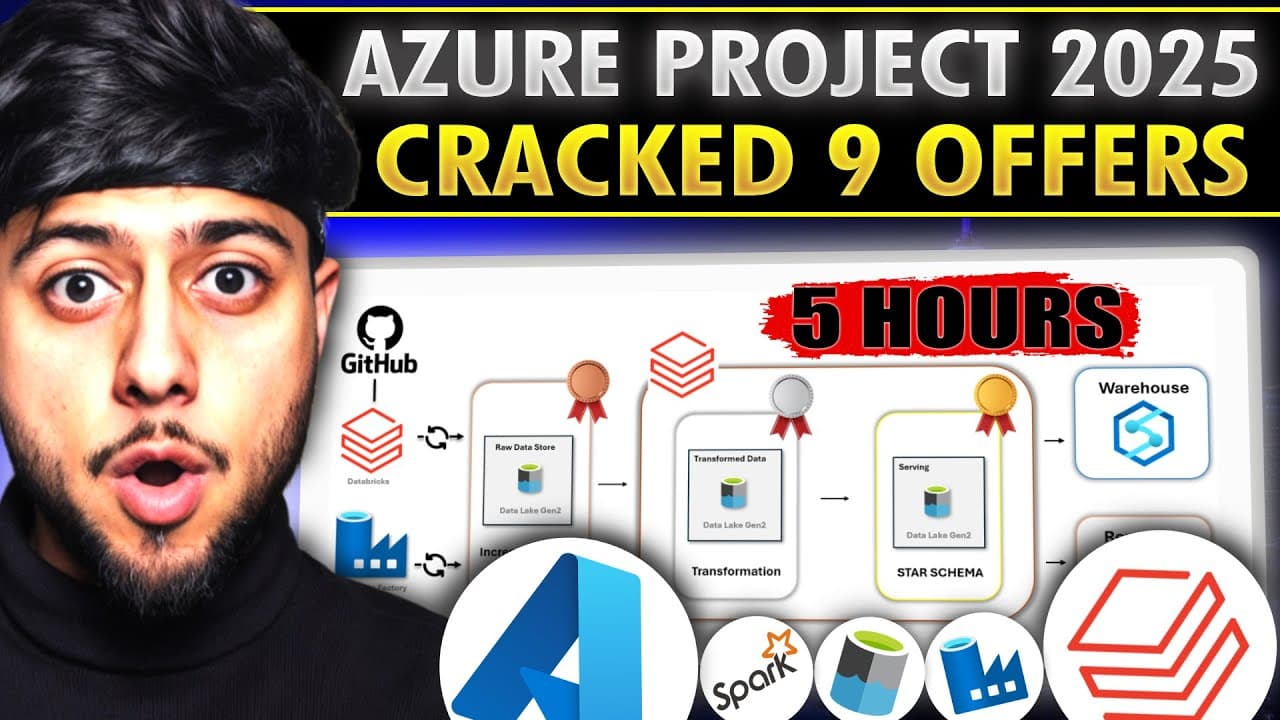
Build the Azure end-to-end data engineering project by creating dynamic, parameterized pipelines in Azure Data Factory, incrementally ingesting Netflix data with Databricks Autoloader, transforming it with PySpark, and producing a gold layer with Delta Live Tables. The 5-hour project follows a Medallion architecture and uses GitHub and a data lake as sources, providing a practical blueprint worth reading on for its orchestration, validation, and transformation details.
Transcript
this 5 hours long end to end your data engineering project will provide you multiple offers in 2025 because this project has high standards instead of building basic pipelines you will build Dynamic parameterized end to end data pipelines with data validation steps in your data Factory and this time you will use autol loader to incrementally read t... Read More
Key Insights
- Dynamic parameterized pipelines are the industry standard because in the real world you do not create static notebooks or pipelines; interviewers want to hear that you can build parameterized notebooks using workflow activities like for-each loops and if-else conditions.
- Autoloader is a popular Databricks feature used to incrementally read data files from a source; in this project it pulls files sitting in the data lake incrementally rather than reloading everything each time.
- Delta Live Tables is described as one of the most in-demand data engineering technologies, and the project builds a Delta Live Table ETL workflow in the gold layer using Databricks.
- The Medallion architecture organizes data into layers where the raw/bronze zone keeps files in their exact original format with no transformations, and transformation happens later using Databricks PySpark.
- Azure Data Factory and Databricks go hand in hand; Data Factory builds the parameterized real-time pipeline with data validation steps, while Databricks handles incremental ingestion and transformation.
- The project uses multiple sources instead of one: some data files sit in GitHub and are pulled via Data Factory, while other files sit in the data lake and are pulled incrementally by Databricks Autoloader.
- A good developer questions requirements rather than doing everything by default; the video pushes data into Synapse as an optional demonstration, stressing you should ask why a stakeholder wants it before replicating a warehouse.
- Netflix data was chosen deliberately for engagement, because working with familiar data (movies and TV series you have watched) makes learners feel they are building something real rather than just studying.
Install to Summarize YouTube Videos and Get Transcripts
Explore YouTube Video Summarizer or Get YouTube Transcript Extractor
Questions & Answers
Q: How do you build this Azure end-to-end data engineering project?
Build a dynamic, parameterized Azure Data Factory pipeline with data validation to ingest lookup files from GitHub. Use Databricks Autoloader to incrementally ingest the main Netflix file from the data lake, retain unchanged source formats in the raw zone, transform the bronze-layer data with PySpark, and create the gold layer through a Delta Live Tables ETL workflow.
Q: What is included in this Azure data engineering project?
The 5-hour project covers Azure Data Factory pipelines, validation steps, Databricks Autoloader, PySpark transformations, parameterized notebooks, Databricks workflow activities, and Delta Live Tables. It follows a Medallion architecture and also demonstrates optional Synapse population and Power BI source connectivity.
Q: What is Databricks Autoloader used for in the project?
Databricks Autoloader incrementally reads files stored in the data lake instead of pulling all source data again. The project applies it to the main Netflix data file before placing the data in the raw zone.
Q: How does the project's Medallion architecture work?
Data first lands in the raw zone of the data lake with its original file formats unchanged and no transformations. Databricks and PySpark then transform bronze-layer data, while a Delta Live Tables ETL workflow creates the gold layer.
Q: Why are the Databricks notebooks dynamic and parameterized?
The presenter says real-world data engineers create dynamic, parameterized notebooks rather than static notebooks. The project orchestrates them with workflow activities such as for-each loops and if-else conditions, providing an approach learners can discuss in interviews.
Q: What Netflix data and source files does the project use?
The project uses Netflix movie and TV data across five to six CSV files, including a main file with movie names, dates added, release years, ratings, descriptions, and show IDs. Lookup files cover directors, countries, cast, and categories; Azure Data Factory pulls those lookup files from GitHub, while Databricks incrementally pulls the main file from the data lake.
Q: How are Delta Live Tables used in the project?
Delta Live Tables are used in Databricks to create the gold layer. The project incorporates them into the existing data flow by building a Delta Live Tables ETL workflow after the bronze-layer transformations.
Q: Are Synapse and Power BI required for this project?
Pushing gold-layer data into a Synapse workspace is optional and is shown to demonstrate an available integration. The project does not build Power BI reports, but it shows how to connect the data source to Power BI so the prepared data can be served to reporting users.
Summary & Key Takeaways
-
This 5-hour end-to-end Azure data engineering project is built to high standards to help viewers land offers in 2025, moving beyond basic pipelines to dynamic parameterized pipelines with data validation steps built in Azure Data Factory across a full Medallion architecture.
-
The workflow uses multiple sources: files in GitHub pulled by Azure Data Factory and files in the data lake pulled incrementally by Databricks Autoloader into a raw bronze zone that keeps the original file formats unchanged, ready for later transformation.
-
Databricks and PySpark transform the data using parameterized notebooks orchestrated with workflow activities, gold-layer Delta Live Tables are built as an ETL workflow, and the data can optionally be pushed to Synapse and connected to Power BI for reporting.
Read in Other Languages (beta)
Share This Summary 📚
Summarize YouTube Videos and Get Video Transcripts with 1-Click
Try YouTube Summary with ChatGPT & Claude or YouTube Transcript Generator
Explore More Summaries from Ansh Lamba 📚



Summarize YouTube Videos and Get Video Transcripts with 1-Click
Try YouTube Summary with ChatGPT & Claude or YouTube Transcript Generator