How to Build a Custom Arduino Serial Terminal in C#
TL;DR
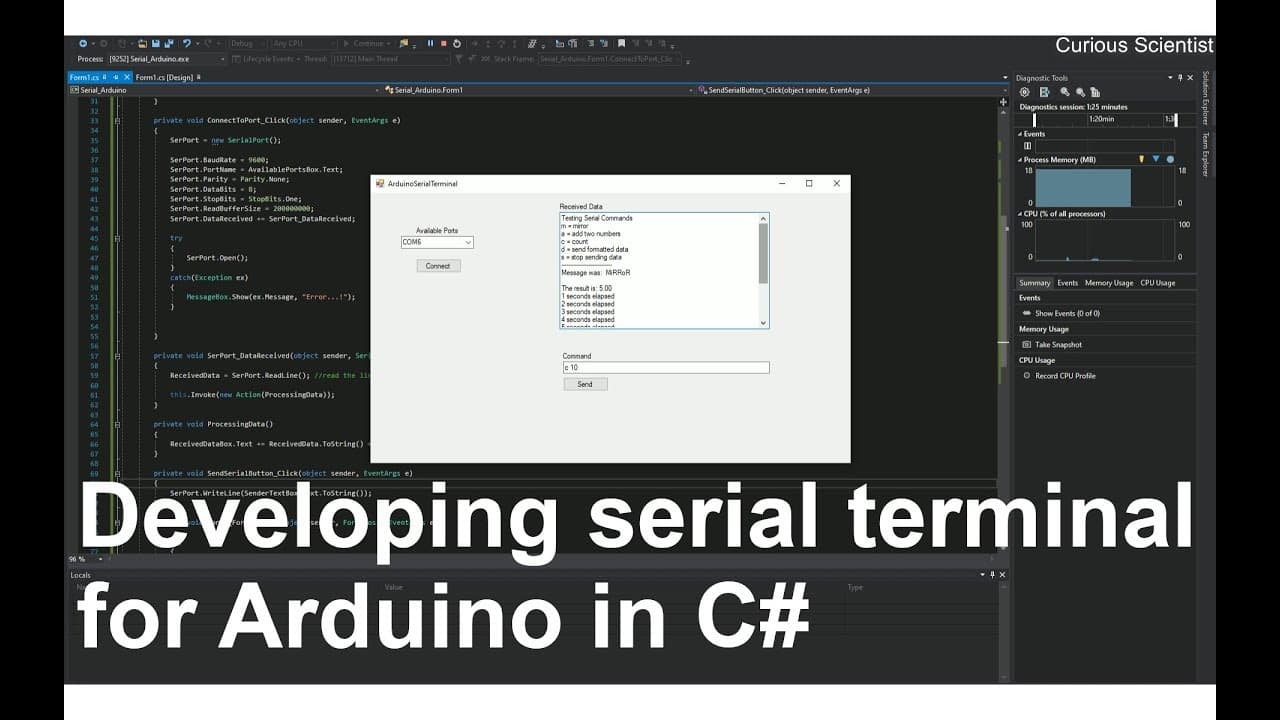
To create a custom serial terminal for Arduino using C#, start by setting up a Windows Form in Visual Studio. Incorporate components like a combo box for port selection and text boxes for sending/receiving data. Implement event handlers for connecting to the Arduino and handling data transmission, ensuring effective communication between your application and the Arduino device.
Transcript
welcome everyone in this video we will continue our work with the Arduino and the serial communication so here we will create a software which is similar to the serial terminal of the Arduino software but we will make our own serial terminal and in this part of the series which is the second part we just create a very simple window which will be ab... Read More
Key Insights
- 💁 The tutorial demonstrates how to create a Windows Form application that serves as a custom serial terminal for Arduino, enhancing user control over data communication.
- 🍱 Viewers learn to create a user-friendly interface by adding components such as combo boxes for port selection and text boxes for displaying received data.
- 👻 The importance of initializing event handlers is emphasized, allowing the application to react dynamically during communication with the Arduino.
- 🫵 Error handling is discussed, providing viewers with insight into basic debugging practices during the application development process.
- 👨💻 The code summary includes a streamlined approach to both sending and receiving data to ensure clear communication between the terminal and Arduino.
- 🫵 Recommendations for following along with the video in real-time aid viewers in absorbing information effectively, reinforcing learning through practice.
- ✊ The importance of keeping the Arduino powered and connected before launching the software is highlighted to avoid disconnection issues during operations.
Install to Summarize YouTube Videos and Get Transcripts
Explore YouTube Video Summarizer or Get YouTube Transcript Extractor
Questions & Answers
Q: What software requirements are necessary to follow this Arduino project?
To follow this Arduino project, you will need Microsoft Visual Studio, which can be downloaded for free. A Microsoft account is required for access. The software will be used to create a Windows Form app that serves as a custom serial terminal for Arduino communication.
Q: How do you enable serial communication in the custom terminal application?
To enable serial communication, a SerialPort component must be added from the toolbox in Visual Studio to the form. This allows the application to set parameters like baud rate and data bits, which determine how the data is transmitted to and received from the Arduino.
Q: Why is it important to handle COM port selection in the application?
Handling COM port selection is crucial because multiple USB devices can be connected to a computer, including sound cards and other peripherals. The application must allow users to select the correct port for the Arduino to ensure proper communication and avoid confusion with other devices occupying different ports.
Q: Can you explain how to implement the receiving data feature in the application?
The application implements the receiving data feature by creating an event handler that triggers when data is received from the Arduino via the serial port. This involves reading the data and appending it to a designated textbox, ensuring that new data appears on a new line to avoid overwriting.
Q: What debugging features are included in this custom terminal application?
Basic error handling is included in the custom terminal application to manage potential issues with opening the serial port. If an error occurs, the application will display a message indicating the problem, allowing users to troubleshoot connection issues effectively.
Q: What future project features does the presenter plan to implement?
In future videos, the presenter plans to focus on processing formatted data received from the Arduino and assigning each component of this data to variables. The aim is to visualize these variables on a chart, enhancing the application's functionality and user interaction.
Summary & Key Takeaways
-
This video focuses on developing a simple serial communication terminal for Arduino using C# and Visual Studio, allowing for data transmission to and from the Arduino.
-
The tutorial guides viewers through setting up the project interface, including adding components like combo boxes and buttons for user interaction and selecting available ports.
-
The presenter emphasizes coding event handlers for connecting and sending data, as well as receiving data and displaying it within the application, ultimately ensuring smooth communication with Arduino.
Read in Other Languages (beta)
Share This Summary 📚
Summarize YouTube Videos and Get Video Transcripts with 1-Click
Try YouTube Summary with ChatGPT & Claude or YouTube Transcript Generator
Explore More Summaries from Curious Scientist 📚




![Building a Peltier cooler-based cooling box - First iteration, improvements [Part 2/6] thumbnail](/_next/image?url=https%3A%2F%2Fi.ytimg.com%2Fvi%2F0YlNw0EGnzI%2Fhqdefault.jpg&w=750&q=75)
Summarize YouTube Videos and Get Video Transcripts with 1-Click
Try YouTube Summary with ChatGPT & Claude or YouTube Transcript Generator