TB6600 and Arduino - Wiring and demonstration
TL;DR
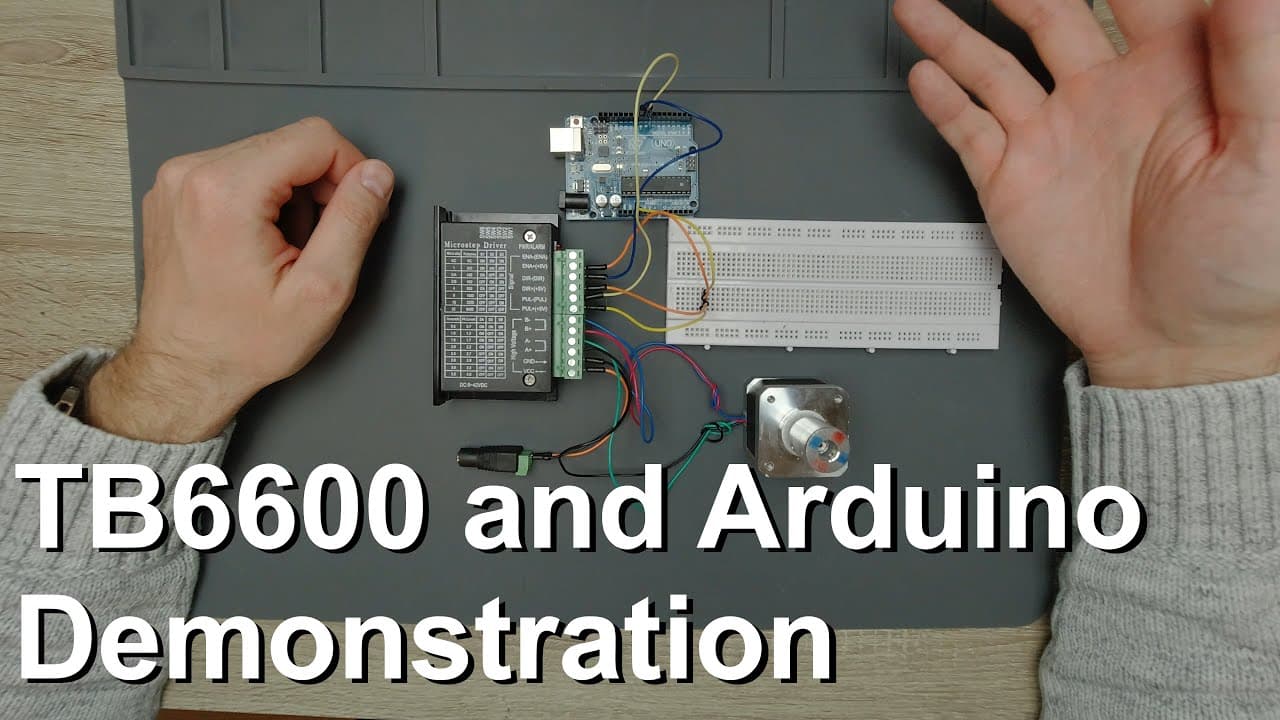
This video guides on connecting the TB6600 stepper motor controller to an Arduino using a NEMA 17 motor.
Transcript
welcome everyone in this video I would like to show you quickly how to connect the TB 6,600 stepper motor controller controller to an Arduino and a circuit and we will use this NEMA 17 stepper motor to demonstrate the connections so just briefly about this stepper motor controller you can see it has a huge heatsink and it's packed in a relatively l... Read More
Key Insights
- 🎮 The TB6600 stepper motor controller provides advanced control capabilities, including microstepping options ranging from 200 to 6400 steps.
- 🧑🦼 Properly identifying motor coils is crucial for correct wiring and optimal motor performance; this can be done easily with a multimeter.
- ⚡ Power supply requirements are flexible, with the controller supporting voltages between 9 and 42 volts, accommodating various applications.
- 👻 The integration of Arduino with the TB6600 is straightforward, requiring minimal setup and allowing for quick deployment in motor-driven projects.
- 👻 Utilizing libraries can significantly streamline the programming process, allowing for sophisticated motor control without extensive manual calculation.
- ✋ The video emphasizes the TB6600’s ability to handle larger current loads, making it suitable for higher torque applications.
- ✊ An adjustable power supply is recommended to enhance the user experience and compatibility with different projects, providing versatility.
Install to Summarize YouTube Videos and Get Transcripts
Explore YouTube Video Summarizer or Get YouTube Transcript Extractor
Questions & Answers
Q: What is the purpose of the TB6600 stepper motor controller?
The TB6600 stepper motor controller is designed to drive stepper motors, offering precise control over their movements. It allows users to configure microstepping, which determines the number of steps the motor takes. Its capabilities make it suitable for various applications, from 3D printers to CNC machines, providing enhanced performance compared to simpler driver models.
Q: How can I identify the coils in a stepper motor?
To identify the coils in a stepper motor, use a multimeter set to continuity mode. Connect the multimeter probes to the motor's wire ends. When the probes touch the same coil's wire ends, the multimeter emits a beeping sound. Identify pairs of wires that show continuity, grouping them accordingly for proper wiring to the controller.
Q: What power supply is recommended for the TB6600?
A regulated power supply providing between 9 to 42 volts is recommended for the TB6600 stepper motor controller. The presenter suggests purchasing a compact, adjustable power supply that displays actual voltage output, ensuring it meets the project's requirements and can easily be integrated into other electronics projects.
Q: How do I connect the Arduino to the TB6600 controller?
To connect the Arduino to the TB6600, link pin 9 from the Arduino to the direction pin of the controller and pin 8 to the pulse pin. Additionally, connect the controller’s +5V pins to the Arduino's 5V output, ensuring the power supply and ground connections are secure for proper operation.
Q: What is microstepping, and why is it important?
Microstepping allows for finer movement control in stepper motors by dividing a full step into smaller steps. This results in smoother motion and increased positional accuracy, essential for applications requiring precision, such as robotics and CNC machines. The TB6600 supports microstepping settings that can be easily adjusted using dip switches.
Q: What features make the TB6600 superior to simpler drivers like the Easy Driver?
The TB6600 is superior to simpler drivers like the Easy Driver due to its higher current handling capabilities, adjustable microstepping options, and built-in features like thermal protection. It can accommodate larger motors and provides greater flexibility for complex projects, resulting in better performance during operation.
Q: Can the TB6600 be used with other microcontrollers?
Yes, the TB6600 stepper motor controller can be used with various microcontrollers, including Arduino Mega, Arduino Nano, and STM32 boards. The wiring and pin configuration may vary slightly but essentially follow the same principles outlined in the video, ensuring broad compatibility for various projects.
Q: What are the advantages of using a library for motor control?
Utilizing a library for motor control simplifies programming by abstracting complex calculations for speed and acceleration. It allows users to implement sophisticated movement algorithms without delving into the underlying mathematics or physical mechanics, resulting in faster development times and fewer errors in code.
Summary & Key Takeaways
-
The video explains how to connect a TB6600 controller to an Arduino, using a NEMA 17 stepper motor for demonstration.
-
It details the importance of identifying motor coils and configuring the controller's microstepping and current settings for optimal performance.
-
The presenter offers practical wiring advice, including how to connect power supplies and Arduino pins to the controller efficiently.
Read in Other Languages (beta)
Share This Summary 📚
Summarize YouTube Videos and Get Video Transcripts with 1-Click
Try YouTube Summary with ChatGPT & Claude or YouTube Transcript Generator
Explore More Summaries from Curious Scientist 📚


![Building a coil winder [Part 6] - A few improvements thumbnail](/_next/image?url=https%3A%2F%2Fi.ytimg.com%2Fvi%2F3eyxG_g2iUA%2Fhqdefault.jpg&w=750&q=75)
![Building a Peltier cooler-based cooling box - First iteration, improvements [Part 2/6] thumbnail](/_next/image?url=https%3A%2F%2Fi.ytimg.com%2Fvi%2F0YlNw0EGnzI%2Fhqdefault.jpg&w=750&q=75)
Summarize YouTube Videos and Get Video Transcripts with 1-Click
Try YouTube Summary with ChatGPT & Claude or YouTube Transcript Generator