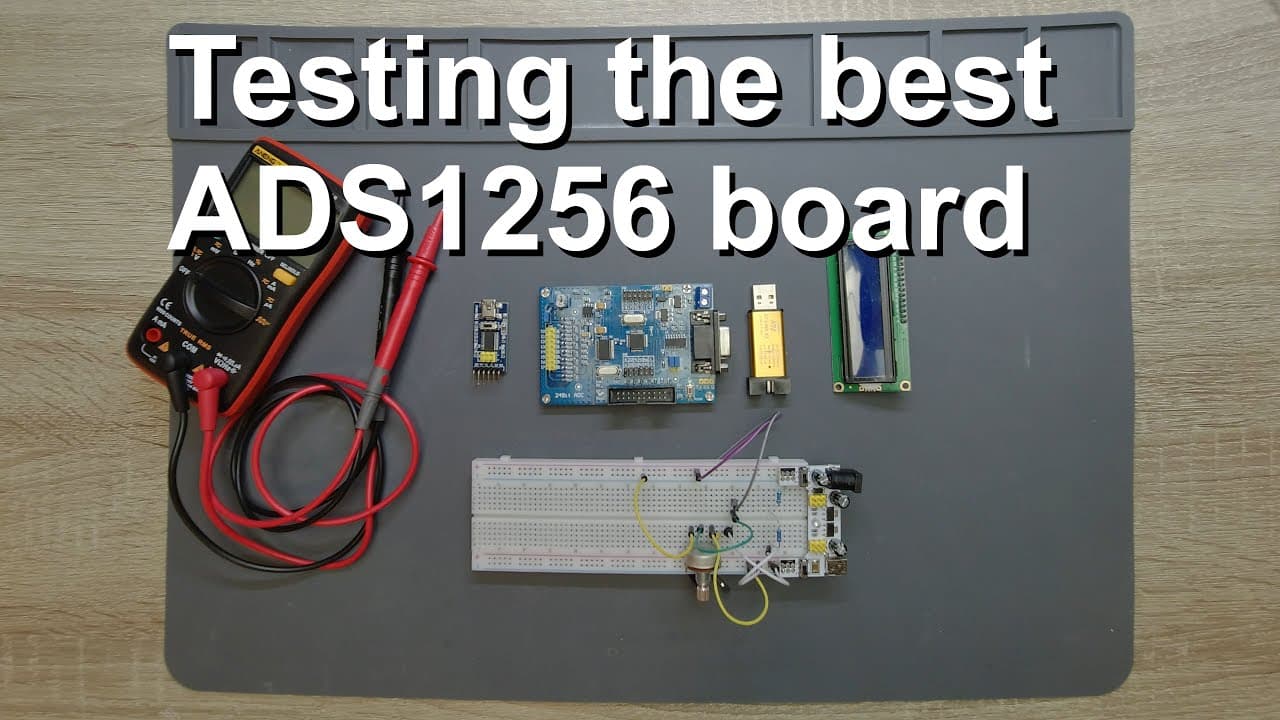
Testing and demonstrating the best ADS1256 board
TL;DR
The video explores the features and uses of the 80s 1256 board integrated with an STM32 microcontroller.
Transcript
rock America in this video I'm going to study and introduce another 80s 1256 board and I think this is my most favorite board among those ports which I own I have like five different 80s 1256 boards but I think this will be the best and I will buy a few and use them for different projects because this is like really amazing so first of all what is ... Read More
Key Insights
- 👻 The 80s 1256 board features an 8-channel 24-bit ADC, allowing for high-resolution signal acquisition.
- 🔂 It includes both single-ended and differential input configurations, catering to various sensing scenarios.
- 📽️ The integration of STM32 microcontroller enhances performance and offers flexibility for project scaling.
- 🥾 JTAG is recommended for programming to avoid common boot mode complications associated with serial setups.
- ✊ Proper grounding and power supply management are crucial for accurate voltage measurements and overall board functionality.
- 🏂 The board accommodates several communication protocols, enabling diverse application implementations.
- 😘 The presenter suggests a low-cost solution for building advanced projects without the clutter of loose wires.
Install to Summarize YouTube Videos and Get Transcripts
Explore YouTube Video Summarizer or Get YouTube Transcript Extractor
Questions & Answers
Q: What makes the 80s 1256 board preferable compared to standalone ADC boards?
The 80s 1256 board integrates an STM32 microcontroller, compact design, and built-in oscillators, which reduce electronic noise. This streamlined setup minimizes assembly complexity and allows for better performance, particularly in sensitive applications where precision in measurements is crucial.
Q: How can I program the STM32 microcontroller on the 80s 1256 board?
The STM32 microcontroller can be programmed using the ST-Link for JTAG programming, which simplifies the process. By connecting the SW CLK and SW DIO pins to the respective JTAG interface, users can efficiently upload code without changing boot pin configurations, streamlining development.
Q: Why is it necessary to differentiate between TX and RX connections when communicating with the 80s 1256 board?
The TX (transmit) and RX (receive) lines must be crossed during serial communication; the TX from one device connects to the RX of another. This is vital to establish proper data exchange, as failure to cross these signals will result in communication errors and data inaccuracies.
Q: What are the possible applications for the 80s 1256 board?
This board can be used in various applications requiring precise analog-to-digital conversions, such as data logging, sensor interfacing, or control systems. Its compatibility with SPI and I²C allows for interfacing with displays or SD card readers, enhancing its utility in embedded systems design.
Summary & Key Takeaways
-
The content provides an overview of the 80s 1256 board, highlighting its 8-channel 24-bit ADC capabilities. It also discusses its compatibility with various microcontrollers, especially the STM32.
-
The speaker explains the advantages of this specific board over standalone alternatives, noting its compact design, built-in oscillators, and reduced noise interference, making it suitable for precise measurements and projects.
-
Detailed instructions on connecting and programming the board, including JTAG and serial communication setups, are shared, along with tips for effective operation using SPI and I²C protocols for data handling.
Read in Other Languages (beta)
Share This Summary 📚
Summarize YouTube Videos and Get Video Transcripts with 1-Click
Try YouTube Summary with ChatGPT & Claude or YouTube Transcript Generator
Explore More Summaries from Curious Scientist 📚

![Building a coil winder [Part 6] - A few improvements thumbnail](/_next/image?url=https%3A%2F%2Fi.ytimg.com%2Fvi%2F3eyxG_g2iUA%2Fhqdefault.jpg&w=750&q=75)


![Building a Peltier cooler-based cooling box - First iteration, improvements [Part 2/6] thumbnail](/_next/image?url=https%3A%2F%2Fi.ytimg.com%2Fvi%2F0YlNw0EGnzI%2Fhqdefault.jpg&w=750&q=75)
Summarize YouTube Videos and Get Video Transcripts with 1-Click
Try YouTube Summary with ChatGPT & Claude or YouTube Transcript Generator