How to Build a Claude Code Command Center
TL;DR
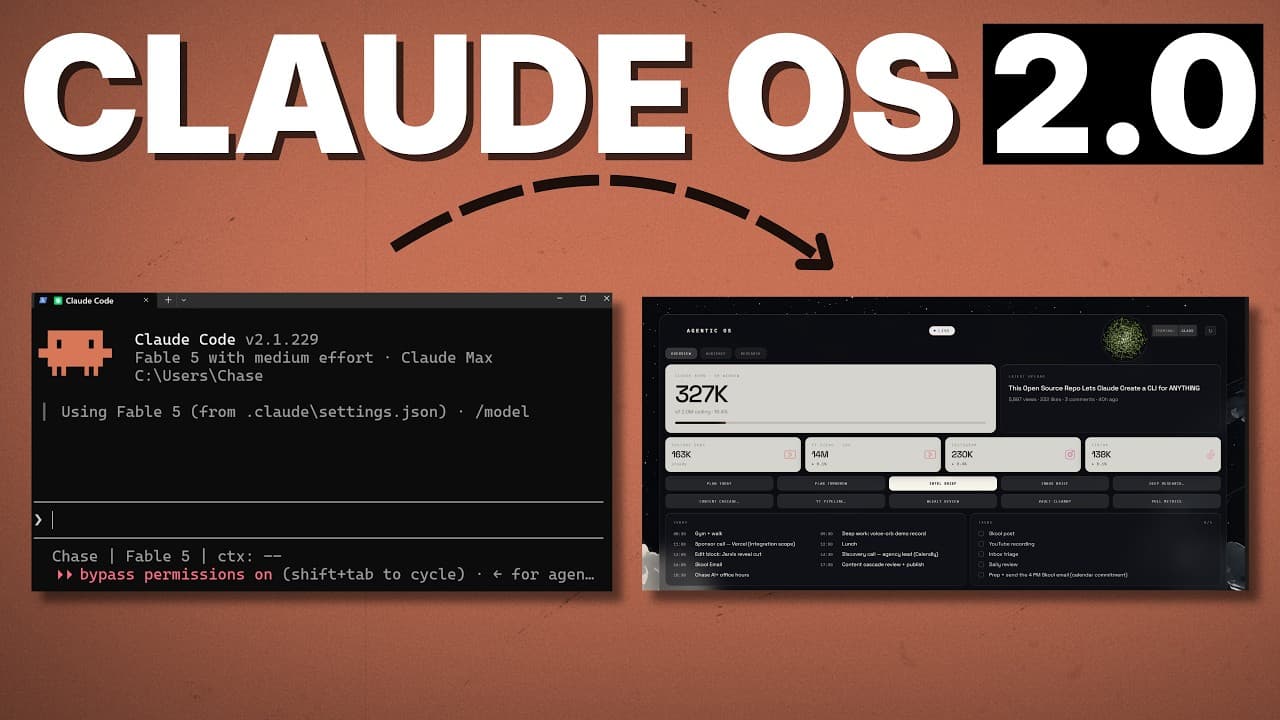
Build the system around three foundations: a customizable Obsidian interface, reusable skills and automations, and a well-organized markdown memory layer. A local voice mode can retrieve existing reports quickly, control interface elements, or start deeper Claude Code work in the background, while thoughtful vault organization improves navigation, reduces token usage, and supports more accurate answers.
Transcript
You're using cloud code in Obsidian the wrong way, or at least you're barely scratching the surface. We can use Obsidian to do a lot more than just track markdown files for us. Instead, we can use it to create a command center for our entire Claude OS. A system that includes a fleet of skills and automations, a memory layer, and a visual wrapper on... Read More
Key Insights
- The command center is a custom Obsidian plugin built by Claude Code, and its displayed information is fully customizable. It can surface selected metrics, social media performance, Google Calendar schedules, task breakdowns, morning headlines, reports, skills, and automations in one visual interface.
- The visual interface creates value by presenting important information at a glance. Dedicated tabs can expose recurring research and audience reports, including GitHub trends, YouTube outlier videos, content angles, Hacker News activity, and explanations of which published content is or is not performing well.
- Local voice mode can control parts of Obsidian and answer questions about reports that have already been generated. Responses are relatively quick when the requested information is already available because the system does not need to search the web, process new findings, and then formulate an answer.
- The voice interface works even when Obsidian is not the active application. A hotkey can initiate audible questions about stored schedules or reports while the user works elsewhere, providing a voice interaction pattern similar to the referenced live voice experiences.
- Headless Claude Code can perform deeper work initiated through voice commands. Requests such as project planning or deep research can run in the background, although their responses take longer than simple retrieval because Claude must complete the requested work before reporting the result.
- The skills and automation backbone is the substantive foundation of the system. Recurring daily and weekly tasks should be identified, grouped into domains, performed manually until the desired workflow is clear, converted into reusable skills, and automated only when automation makes practical sense.
- The Obsidian memory layer primarily organizes markdown information for the human rather than transforming the vault into a graph retrieval system. The visual graph should not be mistaken for GraphRAG, and its appearance alone does not provide the system with meaningful operational value.
- A well-structured vault provides a secondary performance benefit for Claude Code when thousands of files are present. Clear organization makes relevant files easier to navigate, which can improve answer accuracy and speed while reducing unnecessary token consumption.
Install to Summarize YouTube Videos and Get Transcripts
Explore YouTube Video Summarizer or Get YouTube Transcript Extractor
Questions & Answers
Q: How do you build a Claude Code command center in Obsidian?
Build it around three connected components: a custom Obsidian interface, a backbone of reusable skills and automations, and an organized markdown memory layer. Configure the interface to display the metrics, schedules, reports, and controls you actually use. Then add local voice interaction for retrieval and commands, while structuring the vault so Claude Code can navigate stored information efficiently.
Q: What value does an Obsidian dashboard add beyond the terminal?
An Obsidian dashboard provides a customizable visual overview of information that would otherwise remain scattered across files, reports, calendars, and command-line sessions. It can show token usage, social metrics, schedules, tasks, headlines, research reports, and automation buttons at a glance. It can also embed a terminal, so the visual interface complements rather than eliminates command-line access.
Q: How does local voice mode work with the Obsidian command center?
Local voice mode accepts spoken requests and can control interface elements, retrieve information from existing reports, or start Claude Code work in the background. It runs locally on the creator's GPU and remains available when Obsidian is not active. Retrieval questions respond relatively quickly, while deeper tasks take longer because Claude must first complete the requested work.
Q: Why are existing reports important for fast voice responses?
Existing reports give the voice system a prepared source of information that it can inspect immediately. When a question concerns a completed research report or stored schedule, the system does not need to search the web and process new material before answering. This makes retrieval relatively smooth and supports quick spoken answers about research findings, headlines, commitments, and other stored information.
Q: How should recurring tasks become Claude Code skills?
Start by listing tasks performed regularly across personal and professional work, then group them into clear domains such as research, productivity, content, sales, community, and memory. Perform each workflow manually until its desired steps and output are understood. Convert the stable process into a reusable skill, then decide separately whether its frequency and predictability justify turning it into an automation.
Q: When should a Claude Code skill become an automation?
A skill should become an automation only after the underlying workflow has been worked out manually and converted into a reliable reusable process. The decision depends on whether automatic execution makes sense for that task. Recurring activities such as a morning trend scan may fit automation, while other skills may remain better suited to manual activation through a button or voice request.
Q: What is the purpose of the Obsidian memory layer?
The Obsidian memory layer primarily organizes markdown information for the human user. It is not automatically a GraphRAG system, and an attractive graph view does not itself enhance Claude Code. Its secondary benefit appears when the vault contains thousands of files: a sensible structure helps Claude navigate information, retrieve relevant context accurately, and avoid wasting tokens on unnecessary exploration.
Q: How does vault organization improve Claude Code performance?
Vault organization gives Claude Code clearer paths through a large collection of markdown files. When folders, files, and related information follow a sensible structure, Claude can locate relevant material more quickly and produce accurate answers with less searching. The benefit becomes especially useful with thousands of files, where poor organization could increase navigation effort and unnecessary token consumption.
Summary & Key Takeaways
-
The Obsidian command center combines a customizable dashboard, embedded terminal, reports, calendar information, social metrics, action buttons, and local voice interaction. Its purpose is to expose useful information and controls that are harder to access at a glance through a terminal or desktop application alone, while remaining adaptable to personal workflows.
-
The operational foundation is a collection of skills and automations derived from recurring personal and professional tasks. Tasks are grouped into domains such as productivity, research, content, community, sales, and memory. A workflow should first be understood and performed manually, then converted into a reusable skill and automated when appropriate.
-
The memory layer uses organized markdown files primarily to help the human manage information. Its secondary benefit is making large collections of files easier for Claude Code to navigate. With a sensible vault structure, the system can retrieve accurate information more quickly, consume fewer tokens, and answer questions from previously generated reports.
Read in Other Languages (beta)
Share This Summary 📚
Summarize YouTube Videos and Get Video Transcripts with 1-Click
Try YouTube Summary with ChatGPT & Claude or YouTube Transcript Generator
Explore More Summaries from Chase AI 📚


Summarize YouTube Videos and Get Video Transcripts with 1-Click
Try YouTube Summary with ChatGPT & Claude or YouTube Transcript Generator