How to Use for Loop with Strings in Python
TL;DR
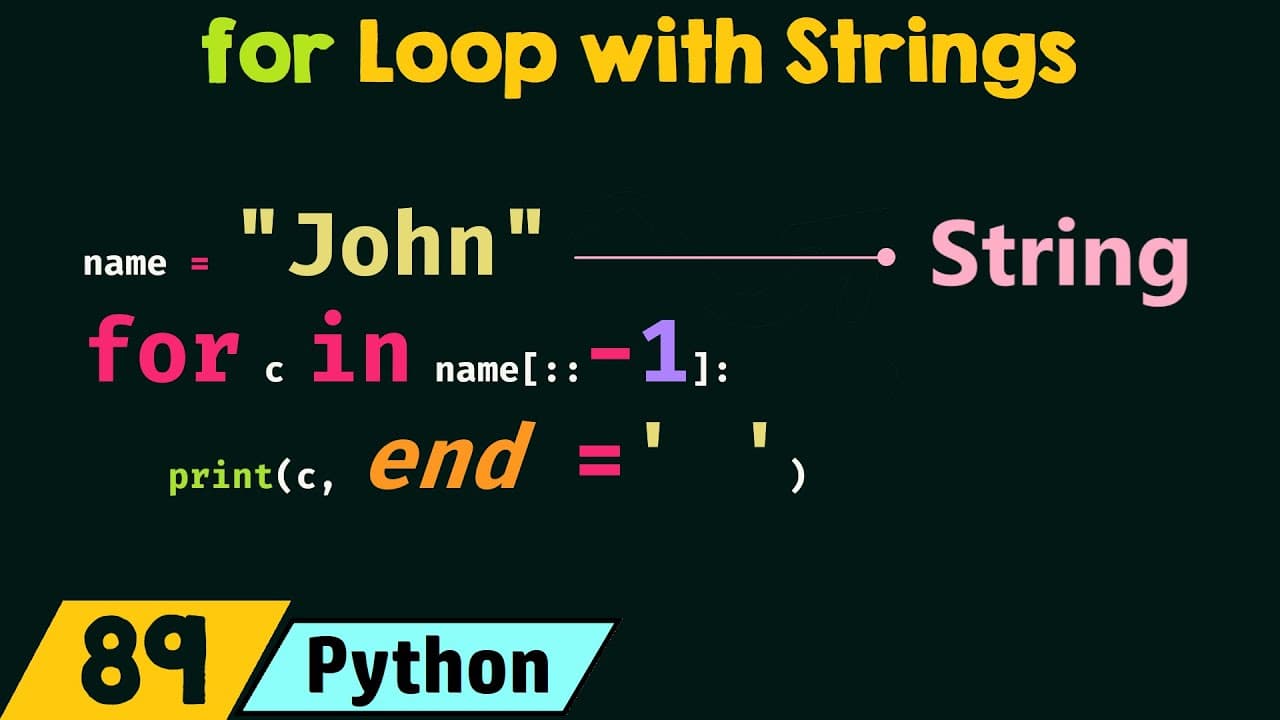
A for loop in Python can access each character of a string, iterate the string in reverse order, and access each word in a string. By reversing the string or splitting it into words, the for loop can perform these tasks efficiently, allowing for versatile string manipulation.
Transcript
in this presentation we will understand how for Loop works with strings so without any further delay let's get started the first topic of this presentation is accessing characters of a string using for Loop the second topic is iterating a string in reverse order using for Loop and the third topic is accessing words of a string using for Loop so let... Read More
Key Insights
- A for loop can access each character of a string sequentially, allowing for individual manipulation or display of characters.
- By using slicing, a string can be reversed, enabling the for loop to iterate over the string in reverse order.
- The split function divides a string into words, which can then be accessed individually using a for loop.
- To print characters on the same line, the print function can be modified with an additional argument.
- Reversing a string with slicing involves using a step value of -1, which the for loop utilizes to iterate backwards.
- The split function defaults to using whitespace as a separator, making it simple to split sentences into words.
- Counting words in a string involves splitting the string and incrementing a count variable within a for loop.
- The f-string in Python allows for embedding variables directly within strings for dynamic output generation.
Install to Summarize YouTube Videos and Get Transcripts
Explore YouTube Video Summarizer or Get YouTube Transcript Extractor
Questions & Answers
Q: How to access each character of a string using a for loop?
To access each character of a string using a for loop, iterate over the string with a loop variable that receives each character one at a time. This allows for operations like printing or modifying each character individually. The loop runs for the length of the string, processing each character in sequence.
Q: How to iterate a string in reverse order using a for loop?
To iterate a string in reverse order using a for loop, first reverse the string with slicing, using a step value of -1. Pass this reversed string to the for loop, which will then process each character from the last to the first, enabling reverse order operations.
Q: How to access words of a string using a for loop?
To access words of a string using a for loop, utilize the split function to divide the string into a list of words based on whitespace or a specified separator. The for loop can then iterate over this list, accessing each word individually, facilitating tasks like counting or transformation.
Q: What is the role of the split function in string manipulation?
The split function is crucial for string manipulation, as it divides a string into a list of substrings based on a specified separator, typically whitespace. This allows for easy access to individual words or components of the string, which can then be processed using a for loop or other methods.
Q: How to print characters on the same line using a for loop?
To print characters on the same line using a for loop, modify the print function with an additional argument, such as end='', which prevents a newline after each character. This allows characters to be printed consecutively on the same line, with optional separators like spaces if desired.
Q: What is the significance of slicing in string manipulation?
Slicing is significant in string manipulation as it allows for extracting specific parts of a string or reversing the string entirely. By specifying start, stop, and step values, slicing can create substrings or reversed strings, which are useful for operations like reverse iteration in a for loop.
Q: How does the f-string enhance output generation in Python?
The f-string enhances output generation in Python by allowing variables to be embedded directly within strings. This feature simplifies the creation of dynamic strings that include variable values, making it easier to generate formatted output without complex concatenation or formatting methods.
Q: How to count words in a string using a for loop?
To count words in a string using a for loop, first split the string into words using the split function. Initialize a count variable to zero, then iterate over the list of words with the for loop, incrementing the count for each word encountered. This method provides an accurate word count.
Summary & Key Takeaways
-
A for loop in Python can be used to access each character of a string, allowing for operations like printing or modifying each character. By default, characters are accessed in order, but reversing the string allows for reverse iteration.
-
Strings can be reversed using slicing, with a step value of -1, enabling the for loop to iterate over the string from the last character to the first. This technique is useful for tasks requiring reverse order processing.
-
The split function is utilized to divide a string into words based on whitespace or a specified separator. Once split, a for loop can iterate over the resulting list of words, facilitating operations like counting or transformation.
Read in Other Languages (beta)
Share This Summary 📚
Summarize YouTube Videos and Get Video Transcripts with 1-Click
Try YouTube Summary with ChatGPT & Claude or YouTube Transcript Generator
Explore More Summaries from Neso Academy 📚

Summarize YouTube Videos and Get Video Transcripts with 1-Click
Try YouTube Summary with ChatGPT & Claude or YouTube Transcript Generator