How to Retrieve Employee Information Using Relational Algebra
TL;DR
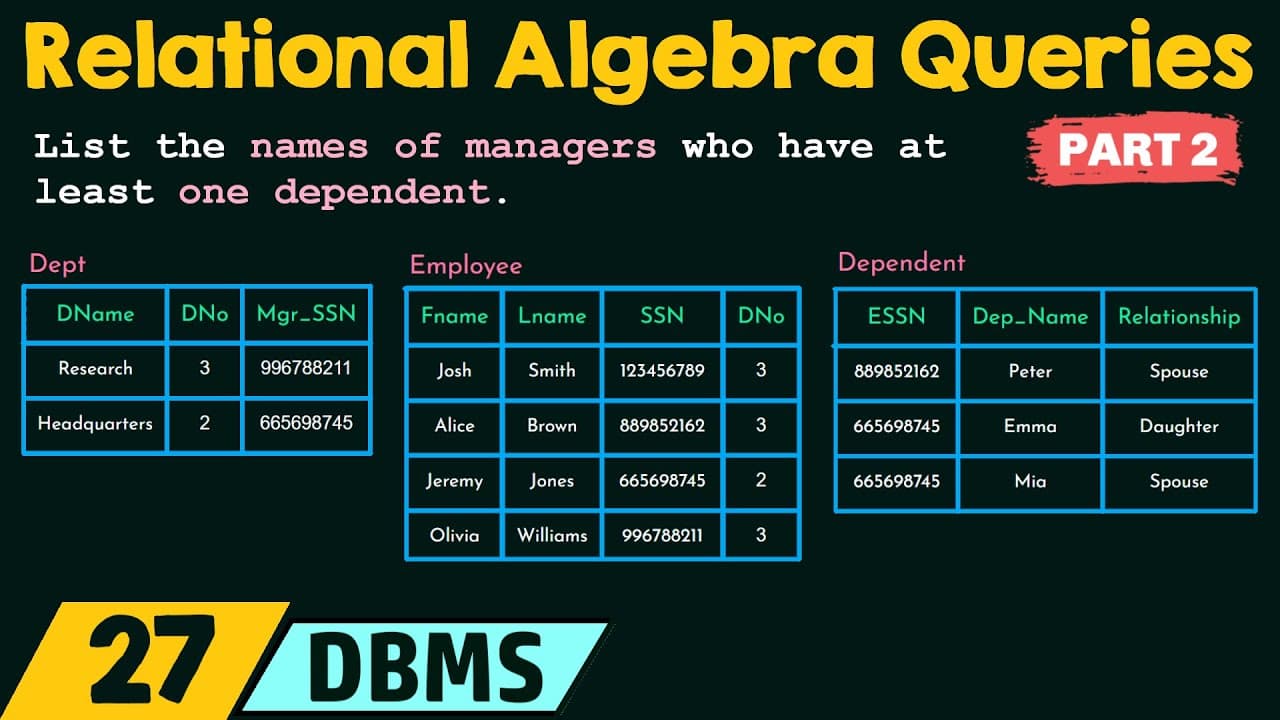
This video demonstrates how to use relational algebra to find employees with multiple dependents. It covers retrieving names of employees with two or more dependents, those with none, and managers with at least one dependent through aggregation, set difference, and intersection operations, culminating in natural joins to obtain the desired results.
Transcript
hello everyone and welcome back to the part two of example queries based on relational algebra for the examples that we are going to discuss here in this video there are mainly three relations that we are going to use they are the employee relation having the employee details the department relation having the details of each department and its man... Read More
Key Insights
- In order to find employees with two or more dependents, we need to count the number of dependents for each employee using the aggregate count function.
- The count is performed by grouping the employee SSN attribute and applying the count function on each group.
- The result is stored in a relation called t1, with attributes for the SSN and number of dependents.
- 🔍 Retrieving Employees with Two or More Dependents:
- To find employees with two or more dependents, we select tuples from t1 where the number of dependents is greater than or equal to 2.
- This resulting tuple is stored in another relation called t2.
- 👥 Joining to Retrieve Employee Names:
- To obtain the names of employees with two or more dependents, we perform a natural join between t2 and the employee relation.
- The join is based on the SSN attribute, and the resulting combination of tuples is stored in a new relation.
- We then project only the first name and last name attributes of the employee and store them in the final result relation.
- 🚫 Employees with No Dependents:
- To retrieve the names of employees with no dependents, we need to identify the employees who do have dependents and subtract them from the list of all employees.
- The query involves listing out all employee SSNs, listing out the SSNs of employees with dependents, and then using set difference to obtain the SSNs of employees with no dependents.
- 🏢 Finding Managers with Dependents:
- To find managers with at least one dependent, we need to retrieve the names of managers from the department relation, the details of dependents from the dependent relation, and the information of all employees from the employee relation.
- By performing operations such as projection, renaming, intersection, and natural join, we can identify the SSN of the manager with at least one dependent and then retrieve their names.
- Each query involves a series of steps, including retrieving relevant attributes from specific relations, performing aggregations, grouping, counting, and joining.
- The steps are executed in a specific order to obtain the desired result.
- This video concludes the chapter on relational algebra, covering various example queries and concepts.
- Understanding the concepts and queries discussed in this chapter is crucial for working with relational databases and analyzing data effectively.
Install to Summarize YouTube Videos and Get Transcripts
Explore YouTube Video Summarizer or Get YouTube Transcript Extractor
Questions & Answers
Q: How can you retrieve the names of employees with two or more dependents using relational algebra?
To retrieve the names of employees with two or more dependents, you need to count the number of dependents for each employee. First, group the employee SSNs and apply the count aggregate function. Next, select the tuples with a number of dependents greater than or equal to two. Finally, perform a natural join with the employee relation to get the names.
Q: How do you retrieve the names of employees with no dependents using relational algebra?
To retrieve the names of employees with no dependents, list all the employee SSNs and the SSNs of employees with dependents. Then, perform a set difference operation between the two relations to get the employees with no dependents. Lastly, use a natural join with the employee relation to retrieve their names.
Q: How can you retrieve the names of managers who have at least one dependent using relational algebra?
To retrieve the names of managers with at least one dependent, obtain the manager SSNs from the department relation. Next, list the SSNs of employees with dependents. Then, perform an intersection operation to find the common SSNs. Finally, perform a natural join with the employee relation to retrieve their names.
Q: What is the purpose of the count aggregate function in relational algebra?
The count aggregate function is used to count the total number of dependents for each employee. It is used to determine which employees have two or more dependents in this example.
Summary & Key Takeaways
-
First, the video explains how to retrieve the names of employees with two or more dependents using grouping attributes and the count aggregate function, and then using a natural join to get the names from the employee relation.
-
Next, the video demonstrates how to retrieve the names of employees with no dependents by listing the SSN of all employees, listing the SSN of employees with dependents, and then performing a set difference operation to get the employees with no dependents. Finally, a natural join is used to get the names from the employee relation.
-
Lastly, the video shows how to retrieve the names of managers who have at least one dependent by obtaining the manager SSNs from the department relation, listing the SSN of employees with dependents, performing an intersection operation to find the common SSNs, and using a natural join to retrieve the names from the employee relation.
Read in Other Languages (beta)
Share This Summary 📚
Summarize YouTube Videos and Get Video Transcripts with 1-Click
Try YouTube Summary with ChatGPT & Claude or YouTube Transcript Generator
Explore More Summaries from Neso Academy 📚



Summarize YouTube Videos and Get Video Transcripts with 1-Click
Try YouTube Summary with ChatGPT & Claude or YouTube Transcript Generator