How Do Preemptive and Non-Preemptive Scheduling Work?
TL;DR
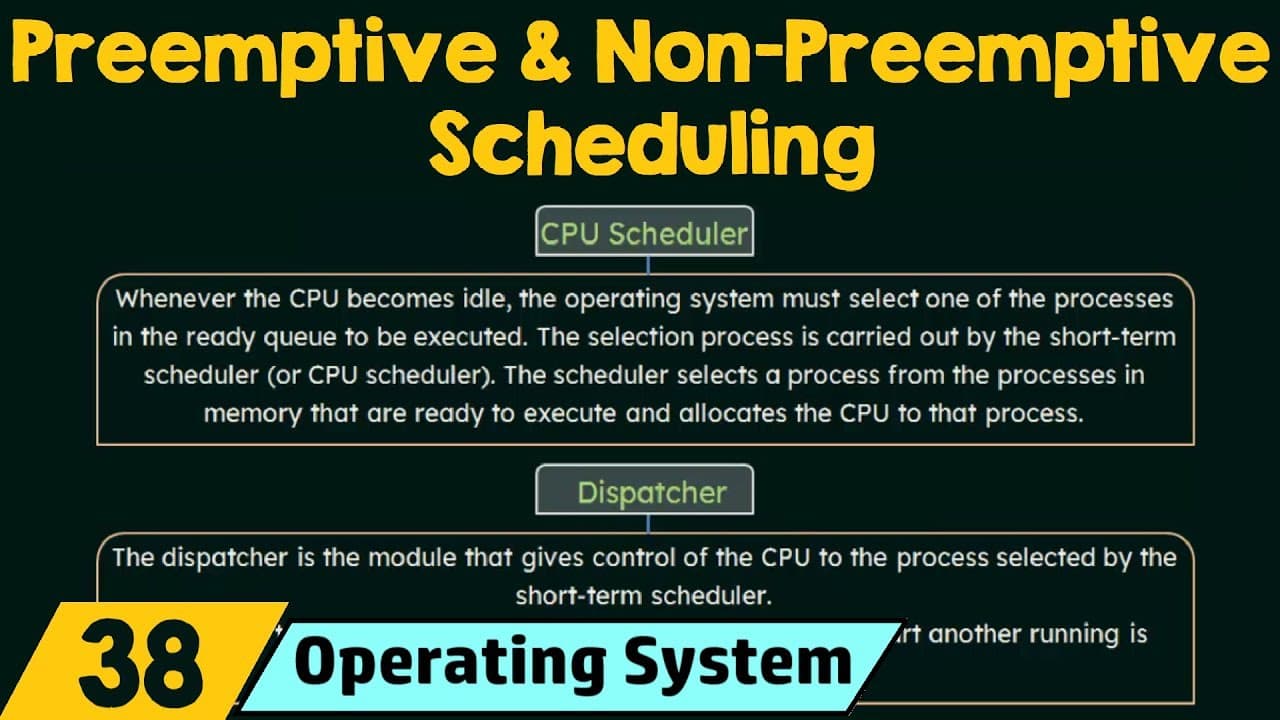
Preemptive scheduling allows a scheduling choice when a running process returns to the ready state or a waiting process becomes ready, while non-preemptive scheduling does not use those circumstances to take the CPU from the current process. The CPU scheduler selects a ready process, and the dispatcher transfers CPU control to it, with dispatch latency measuring the time needed to stop one process and start another.
Transcript
in this lecture we are going to study about pre-emptive and non pre-emptive scheduling so pre-emptive and non pre-emptive scheduling are two different ways in which scheduling can take place now remember that pre-emptive and non pre-emptive scheduling are not CPU scheduling algorithms but they are two ways in which CPU scheduling takes place so in ... Read More
Key Insights
- The CPU scheduler is the operating system component that selects one process from the ready processes in memory and allocates the CPU to it. It is also called the short-term scheduler and performs the selection when the CPU needs another process to execute.
- The dispatcher is the module that transfers control of the CPU to the process selected by the CPU scheduler. The scheduler decides which process should run, while the dispatcher performs the control transfer needed to begin or resume that process's execution.
- Dispatch latency is the time the dispatcher takes to stop one process and start another. Because processes frequently switch between execution and waiting, the dispatcher must be quick, and efficient computation requires this switching delay to be kept minimal.
- A running-to-waiting transition requires another ready process to receive the CPU because the current process is waiting for an operation, such as an input-output request. Assigning the CPU elsewhere prevents it from remaining idle while the waiting process cannot use it.
- A running-to-ready transition can occur when an interrupt halts a process before its execution is complete. The interrupted process still needs the CPU, so it returns to the ready state and waits for an opportunity to continue executing.
- A waiting-to-ready transition occurs when the event holding a process in the waiting state is completed, such as completion of an input-output request. The process then becomes ready to receive the CPU again and continue its unfinished execution.
- Process termination requires a new scheduling decision because the terminated process releases the CPU. If another process exists in the ready queue, one must be selected for execution, so the operating system has no choice about whether scheduling is necessary.
- Preemptive and non-preemptive scheduling are two ways in which CPU scheduling can take place, not individual CPU scheduling algorithms. Their distinction concerns whether scheduling choices are made during transitions where the current process could otherwise continue holding the CPU.
Install to Summarize YouTube Videos and Get Transcripts
Explore YouTube Video Summarizer or Get YouTube Transcript Extractor
Questions & Answers
Q: What is the difference between preemptive and non-preemptive scheduling?
Preemptive and non-preemptive scheduling are two ways CPU scheduling can take place, rather than separate CPU scheduling algorithms. The distinction appears in situations where scheduling involves a choice, particularly when a process moves from running to ready after an interrupt or from waiting to ready after an input-output request completes. Preemptive scheduling permits selection in these circumstances, while non-preemptive scheduling does not take the CPU from the current process in them.
Q: What does a CPU scheduler do in an operating system?
The CPU scheduler selects one process from the processes in memory that are ready to execute and allocates the CPU to that process. It is also called the short-term scheduler. When the CPU becomes idle or a scheduling circumstance requires another process to run, the scheduler examines the ready queue and determines which available process should receive the CPU for execution.
Q: What is the role of the dispatcher in CPU scheduling?
The dispatcher gives control of the CPU to the process selected by the CPU scheduler. These components therefore perform related but different functions: the scheduler identifies the process that should execute, and the dispatcher carries out the transfer of CPU control. Since processes switch frequently as execution and waiting states change, the dispatcher must perform its work quickly.
Q: What is dispatch latency in an operating system?
Dispatch latency is the time taken by the dispatcher to stop one process and start another process running. It represents the delay involved when CPU control switches between processes. Because this switching can happen frequently, the dispatcher needs to be fast. Minimal dispatch latency is desirable for efficient computation because less time is spent transferring control instead of executing processes.
Q: When can CPU scheduling decisions take place?
CPU scheduling decisions may take place under four stated circumstances: when a process moves from running to waiting, when it moves from running to ready, when it moves from waiting to ready, and when it terminates. Examples include waiting for an input-output operation, being halted by an interrupt, becoming ready after an input-output request completes, and releasing the CPU after termination.
Q: Why must another process run when the current process enters the waiting state?
A process in the waiting state is waiting for an event such as completion of an input-output request and is not using the CPU. Assigning the CPU to another ready process prevents the CPU from remaining idle and helps maximize CPU utilization. Therefore, when a running process moves to waiting, another process in the ready queue must be selected if one is available.
Q: Why is scheduling required when a process terminates?
Scheduling is required after termination because the completed process releases the CPU and can no longer continue executing. If another process exists in the ready queue, one of those ready processes must be selected and given the CPU. This circumstance provides no choice about whether to schedule, since leaving the CPU unassigned would prevent an available ready process from executing.
Q: Why do running-to-ready and waiting-to-ready transitions provide a scheduling choice?
A running-to-ready transition leaves the interrupted process unfinished and still ready to use the CPU, while a waiting-to-ready transition introduces a process that can resume after its request is completed. These circumstances create a choice because a ready process becomes available while CPU execution may continue or be reassigned. That scheduling choice is central to distinguishing preemptive scheduling from non-preemptive scheduling.
Summary & Key Takeaways
-
The CPU scheduler, also called the short-term scheduler, selects a process from those in memory that are ready to execute. It allocates the CPU to the selected process whenever scheduling is required, such as when the CPU becomes idle or the currently running process can no longer continue using it.
-
The dispatcher gives CPU control to the process chosen by the CPU scheduler. Because process switching happens frequently, the dispatcher must operate quickly. Dispatch latency is the time required to stop one process and start another, and minimizing this delay supports more efficient computation when control changes between processes.
-
Scheduling decisions can arise during four process transitions: running to waiting, running to ready, waiting to ready, and termination. A new ready process must be selected after running-to-waiting transitions or termination. Running-to-ready and waiting-to-ready transitions provide a scheduling choice that distinguishes preemptive scheduling from non-preemptive scheduling.
Read in Other Languages (beta)
Share This Summary 📚
Summarize YouTube Videos and Get Video Transcripts with 1-Click
Try YouTube Summary with ChatGPT & Claude or YouTube Transcript Generator
Explore More Summaries from Neso Academy 📚

Summarize YouTube Videos and Get Video Transcripts with 1-Click
Try YouTube Summary with ChatGPT & Claude or YouTube Transcript Generator