How to Create Clickable YouTube Thumbnails That Drive Views
TL;DR
To create clickable YouTube thumbnails, use visual cues like hand symbols and eye-catching icons that encourage viewers to click. Incorporate relevant text, such as names of well-known figures or provocative questions, to spark curiosity. Effective thumbnails enhance click-through rates, helping to attract more viewers to your content.
Transcript
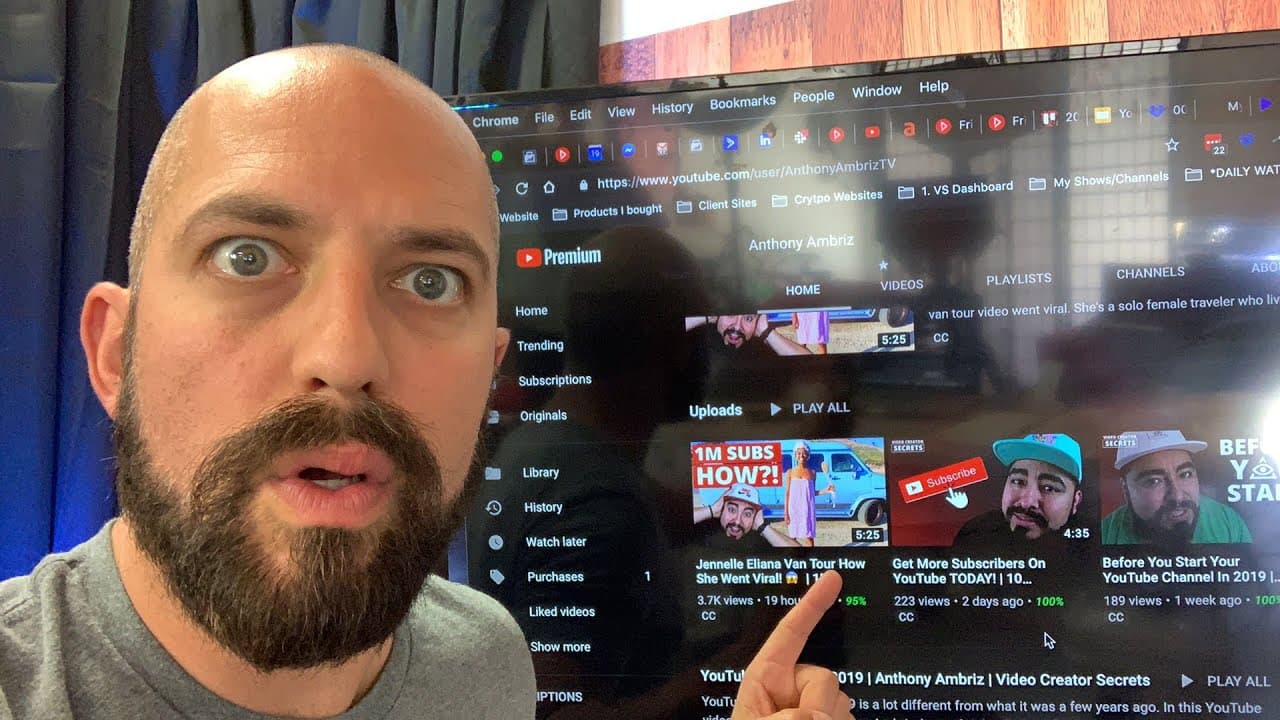
how do you make a thumbnail that's more clickable meeting the viewers gonna watch it and they're gonna click on it I'm gonna show you a couple of excellent examples from my boy Anthony and Brees over at YouTube video creator secrets come over here and check this out so this is Anthony's this is Anthony's page right here on YouTube and you can see s... Read More
Key Insights
- 🤗 Including subconscious cues like hand symbols and icons in thumbnails can increase clickability.
- ⁉️ Visual elements like stars, bursts, exclamation marks, and question marks make thumbnails more enticing.
- 💭 Incorporating relevant text, such as the name of a well-known YouTuber or a thought-provoking question, can generate curiosity and clicks.
- 👨💼 Clickable thumbnails are especially valuable for business owners on YouTube to drive traffic, increase brand visibility, and potentially boost conversions.
- 🫵 Effective thumbnails should help viewers envision themselves engaging with the content.
- ❓ Product demos should showcase the product and include customer testimonials to make potential customers envision themselves using it.
- 🫵 Using clickable elements in thumbnails helps viewers visualize clicking and ultimately leads to more clicks and video views.
Install to Summarize YouTube Videos and Get Transcripts
Explore YouTube Video Summarizer or Get YouTube Transcript Extractor
Questions & Answers
Q: How can clickable thumbnails lead to higher click-through rates?
Clickable thumbnails use subconscious cues and visually appealing elements to entice viewers to click, resulting in higher click-through rates. By incorporating symbols, icons, and relevant text, viewers are more likely to envision themselves clicking on the thumbnail and accessing the video.
Q: What are some effective elements to include in a clickable thumbnail?
Effective clickable thumbnails often include hand symbols, icons, relevant text, and visual cues like stars or bursts. These elements capture attention and prompt viewers to click, increasing the clickability and engagement of the thumbnail.
Q: How can clickable thumbnails benefit business owners on YouTube?
Clickable thumbnails are particularly beneficial for business owners on YouTube. By making viewers visualize themselves clicking and engaging with your content, clickable thumbnails can drive more traffic to your video, increase brand awareness, and potentially lead to conversions.
Q: Why is it important to showcase the product and customer testimonials in product demos?
In product demos, showcasing the product and providing customer testimonials allows potential customers to envision themselves using the product. This visualization enhances their interest and likelihood of making a purchase.
Summary & Key Takeaways
-
The content discusses the importance of creating clickable thumbnails and highlights examples of effective thumbnails by YouTube creators Anthony and Brees.
-
It emphasizes the use of subconscious cues, such as hand symbols and icons, to subconsciously encourage viewers to click on the thumbnails.
-
The content also compares the clickability and views of a video with an engaging thumbnail to one without, showcasing the impact of a compelling thumbnail design.
Read in Other Languages (beta)
Share This Summary 📚
Summarize YouTube Videos and Get Video Transcripts with 1-Click
Try YouTube Summary with ChatGPT & Claude or YouTube Transcript Generator
Explore More Summaries from Owen Video 📚




Summarize YouTube Videos and Get Video Transcripts with 1-Click
Try YouTube Summary with ChatGPT & Claude or YouTube Transcript Generator