How to build an AI system to find viral video ideas
TL;DR
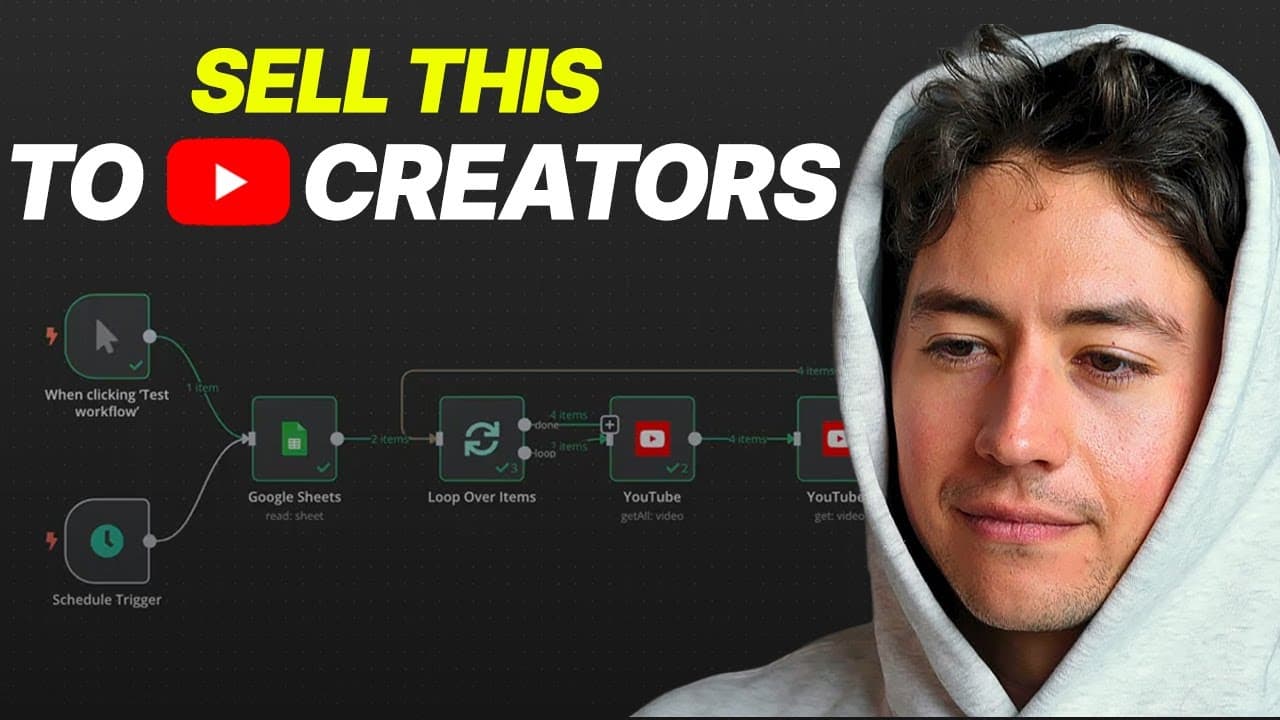
The system uses two workflows: one to fetch and update trending YouTube videos via the YouTube API and Google Sheets, and a second to generate a daily digest email of high potential videos. It can be adapted to deliver updates through other channels like Slack or SMS. The idea is to automate trend detection for personal branding or productized services.
Transcript
Hey, in this video I'm going to be building a YouTube trend detector live. This is a system you can use for yourself if you're into personal branding, or you could sell directly to coaches, consultants, people selling info products themselves, and so on and so forth for over $2,000 a pop. I'm going to be building this live alongside you, show you g... Read More
Key Insights
- The system is built around two separate flows, one for data collection and one for daily digest delivery.
- The data source is a Google sheet database of channel IDs that feeds into the YouTube API to retrieve video data.
- Videos are filtered to exclude shorts and are stored with view counts to compute trends.
- A proxy method is used to differentiate long form videos from shorts due to API limitations.
- Trends are determined by comparing each video view count to the average views within a sheet’s videos.
- A threshold determines which videos are included in the daily digest.
- The daily digest can be delivered via email or extended to other delivery methods like Slack or SMS.
- The approach emphasizes using familiar tools like Google Sheets to keep the workflow accessible for beginners.
- More videos from this channel:
- More from this channel: Nick Saraev
Install to Summarize YouTube Videos and Get Transcripts
Explore YouTube Video Summarizer or Get YouTube Transcript Extractor
Questions & Answers
Q: How does the two-flow system work in this trend detector
The two-flow system separates concerns for clarity and scalability. The add or update flow retrieves all videos for monitored channels, gathers details via the YouTube API, and updates the Google Sheet with new view counts. The daily digest flow then reads the updated data, computes a running average of views, determines a multiple for each video, and includes high performers in a formatted digest delivered by email. This modular design makes testing and extension straightforward.
Q: What data sources are used to identify trending videos
The primary data source is a Google Sheet database containing channel IDs and video data. The system uses the YouTube API to pull videos from each channel, then pings individual videos to collect detailed metrics such as view counts. The data is stored back into Google Sheets, which serves as the basis for calculating popularity through averages and multiples. This setup enables a simple, trackable trend detector.
Q: How are videos filtered to focus on meaningful content
To focus on comparable content, the detector filters out shorts as there is no built in way with the API to classify them directly. This proxy filtering creates apples to apples comparisons by concentrating on long form videos. The system then compares each long form video’s view count against the sheet’s average to compute a multiple that signals relative popularity.
Q: How is trend significance determined in the workflow
Trend significance is determined by calculating the average view count of all videos in a sheet and then computing a multiple for each video by comparing its individual view count to that average. If the multiple exceeds a certain threshold, the video is included in the daily digest. This method highlights videos that outperform their peers within the same dataset.
Q: What role does Google Sheets play in the process
Google Sheets serves as the core database for channel IDs and video data. It acts as the storage layer where the add or update flow writes new information and where the daily digest flow reads data to compute trends. The system uses a Sheets node to fetch rows and has the option to pin data to cache results for faster subsequent runs.
Q: What delivery options are considered for the daily digest
The creator demonstrates delivering the daily digest via email, calling it the daily digest for a nicely formatted summary. He also mentions the possibility of delivering through other channels such as Slack, SMS, or even a custom website interface, indicating a flexible delivery architecture that can be extended beyond email.
Q: Why is SQL avoided in this setup
SQL is avoided to keep the workflow simple and beginner friendly. The presenter prefers building the data handling inside Google Sheets rather than introducing SQL, which he considers scary and intimidating for beginners. This choice aligns with the goal of making the system straightforward to set up and extend while maintaining accessibility.
Q: What practical use cases does the video suggest for this system
The system is useful for personal branding and for selling to coaches, consultants, or information product creators who want to identify viral content ideas. It can be set up for one’s own use or offered as a service to clients at a price, enabling automated discovery of trending videos and timely digests that inform content strategy.
Summary & Key Takeaways
-
Summary point 1: The workflow is designed to pull videos from a Google sheet database of channel IDs, fetch data via the YouTube API, and push results back into the sheet, creating a live trend detector you can run on a schedule.
-
Summary point 2: The system splits into two flows; an add or update flow for data collection and a daily digest flow for delivering a summarized list of trending content via email, with potential to extend to other delivery methods.
-
Summary point 3: The creator emphasizes simplicity by using Google Sheets instead of SQL, choosing a straightforward setup that beginners can follow while building and testing the detector.
Read in Other Languages (beta)
Share This Summary 📚
Summarize YouTube Videos and Get Video Transcripts with 1-Click
Try YouTube Summary with ChatGPT & Claude or YouTube Transcript Generator
Explore More Summaries from Nick Saraev 📚





Summarize YouTube Videos and Get Video Transcripts with 1-Click
Try YouTube Summary with ChatGPT & Claude or YouTube Transcript Generator