How I Decide My Priorities for the Week
TL;DR
The speaker decides weekly priorities by processing every task once, marking it high if it must happen this week and medium if it can wait until after this week, then assigning it to a project or area of responsibility. Because another weekly review will happen within four, five, or six days, medium tasks can be deferred with confidence. Read on for the complete decision process and grounded examples.
Transcript
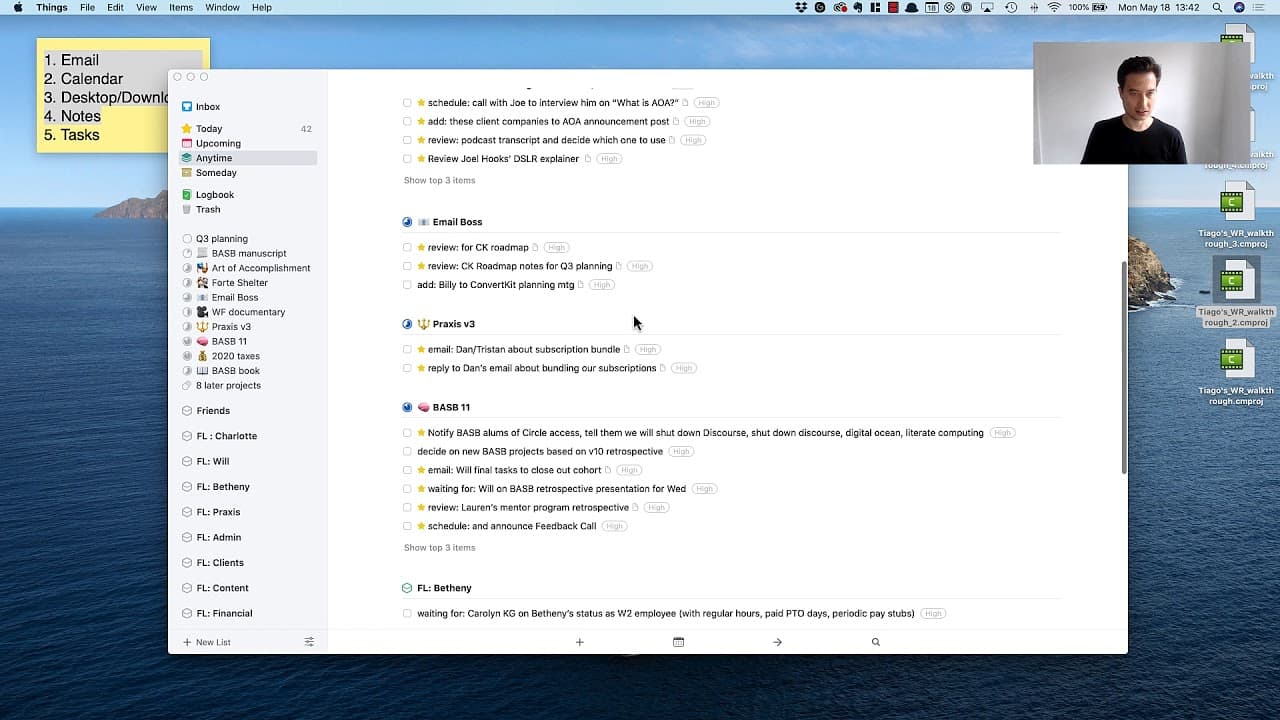
it's finally time for me to look at my task manager a task manager is simply a software program for your to deuce so we've been through the first four steps of my weekly review which you can see here in the in the sticky note and all of it has come down to this moment all of this processing and capturing and saving has been to sort of funnel everyt... Read More
Key Insights
- Priority begins before execution: The speaker does not treat a populated inbox as a signal to start completing whatever appears first. The list contains tasks of different sizes, effort levels, and deadlines, so it requires deliberate sorting before action. Priority, sequence, context, and appropriate completion timing are established while reviewing the inbox.
- Tasks complete an earlier funnel: The task manager appears only after four earlier weekly review steps involving processing, capturing, and saving. Those activities funnel varied inputs into the language of action. A task is therefore presented as the actionable result of earlier review work, rather than an isolated note added without context.
- OneTouch constrains review behavior: The OneTouch principle gives the inbox review a strict direction. The speaker begins at the top, considers one task at a time, does not skip entries, and does not move backward. The aim is to make a decision on each item while maintaining enough momentum to get through the formidable list quickly.
- Two choices reduce decision difficulty: The priority system deliberately contains only high and medium. The speaker found that using more than two priority levels makes each classification too difficult. The simplified distinction asks whether an item must happen during the current week or whether it can wait until after that week.
- Weekly recurrence enables deferral: A medium label is easier to assign because the speaker expects to conduct another weekly review within four, five, or six days. That recurring review provides confidence that postponed work will return for consideration. Medium therefore does not mean forgotten, it means the task does not need completion during the present week.
- Scheduled events determine urgency: The ConvertKit roadmap becomes high priority because a Thursday meeting will cover Q3 plans and an email marketing system upgrade. Potential Q3 projects also lead the speaker to create a dedicated Q3 Planning project. Both examples show that an upcoming meeting can determine priority and reveal a need for additional project structure.
- Deadlines anchor course decisions: Final tasks for closing the cohort are high because the cohort finishes on Wednesday. The retrospective is also high because it will be presented to students that Wednesday. These decisions connect priority to a stated completion or presentation date, while the tasks are organized within the relevant course project.
- Current focus can elevate tasks: Work related to the Art of Accomplishment receives high priority because moving that course forward is one of the speaker's current top priorities. Reviewing Joe's guest appearance, compiling a list of past clients, and working on a new DSLR setup are treated as part of that concentrated weekly effort.
- Future needs remain medium: The speaker marks a birthday present medium because the birthday is still two or three weeks away. Reading the Fast Company article mentioning the speaker is also medium because it is not urgent. These examples distinguish personal relevance or interest from a genuine requirement to act during the current week.
- Projects provide action context: Priority is only one part of processing. The ConvertKit roadmap goes into Email Boss, Joe-related course work goes into Art of Accomplishment, and mortgage and move-in tasks go into Home. This classification connects each task to the project or responsibility where its purpose can be understood.
- New structures emerge during review: When the speaker encounters potential projects for Q3, the amount of related work justifies creating a new Q3 Planning project. Inbox processing can therefore expose a cluster that needs its own container. The review is not limited to tagging existing tasks within a fixed organizational structure.
- Shortcuts accelerate repeated tagging: The speaker applies priority tags through keyboard shortcuts, using Command-1 for high and Command-2 for medium. This supports the repeated classification required by a long inbox. The shortcuts do not decide priority, but they make it faster to record each decision after its weekly timing has been evaluated.
Install to Summarize YouTube Videos and Get Transcripts
Explore YouTube Video Summarizer or Get YouTube Transcript Extractor
Questions & Answers
Q: How do I decide my priorities for the week?
Review each task and ask whether it must happen during the current week. Mark it high if it does, and medium if it can happen after the week. Use scheduled meetings, deadlines, presentations, closings, and current top priorities as evidence for the decision. Then place the task in its relevant project or area of responsibility so its context remains clear. The speaker can safely defer medium items because another weekly review will occur within four, five, or six days.
Q: What is the weekly priority system?
The system uses only two levels: high and medium. High means a task needs to happen this week, while medium means it can happen after this week. The speaker limits the system to two choices because additional levels make priority decisions too difficult. This clear timing distinction also helps prevent every task from receiving the same supposedly urgent label.
Q: Why should not every task be high priority?
If everything is labeled high, the label no longer distinguishes what truly must be done this week. The speaker explicitly notes that marking everything as priority completely misses the point. A task should receive high status only when its timing or connection to a current priority supports that choice. Less urgent work can remain medium because it will be reconsidered at the next weekly review.
Q: How is the task-manager inbox processed?
The speaker starts at the beginning of the inbox and processes one task at a time. Following the OneTouch principle, no items are skipped and the review does not move backward. For each task, the speaker decides its priority, considers the best completion time, and assigns an appropriate project or area. This method is used to move quickly through a formidable list without immediately diving into execution.
Q: What makes a task high priority?
A task is high when it needs to happen during the current week. The transcript supports this with concrete timing, including a Thursday Q3 planning meeting, a cohort finishing Wednesday, a Wednesday student presentation, and a mortgage closing that week. Tasks tied to the current Art of Accomplishment focus also become high. The reason is that delaying these items would conflict with an imminent commitment or an active weekly priority.
Q: What makes a task medium priority?
A task is medium when it can happen after the current week. Examples include buying a birthday present needed in two or three weeks, reading a nonurgent Fast Company article, trying YouTube Live, and fixing a PDF download problem. Reading a testimonial and reviewing Billy's landing-page advice are also placed at medium. The label preserves these tasks while allowing the week to focus on work with stronger timing requirements.
Q: How are tasks organized after prioritization?
Each task is moved into a project or an area of responsibility that matches its context. ConvertKit work goes into Email Boss, while course-development work can go into Art of Accomplishment or the relevant course project. Mortgage and move-in work belong in Home, and unrelated personal items can go into Personal Miscellaneous. This organization keeps the priority decision connected to the broader work or responsibility that explains the task.
Q: Which keyboard shortcuts apply priority tags?
The speaker uses Command-1 to apply a high-priority tag. Command-2 applies a medium-priority tag. These shortcuts are used while moving sequentially through the task-manager inbox. They support faster tagging, while the actual choice between high and medium still depends on whether the task must happen this week.
Summary & Key Takeaways
-
Turning captured items into action: After completing the first four weekly review steps, the speaker opens a task manager, described as software for to-dos. Processing, capturing, and saving have funneled everything into tasks, which represent the language of action. The inbox contains many new tasks by default, creating a formidable list with considerable variety. Some items are quick and easy, others are huge, and their timing ranges from immediate to days or weeks away.
-
Processing the inbox sequentially: Rather than beginning work immediately, the speaker first prioritizes, sequences, and contextualizes every inbox item. For each task, the central timing question is when it would be best completed. The review follows a OneTouch principle: start at the beginning, handle one item at a time, skip nothing, do not move backward, and move through the list quickly. This creates a consistent decision process for a mixed and potentially intimidating collection of work.
-
Using only two priorities: Each task receives either high or medium priority because more than two choices make the decision too difficult. High means the task needs to happen this week, while medium means it can happen after this week. The speaker warns against marking everything high because that defeats the purpose of prioritization. Confidence comes from knowing another weekly review will occur within four, five, or six days, when deferred tasks can be reconsidered.
-
Classifying time-sensitive commitments: Tasks connected to scheduled events or current deadlines receive high priority. Reviewing the ConvertKit roadmap supports a Thursday Q3 planning meeting, closing cohort tasks precede the Wednesday finish, and a retrospective will be presented to students on Wednesday. A mortgage document is high because the mortgage closes that week. Feedback for Joe, course work for Art of Accomplishment, a timely Seattle meetup group, and adding Billy to the ConvertKit meeting also qualify.
-
Deferring and organizing remaining work: Items without immediate timing pressure receive medium priority, including a birthday present needed in two or three weeks, reading a Fast Company article, trying YouTube Live, fixing a PDF download problem, reading a testimonial, and reviewing Billy's landing-page advice. Every item is also placed in a relevant project or area, such as Email Boss, Art of Accomplishment, Home, the course, the online school, or Personal Miscellaneous. Keyboard shortcuts apply the priority tags efficiently.
Read in Other Languages (beta)
Share This Summary 📚
Summarize YouTube Videos and Get Video Transcripts with 1-Click
Try YouTube Summary with ChatGPT & Claude or YouTube Transcript Generator
Explore More Summaries from Tiago Forte 📚



Summarize YouTube Videos and Get Video Transcripts with 1-Click
Try YouTube Summary with ChatGPT & Claude or YouTube Transcript Generator