Which Mac Apps Improve Everyday Productivity?
TL;DR
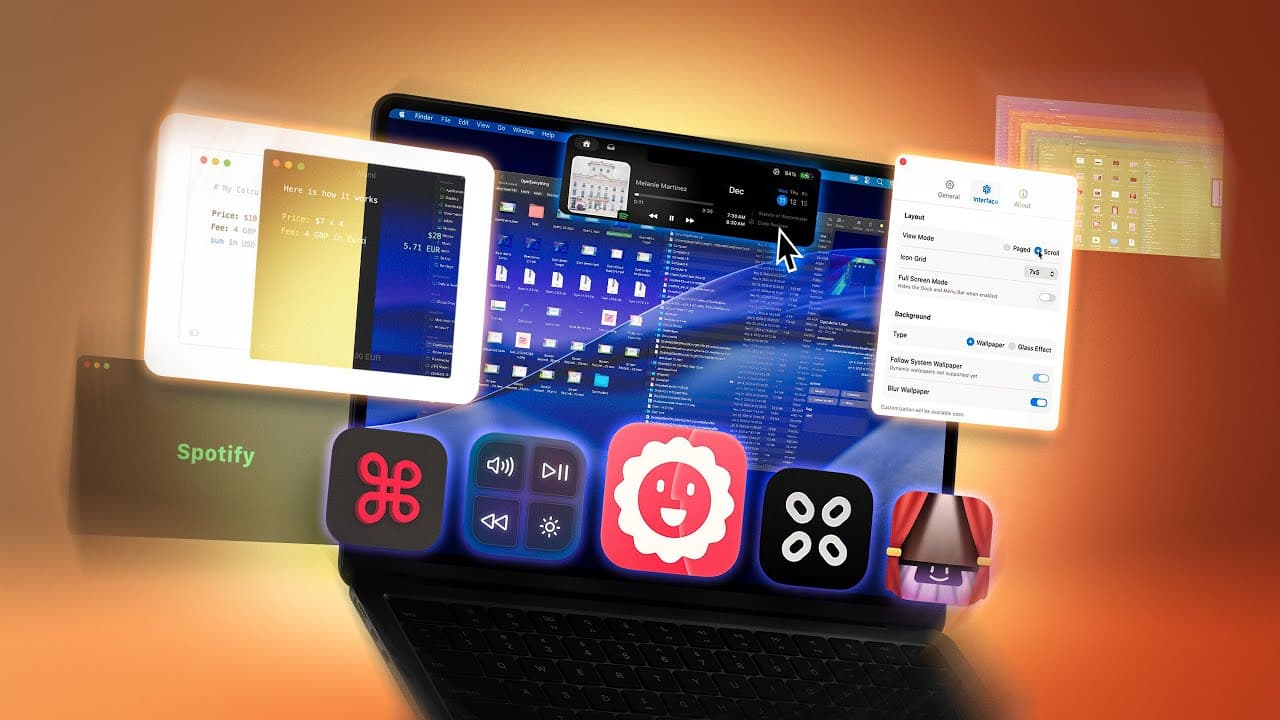
Bloom improves file management with multiple panels, saved workspaces, stronger folder search, archive previews, and a floating file portal. MediaMate modernizes volume and brightness controls, LaunchOS restores a Launchpad-style app browser, CCC Corners assigns apps to screen corners, and Moonlock adds real-time malware monitoring, system checks, network controls, and a VPN.
Transcript
I've already shared dozens of my favorite Mac applications with you here on the channel, but here are 11 more Mac applications that I wish I knew about sooner. Now, first up is Bloom. And this is a modern alternative to Finder, and it has a ton of customizability. And the very first thing that made me fall in love with this application is the fact ... Read More
Key Insights
- Bloom is a modern Finder alternative that can display multiple file paths in separate panels at the same time. These panel arrangements can be saved as workspaces, allowing frequently used folders to be grouped into configurations for work, leisure, or other recurring activities.
- Bloom's search is presented as more capable than Finder search because a user can enter a folder, search its contents, and progressively narrow results with additional terms. Command-F also provides direct searching while working within the application's folder view.
- Bloom can preview the contents of an archive without requiring the user to unzip it first. Its settings also cover appearance, fonts, date formats, column resizing, thumbnails, sound effects, volume checks during dragging, sidebar behavior, controls, workspaces, and restoration of the previous session.
- Bloom's Portal feature is a floating file window that stays above Safari or another application. It keeps selected files readily accessible, which is useful when the same files need to be dragged repeatedly or transferred into several locations during a task.
- MediaMate is a customizable replacement for macOS volume and brightness displays. It offers classic, circular, notch, and iOS presentation styles, plus controls for labels, numerical values, screen position, visibility duration, and a separate now-playing interface.
- LaunchOS is a Launchpad alternative designed for macOS 26 Tahoe. It displays installed applications in a searchable interface, supports scrolling or paged layouts, permits unwanted applications to be hidden, and can open through a hotkey or trackpad-related corner trigger.
- Moonlock is presented as a security application with manual malware scanning and continuous real-time monitoring. Detected threats can trigger an alert and be quarantined, while Network Inspector can block applications and websites from sending information to user-selected countries.
- CCC Corners is an application launcher controlled through the Mac's screen corners without requiring accessibility permissions. Each corner can open an assigned application, use its own modifier, and perform a second action such as hiding, minimizing, or quitting that application when activated again.
Install to Summarize YouTube Videos and Get Transcripts
Explore YouTube Video Summarizer or Get YouTube Transcript Extractor
Questions & Answers
Q: How does Bloom improve file management on a Mac?
Bloom improves file management by showing multiple file paths in separate panels, so folders such as Documents, Desktop, and an external SSD can remain visible together. Users can save these arrangements as workspaces for different activities. Bloom also provides folder search, progressive filtering, archive-content previews, session restoration, and extensive controls for its appearance and behavior.
Q: How do Bloom workspaces and Portal windows work?
Bloom workspaces save groups of panels and tabs so frequently accessed folders can be reopened as a prepared arrangement for work, leisure, or another activity. A Portal window serves a different purpose: it floats above other windows and keeps files accessible while another application is active, making repeated dragging and file transfers easier.
Q: How can Bloom search for files inside a folder?
Bloom lets a user navigate into a directory and enter a search term to display matching file names within that location. More terms can then be added to narrow the results further, as demonstrated with the terms “iPhone” and “online.” Command-F also opens a search field directly from the application's folder view.
Q: What can MediaMate change about Mac volume and brightness controls?
MediaMate replaces the ordinary volume and brightness displays with configurable interfaces. Available styles shown in the transcript include classic, circular, notch, and iOS. Users can move the display to different screen positions, hide labels or values, control how long it remains visible, and disable the separate now-playing feature if they only want hardware-control indicators.
Q: How does LaunchOS replace Launchpad in macOS 26 Tahoe?
LaunchOS creates a Launchpad-style view that displays applications in a fluid, searchable interface on macOS 26 Tahoe. It can use a continuous scrolling layout or a paged layout resembling the older Launchpad experience. Users can hide applications, customize the Dock icon, and activate LaunchOS with a hotkey or configured trackpad-related corner action.
Q: What security features does Moonlock provide for a Mac?
Moonlock provides a malware scanner that checks the Mac for threats, plus real-time protection that continuously monitors the system. When a threat is detected, the application can alert the user and quarantine it to prevent data theft or further spread. It also includes Network Inspector, system-protection recommendations, and a built-in VPN with selectable locations.
Q: How does CCC Corners launch Mac applications?
CCC Corners assigns applications to any of the Mac's four screen corners and activates them when the pointer reaches the configured corner. Individual corners can require modifiers, and a second activation can hide, minimize, or quit the associated application. Users can also change corner sensitivity, the menu-bar icon, and the icon's position.
Q: Which Mac apps are named in the provided description?
The description links Bloom, MediaMate, LaunchOS, CCC Corners, The Boring Notch, PBH Experiments, Updatest, Numi, Launchy, rcmd, and Music Decoy. Moonlock is also featured in the transcript as the partner application. The supplied transcript explains Bloom, MediaMate, LaunchOS, Moonlock, and CCC Corners, but it ends before detailing the remaining linked applications.
Summary & Key Takeaways
-
Bloom is presented as a customizable Finder alternative with simultaneous folder panels, reusable workspaces, refined search, archive previews, appearance controls, and session restoration. Its Portal feature creates a floating file window that remains above other applications, making repeatedly dragging or transferring files between locations more convenient during everyday work.
-
MediaMate replaces standard volume and brightness displays with configurable interfaces, including classic, circular, notch, and iOS styles. It can also create a now-playing notch on a notchless Mac. Users can change screen position, labels, displayed values, visibility duration, and whether the separate now-playing feature appears at all.
-
LaunchOS recreates a Launchpad-style application browser for macOS 26 Tahoe, while CCC Corners launches assigned applications through screen corners. Moonlock supplies malware scanning, continuous protection, quarantine, network inspection, system-setting recommendations, and a VPN. The description additionally links several other featured utilities, though their functions are not detailed in the provided transcript.
Read in Other Languages (beta)
Share This Summary 📚
Summarize YouTube Videos and Get Video Transcripts with 1-Click
Try YouTube Summary with ChatGPT & Claude or YouTube Transcript Generator
Explore More Summaries from Brandon Butch 📚

Summarize YouTube Videos and Get Video Transcripts with 1-Click
Try YouTube Summary with ChatGPT & Claude or YouTube Transcript Generator