How to Build a Local LLM App with Python
TL;DR
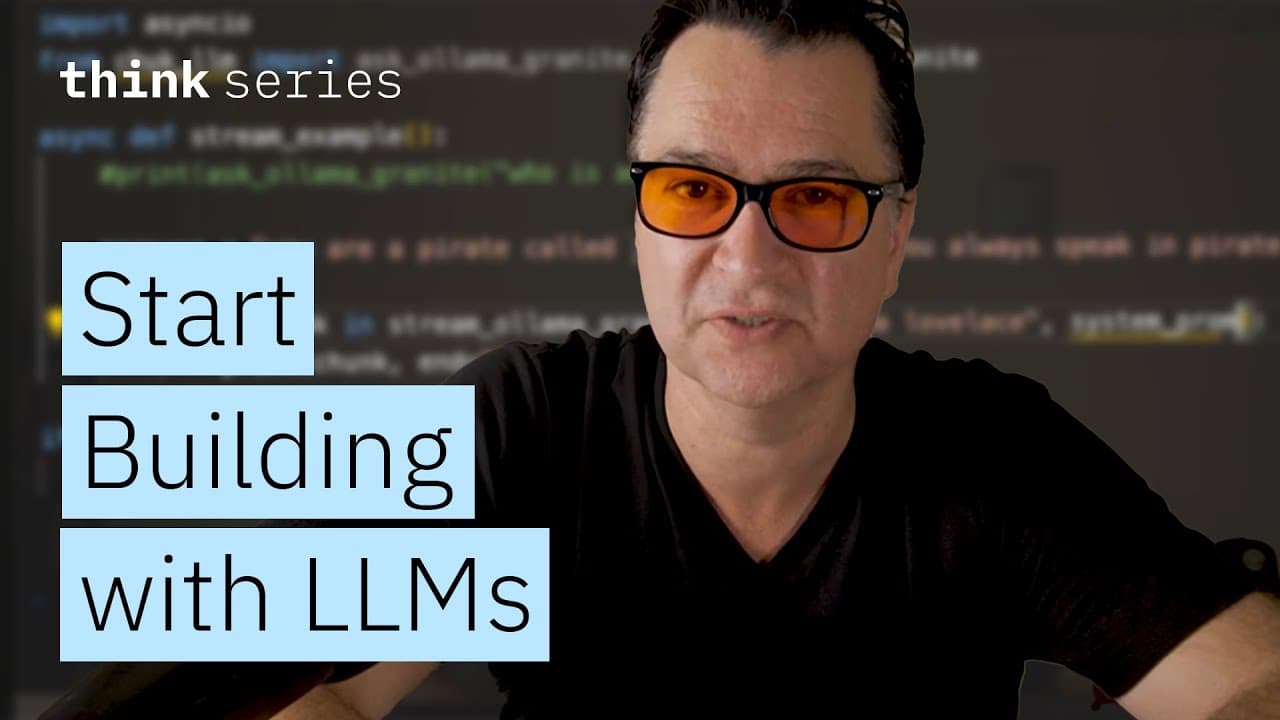
You can quickly set up a local large language model (LLM) application using Python and the Ollama tool. By downloading the Granite 3.3 model and using a simple library, you can interact with the model using just two lines of Python code. This setup allows for easy programming and customization of LLMs on your machine.
Transcript
So I was recently challenged by one of my colleagues on what is the quickest way to get someone started programing against a large language model. And I said, I think we could do it in two lines of code, and that is what we're going to do today. So this will work against any LLM provider. But for easiness sake, I want you to be able to run this loc... Read More
Key Insights
- Ollama is a tool that allows you to run large language models locally on your machine.
- The Granite 3.3 model can be downloaded and used with the Ollama tool for local LLM applications.
- A simple library facilitates programming against LLMs with minimal code, specifically two lines.
- The 'uv' package management tool is used to install necessary libraries for LLM programming.
- The 'ask_ollama_granite' function is generated at runtime to interact with the Granite model.
- Asynchronous programming is possible using the 'asyncio' library for streaming model responses.
- System prompts can be set to customize the model's persona during interactions.
- Multi-turn conversations are supported using a conversation function within the framework.
Install to Summarize YouTube Videos and Get Transcripts
Explore YouTube Video Summarizer or Get YouTube Transcript Extractor
Questions & Answers
Q: How to set up a local LLM app using Python?
To set up a local LLM app using Python, download the Ollama tool and the Granite 3.3 model. Install the 'uv' package management tool to manage libraries. Use the 'ask_ollama_granite' function to interact with the model. This setup allows efficient local programming with LLMs using just two lines of code.
Q: What is the role of the Ollama tool in LLM setup?
The Ollama tool is essential for running large language models locally on your machine. It allows you to download and manage models like Granite 3.3, facilitating local LLM applications. Ollama's library provides the necessary functions to interact with these models efficiently, making it a crucial component in setting up a local LLM environment.
Q: Why use asynchronous programming with LLMs?
Asynchronous programming is used with LLMs to efficiently handle streaming responses. By using the 'asyncio' library, you can manage token-by-token output from the model, allowing for a more interactive and responsive user experience. This method is particularly useful for applications requiring real-time data processing and interaction.
Q: How can you customize a model's persona?
A model's persona can be customized using system prompts. These prompts set specific instructions for the model, such as adopting a particular character or tone. System prompts take precedence over user prompts, allowing for consistent persona behavior throughout interactions, which is especially useful for applications requiring specific response styles.
Q: What are multi-turn conversations in LLMs?
Multi-turn conversations in LLMs refer to the ability to maintain context across multiple interactions. Using a conversation function, you can engage in back-and-forth dialogues with the model, where it remembers previous exchanges. This feature is essential for applications requiring coherent and context-aware interactions over extended sessions.
Q: How does the 'ask_ollama_granite' function work?
The 'ask_ollama_granite' function is generated at runtime to interact with the Granite model. It allows users to send queries to the model and receive responses. The function is part of a library that simplifies LLM programming, enabling efficient interaction with models using minimal code, specifically designed for ease of use in local applications.
Q: What is the significance of the 'uv' package management tool?
The 'uv' package management tool is significant for managing libraries and dependencies required for LLM programming. It simplifies the installation and management of necessary packages, ensuring a smooth setup process. By using 'uv', developers can quickly install and integrate libraries like 'chuk-llm', facilitating efficient local LLM application development.
Q: How to handle low-level API interactions with LLMs?
Handling low-level API interactions with LLMs involves using a client to create message structures and completions. This approach allows for detailed control over interactions, including setting roles and content for system and user prompts. While more complex, it provides flexibility for advanced applications, supporting multi-turn conversations and persona settings.
Summary & Key Takeaways
-
The video demonstrates how to set up a local LLM application using Python and the Ollama tool. By downloading the Granite 3.3 model and using a simple library, you can interact with the model using just two lines of code. The process involves installing necessary tools and libraries, allowing for efficient LLM programming.
-
Asynchronous programming is highlighted as a method to handle streaming responses from the model. The video also explains how to customize the model's persona using system prompts and supports multi-turn conversations. This setup provides a straightforward approach to working with LLMs on a local machine.
-
The video provides a comprehensive guide to setting up and interacting with LLMs locally using Python. Key elements include downloading models, using a simple library for programming, and customizing interactions. The video emphasizes the ease and speed of setting up a functional LLM environment with minimal code.
Read in Other Languages (beta)
Share This Summary 📚
Summarize YouTube Videos and Get Video Transcripts with 1-Click
Try YouTube Summary with ChatGPT & Claude or YouTube Transcript Generator
Explore More Summaries from IBM Technology 📚
Summarize YouTube Videos and Get Video Transcripts with 1-Click
Try YouTube Summary with ChatGPT & Claude or YouTube Transcript Generator