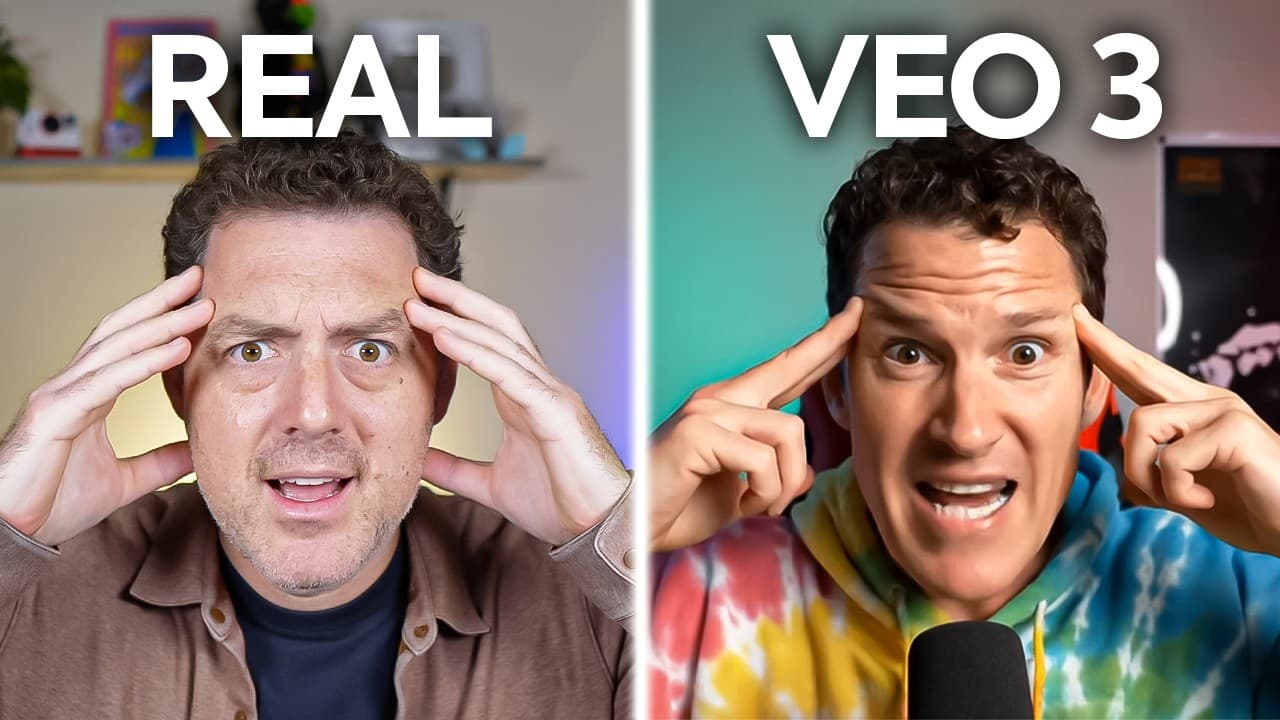
How to test VO3 AI video generation capabilities
TL;DR
VO3 can generate surprisingly convincing AI driven video scenes, but prompts may not always align perfectly with expected visuals. The creator experiments with street interviews, train collisions, Rubik’s cubes, and movie style scenes, then showcases a Hostinger Horizons no code deployment workflow and highlights ongoing quality gaps in AI generation.
Transcript
VO3 is here and it's shocked the entire industry. Uh, Alex, what was that? It's nothing. Don't worry about it. Are you trying to replace me with AI? What? No, I'm just trying something new. Just do the normal intro. It It's fine. All right. V3 just dropped and I'm going to show you so many incredible examples of V3 in action. Let's get into it. Oh,... Read More
Key Insights
- VO3 can create hyperrealistic interviews with AI generated voices that resemble real people.
- Prompt prompts may not always produce the exact scene described, requiring multiple generations and edits.
- Audio quality in VO3 outputs can be strong even when visuals diverge from prompts.
- VO3 struggles with perfectly aligned action sequences, such as trains colliding on the same track.
- The Rubik’s Cube prompt generates good movement sound and cube details even when color accuracy fails.
- Visual realism can improve with iterative prompting, but some elements like hands or moving parts may look off.
- VO3 demos cover a wide range of styles from sci-fi to retro to documentary, showing flexible scene synthesis.
- Hostinger Horizons offers a no code path to deploy generated ideas into a live web app, emphasizing quick iteration and deployment.
- More videos from this channel:
- More from this channel: Matthew Berman
Install to Summarize YouTube Videos and Get Transcripts
Explore YouTube Video Summarizer or Get YouTube Transcript Extractor
Questions & Answers
Q: A real search query question about the video (e.g. 'How to...', 'What is...', 'Why does...', 'When should...'). Question 1
What is VO3 capable of producing in AI driven video generation and where do its strengths and weaknesses lie? VO3 demonstrates hyperrealistic street interview scenes with AI generated dialogue and voices, showing strong audio fidelity in several clips. Its strengths include detailed visuals and realistic sound design, while its weaknesses appear when the prompts do not perfectly align with the intended scene, leading to mismatches in motion, timing, and object placement.
Q: Question 2
How does prompt detail affect VO3 output and what examples from the video illustrate this? The video shows attempts with two trains heading toward each other, where the initial prompts produce separate explosions instead of a coordinated collision. After refining prompts, the results vary, with some outputs closer to the intended action while others still miss the mark. This demonstrates that prompt clarity and iteration significantly influence result quality.
Q: Question 3
Why do some VR like scenes in VO3 fail to move as expected and how is this addressed? In the Rubik’s Cube sequence, the model delivers good visual texture and movement sounds but fails to show correct cube rotation or color arrangement, indicating that while assets look convincing, the mechanical accuracy of object manipulation can lag behind. Iteration helps but may not fully resolve it.
Q: Question 4
What role does audio play in VO3 generated videos according to the video and what are its limits? The presenter notes that audio is surprisingly strong in several VO3 outputs, enhancing the sense of realism even when visuals aren’t perfectly matched to prompts. However, some sequences still struggle with sound effects, affecting the overall immersion.
Q: Question 5
What is Hostinger Horizons and how is it presented in the video? Hostinger Horizons is described as an easy way to launch full applications with no code, where AI generates a web app from a prompt and allows one click deployment. The video uses it to illustrate rapid idea to production workflows with a promotional code offered for discounts.
Q: Question 6
How does the video portray the difference between VO3 generations across versions V2 and V3? The video makes direct comparisons by showing the same prompts rendered by V2 and V3, with V3 generally delivering better detail and sound, while still showing inconsistencies such as mismatched motion or awkward hand movements, highlighting ongoing improvements.
Q: Question 7
What kinds of scenes are used to test VO3 in the video and what do they reveal about capabilities? Scenes include street interviews, explosions, Rubik’s cube solving, retro sci-fi vibes, and Jurassic Park like sequences. These tests reveal VO3’s versatility across genres while also exposing limitations in physics, timing, and object interactions.
Q: Question 8
What is the overall takeaway about using VO3 for video production according to the video creator? The takeaways emphasize that VO3 can generate compelling visuals and soundscapes quickly, making it a powerful tool for rapid experimentation. However, prompts require careful iteration, and certain details may not align perfectly, necessitating ongoing refinement.
Summary & Key Takeaways
-
A broad exploration of VO3 in action shows mixed results across prompts, with strong audio and visual detail in some clips and noticeable mismatches in others. The video also demonstrates how to deploy an idea to a real web app with Hostinger Horizons, emphasizing rapid, no code production.
-
The creator experiments with different prompts such as street interviews and action sequences to test VO3 limits, noting alignment issues between prompts and generated outputs while praising specific strengths like audio fidelity and scene composition.
-
The video ends with practical notes on using VO3 for rapid video production, combined with a sponsored plug for Hostinger Horizons, and a call to action to try the platform for building AI-driven projects.
Read in Other Languages (beta)
Share This Summary 📚
Summarize YouTube Videos and Get Video Transcripts with 1-Click
Try YouTube Summary with ChatGPT & Claude or YouTube Transcript Generator
Explore More Summaries from Matthew Berman 📚





Summarize YouTube Videos and Get Video Transcripts with 1-Click
Try YouTube Summary with ChatGPT & Claude or YouTube Transcript Generator