Products
Features
YouTube Video Summarizer
Summarize YouTube videos
Web & PDF Highlighter
Highlight web pages & PDFs
Chat with PDF
Ask any PDF questions with AI
Ask AI Clone
Chat with your highlights & memories
Audio Transcriber
Transcribe audio files to text
Glasp Reader
Read and highlight articles
Kindle Highlight Export
Export your Kindle highlights
Idea Hatch
Hatch ideas from your highlights
Integrations
Obsidian Plugin
Notion Integration
Pocket Integration
Instapaper Integration
Medium Integration
Readwise Integration
Snipd Integration
Hypothesis Integration
Apps & Extensions
Chrome Extension
Safari Extension
Edge Add-ons
Firefox Add-ons
iOS App
Android App
Discover
Discover
Ideas
Discover new ideas and insights
Articles
Curated articles and insights
Books
Book recommendations by great minds
Posts
Essays and notes from readers
Quotes
Inspiring quotes collection
Videos
Curated videos and summaries
Explore Glasp
Glasp Newsletter
Weekly insights and updates
Glasp Talk
Interview series with great minds
Glasp Blog
Latest news and articles
Glasp Use Cases
Learn how others use Glasp
Build & Support
Glasp API
Access Glasp's API for developers
MCP Connector
Connect Glasp to Claude & ChatGPT
Community
Glasp Reddit Community
Students
Student discount and benefits
FAQs
Frequently Asked Questions
AboutPricing
DashboardLog inSign up

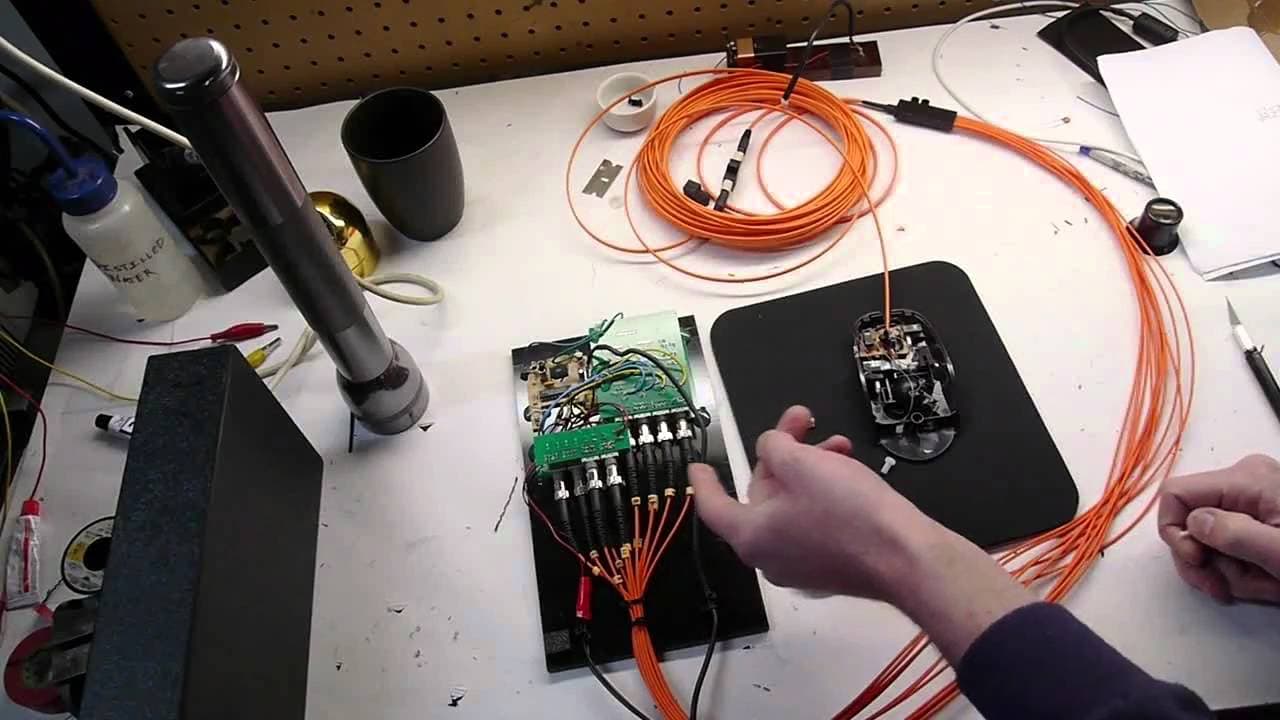
Fiberoptic mouse with quadrature encoders and custom shutter buttons
19.7K views
•
April 14, 2011
by
Applied Science
YouTube video player
Fiberoptic mouse with quadrature encoders and custom shutter buttons

TL;DR

This project showcases a fiber-optic mouse that uses quadrature method to sense movement and has added buttons that block light to indicate clicks.

Transcript

hey guys then here this is a fiber-optic mouse that is similar to another project that I showed on YouTube the fiber-optic joystick so it's a standard computer mouse that does not contain any electronics or any wire at all actually all of these are fiber optics and it senses the direction through a quadrature method and uses the existing encoder wh... Read More

Key Insights

  • 🖱️ Fiber-optic technology can be used to create computer peripherals like mouse and joystick without traditional electronics or wires.
  • 👻 Quadrature method allows for precise sensing of movement direction and speed.
  • 💿 Telecommunications fiber optics can be repurposed for connecting the fiber-optic mouse to a receiver.

Install to Summarize YouTube Videos and Get Transcripts

Explore YouTube Video Summarizer or Get YouTube Transcript Extractor

Questions & Answers

Q: How does the fiber-optic mouse sense movement?

The fiber-optic mouse uses a quadrature method, which involves optical channels and encoder wheels. By sensing which phase leads the other, the direction and speed of each axis can be determined.

Q: How is the fiber-optic mouse connected to the receiver?

The mouse is connected to the receiver using telecommunications fiber optics. Standard ST fiber optic connectors are used, with the ceramic ferrule removed to mount the fiber optics in the mouse.

Q: What components are used on the receiver side?

On the receiver side, Vago HF be our series transmitters and receivers are used. The transmitters provide a steady source of light, while the receivers are wired to a microcontroller for quadrature decoding.

Q: How are the buttons added to the fiber-optic mouse?

The buttons are existing mouse buttons from the original mouse. The fiber optics are mounted in the button body, and a shutter is added to block light when the button is actuated, indicating a click.

Summary & Key Takeaways

  • The fiber-optic mouse is made entirely of fiber optics, with no electronics or wires.

  • It uses a quadrature method with optical channels and encoder wheels to sense movement.

  • The mouse is connected to a receiver using telecommunications fiber optics, and has added buttons with light-blocking shutters for clicking.


Read in Other Languages (beta)

English

Share This Summary 📚

Summarize YouTube Videos and Get Video Transcripts with 1-Click

Download browser extensions on:

Try YouTube Summary with ChatGPT & Claude or YouTube Transcript Generator

Explore More Summaries from Applied Science 📚
Engineering magnetics -- practical introduction to BH curve thumbnail
Engineering magnetics -- practical introduction to BH curve
Applied Science
Product Review: Grizzly 4003G metal gunsmith lathe thumbnail
Product Review: Grizzly 4003G metal gunsmith lathe
Applied Science
Cleaning a high-vacuum Penning gauge (cold cathode vacuum gauge) thumbnail
Cleaning a high-vacuum Penning gauge (cold cathode vacuum gauge)
Applied Science
Photosynthesis photography: Making images with living plant leaves thumbnail
Photosynthesis photography: Making images with living plant leaves
Applied Science
Olestra (zero calorie cooking oil) - chemical synthesis and taste test thumbnail
Olestra (zero calorie cooking oil) - chemical synthesis and taste test
Applied Science
Thermocouple vacuum gauge teardown and explanation thumbnail
Thermocouple vacuum gauge teardown and explanation
Applied Science

Summarize YouTube Videos and Get Video Transcripts with 1-Click

Download browser extensions on:

Try YouTube Summary with ChatGPT & Claude or YouTube Transcript Generator

Apps & Extensions

  • Chrome Extension
  • Safari Extension
  • Edge Add-ons
  • Firefox Add-ons
  • iOS App
  • Android App

Key Features

  • YouTube Video Summarizer
  • Web & PDF Summarizer
  • Web & PDF Highlighter
  • Chat with PDF
  • Ask AI Clone
  • Audio Transcriber
  • Glasp Reader
  • Kindle Highlight Export
  • Idea Hatch

Integrations

  • Obsidian Plugin
  • Notion Integration
  • Pocket Integration
  • Instapaper Integration
  • Medium Integration
  • Readwise Integration
  • Snipd Integration
  • Hypothesis Integration

More Features

  • APIs
  • MCP Connector
  • Blog & Post
  • Embed Links
  • Image Highlight
  • Personality Test
  • Quote Shots

Company

  • About us
  • Blog
  • Community
  • FAQs
  • Job Board
  • Newsletter
  • Pricing
Terms

•

Privacy

•

Guidelines

© 2026 Glasp Inc. All rights reserved.