How Does n8n's Think Tool Improve AI Agent Reasoning?
TL;DR
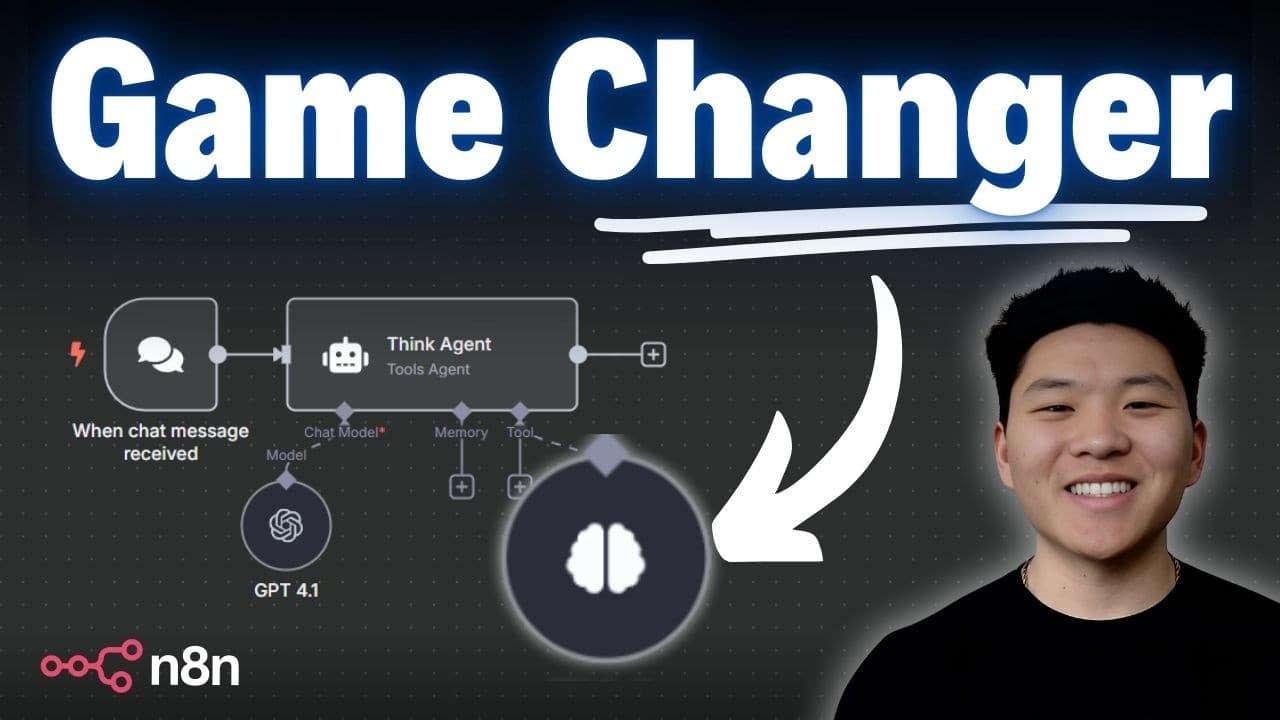
The Think tool, released in n8n version 1.88, gives an AI agent a scratchpad to write down and reflect on its thoughts during long chains of tool calls. Based on Anthropic's Think tool article, it effectively turns non-reasoning models like GPT 4.1 into reasoning models. Anthropic found the best performance comes from pairing the Think tool with an optimized prompt.
Transcript
All right, so here is our beautiful ultimate assistant with the new GPT 4.1 chat model as well as the new think tool. All right, can you please create an event for tonight 7 p.m. It will be an hour long with Dexter Morgan. And can you send him an email to make sure that time works? Can you delete my dinner at 6 p.m. And then can you email Michael S... Read More
Key Insights
- The Think tool is a designated space, like a notepad, where an agent writes down its thoughts and actions to verify it did everything the user asked before finishing. It works like scratch paper for reasoning through complex, multi-step tasks.
- The Think tool was released in n8n version 1.88, so users who do not see it likely need to update their instance. It was inspired directly by Anthropic's engineering article on the Claude Think tool.
- Pairing a non-reasoning model like GPT 4.1 with the Think tool effectively turns it into a reasoning model, giving it the ability to write down thoughts and reflect on them before producing a final answer, similar to how reasoning models think out loud.
- The Think tool differs from extended thinking: extended thinking happens before Claude starts generating a response, while the Think tool lets an agent think in the middle of or after processing tool outputs about what it needs to do next.
- In the demo, the assistant used the Think tool as a final check, confirming all requested actions like scheduling a 7 p.m. meeting, emailing attendees, and deleting a dinner were completed with no further steps needed.
- The Think tool enables self-correction. In the booking demo, the agent noticed a quote tool returned no quote, wrote in the Think tool that it needed to retry with correct details, and re-called the tool instead of giving up.
- Anthropic's testing showed the best performance was achieved by pairing the Think tool with an optimized prompt about how to use it, outperforming baseline, think-alone, and extended-thinking configurations on Claude 3.7.
- Anthropic lists three scenarios for using the Think tool: tool output analysis, policy-heavy requirements, and sequential decision-making. It should not be used for nonsequential tasks, where adding it is overengineering that can hurt performance.
Install to Summarize YouTube Videos and Get Transcripts
Explore YouTube Video Summarizer or Get YouTube Transcript Extractor
Questions & Answers
Q: What is the n8n Think tool?
The Think tool is a native n8n tool that acts like a notepad or scratchpad for an AI agent to write down its thoughts while solving problems and calling other tools. It gives the agent a designated space to reason through complex tasks, reflect on tool outputs, and confirm it completed everything the user requested. It was inspired by Anthropic's engineering article on the Claude Think tool and lets agents include an additional thinking step as part of reaching their final answer.
Q: What n8n version do I need for the Think tool?
The Think tool was released in n8n version 1.88. If you do not see the Think tool in your instance, you probably need to update n8n to at least version 1.88 to access it. The video demonstrates it as a native node that can be added to an agent alongside its other tools, appearing in the agent's logs whenever the agent decides to write down and reflect on its thoughts.
Q: How does the Think tool turn GPT 4.1 into a reasoning model?
GPT 4.1 is not natively a reasoning model, but the Think tool gives it the ability to write down its thoughts and reflect upon them, essentially turning almost any model into a reasoning model. Just as reasoning models think out loud and use that to reason toward the best answer, an agent with the Think tool can pause mid-task, write down what it observed and what it needs to do next, and use those written notes to decide its following actions.
Q: What is the difference between the Think tool and extended thinking?
Extended thinking is about what Claude does before it starts generating a response. The Think tool is a different concept: it gives the agent the ability to think after it has processed different tool outputs, or in the middle of a series of tool calls, about what it needs to do next. This makes the Think tool particularly helpful when performing long chains of tool calls or during long multi-step conversations with the user.
Q: When should you use the Think tool?
According to Anthropic's article referenced in the video, there are three scenarios for using the Think tool: tool output analysis, policy-heavy requirements, and sequential decision-making. These situations benefit from the agent pausing to reason through outputs or rules before acting. The video also notes that Anthropic's testing found the best performance came from pairing the Think tool with an optimized prompt about how to use it.
Q: When should you not use the Think tool?
The Think tool should not be used for nonsequential tasks. The video stresses that in a fast-moving AI space with new models, tools, and frameworks constantly dropping, people tend to get caught in the hype and shove every new tool into everything. A lot of the time that hurts performance and is just overengineering, so the Think tool should be reserved for the scenarios where structured reasoning genuinely helps rather than added everywhere by default.
Q: How does the Think tool help an agent self-correct?
In the booking demo, the agent called an availability tool that confirmed dates were open, then called a quote tool that returned no quote. The agent used the Think tool to write down that availability was confirmed but the quote was not provided, and that it needed to retry the quote request with the correct guests and dates. It retried the tool, and once the quote tool was fixed, it successfully retrieved the quote and confirmed the total cost.
Q: How can you see what an agent did with the Think tool?
You can click into the agent and view its logs, which are read from top to bottom and show exactly how it thought about what it needed to do and what actions it took. The logs display the sequence of memory checks, chat model calls, and tool calls, including each time the agent used the Think tool. In the demo, the log showed the assistant checking memory, reading its system prompt, calling contact, calendar, and email agents, then using the Think tool to confirm all actions were completed.
Summary & Key Takeaways
-
The video demonstrates n8n's new Think tool, released in version 1.88, using an ultimate assistant powered by GPT 4.1. The assistant schedules a 7 p.m. meeting with Dexter Morgan, emails him and Michael Scott, and deletes a 6 p.m. dinner, then uses the Think tool to confirm all actions were completed.
-
The Think tool acts as a scratchpad where the agent writes down its thoughts to reason through problems and verify alignment with the user's request. In a booking demo, the agent detected that a quote tool returned no quote, used the Think tool to decide to retry, and self-corrected once the tool was fixed.
-
Based on Anthropic's Think tool article, the tool adds a thinking step distinct from extended thinking, helping during long chains of tool calls or multi-step conversations. Anthropic recommends pairing it with an optimized prompt and using it for tool output analysis, policy-heavy requirements, and sequential decisions, but not for nonsequential tasks.
Read in Other Languages (beta)
Share This Summary 📚
Summarize YouTube Videos and Get Video Transcripts with 1-Click
Try YouTube Summary with ChatGPT & Claude or YouTube Transcript Generator
Explore More Summaries from Nate Herk | AI Automation 📚


Summarize YouTube Videos and Get Video Transcripts with 1-Click
Try YouTube Summary with ChatGPT & Claude or YouTube Transcript Generator