How to Use Plan Mode for Better AI Coding
TL;DR
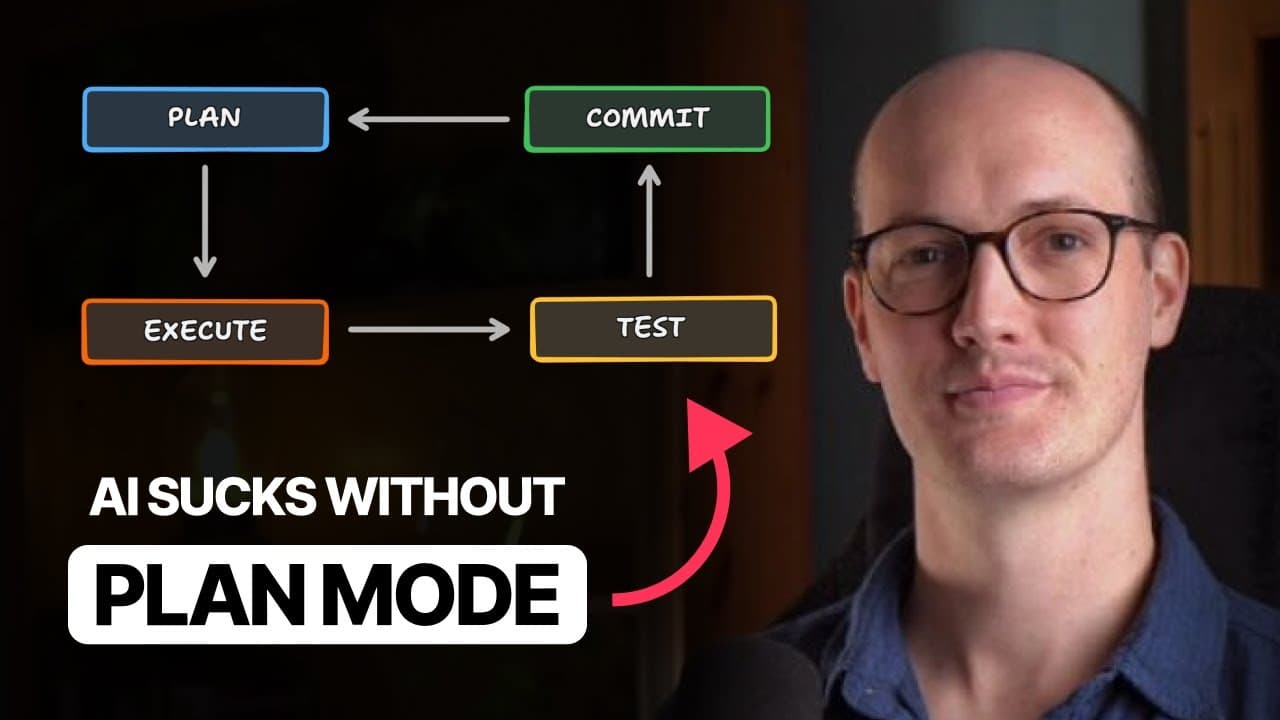
Use plan mode before every AI-generated code change so the agent can inspect the repository, identify relevant patterns, and clarify requirements before writing files. Follow a repeatable loop of planning, execution, testing, and committing, while keeping plans concise and requiring a final list of unresolved questions that must be answered.
Transcript
My interest in AI coding started when I tried plan mode. Before I tried plan mode, I was a total AI skeptic. I thought there's no way that AI can write decent code. Certainly not at the speed that I can. There's no way that AI can understand my codebase as well as I can. And there's no way that AI can mimic the instincts that I've built up over a l... Read More
Key Insights
- Plan mode is a read-first workflow that disables file-writing functionality while an AI agent explores the codebase and creates an implementation plan. Attempts to modify files should fail until the developer approves the plan and moves the agent into an execution mode.
- The core AI coding loop is planning, execution, testing, and committing. The developer first refines a plan with the agent, asks it to write the planned code, validates the result with unit tests, type checking, or manual quality assurance, and then begins the next change.
- Repository exploration is essential because an AI agent does not retain everything learned about a project across separate tasks. Planning fills its context with relevant files, existing patterns, schemas, and dependencies before it decides how the requested change should be implemented.
- Cheap and fast models can perform broad codebase exploration for a more expensive parent agent. In the demonstrated workflow, Claude Code used Haiku 4.5 in an exploration subagent, which examined many files and returned a summary that guided the parent agent's deeper investigation.
- Iterative planning acts like rubber ducking for the developer. Discussing a feature, refactor, or interface adjustment with the agent helps reveal unclear requirements, compare possible approaches, and identify ramifications that may not have been apparent when the initial request was dictated or written.
- Clarifying questions are a necessary part of a dependable plan. In the database bug example, the agent asked whether new repositories should use v1.0 as the initial version name because that requirement was missing from the original short description.
- Plans can be restarted when implementation reveals a separate concern. After discovering that sections still carried an old repository ID, the developer returned to plan mode, allowed further exploration, and expanded the work into a distinct refactor based on repository version IDs.
- Concise planning rules make detailed plans practical to review. The instruction to make plans extremely concise and sacrifice grammar reduced plans from roughly 2,000 words to about 400 words, while a required unresolved-questions list encouraged the agent to surface remaining uncertainty.
Install to Summarize YouTube Videos and Get Transcripts
Explore YouTube Video Summarizer or Get YouTube Transcript Extractor
Questions & Answers
Q: What is plan mode in an AI coding assistant?
Plan mode is a restricted operating mode in which the AI coding agent cannot write to the file system. Instead, it reads relevant files, searches the repository, consults documentation or other available information, and prepares a detailed implementation plan. The restriction forces investigation to happen before modification, and writing begins only after the developer approves the plan and switches modes.
Q: Why does plan mode improve AI-generated code?
Plan mode improves AI-generated code by loading the agent's context with information that is relevant to the requested change. The agent can inspect existing code patterns, schemas, dependencies, and related implementations before proposing modifications. Without that investigation, it may lack important context, use patterns that the repository does not follow, or make avoidable mistakes based on incomplete information.
Q: How should developers use the plan, execute, test, and commit loop?
Developers should begin each change by entering plan mode and refining an implementation plan with the AI. After approving the plan, they should let the agent write the specified code. The developer and agent should then validate the result through unit tests, type checking, or manual quality assurance. Once the change is satisfactory, they commit it and start planning the next task.
Q: How does planning help developers clarify requirements?
Planning gives developers a structured way to talk through what they want before code is written. A feature, refactor, or interface change may contain hidden decisions or consequences that are not obvious in the initial request. Iterating with the AI exposes those gaps, allows possible approaches to be considered, and gives both parties a clearer shared definition of the desired result.
Q: What should an AI coding plan contain?
An AI coding plan should identify the relevant parts of the codebase, describe the required changes at a useful high level, and reflect the repository's existing patterns. It should also include decisions discovered during discussion and finish with a list of unresolved questions, if any. That final list gives the developer a clear opportunity to resolve uncertainty before implementation begins.
Q: How can AI coding plans be made easier to read?
AI coding plans can be made easier to read by explicitly instructing the agent to make them extremely concise and to sacrifice grammar for concision. In the described workflow, this instruction reduced plans from about 2,000 words to about 400 words. The shorter format preserved a detailed high-level overview while making it possible to scan quickly for questionable assumptions or incorrect changes.
Q: When should a developer return to plan mode during implementation?
A developer should return to plan mode when implementation exposes a concern that was not covered by the approved plan, especially when it represents a separate refactor or changes the original design. In the example, discovering an obsolete repository ID on sections prompted more exploration and a revised plan centered on repository version IDs and resolving dependencies through them.
Q: How can saved AI coding plans support team collaboration?
Saved plans can be placed in GitHub issues so teammates can comment on them and work toward a shared solution, similar to a request-for-comment proposal. They can also be included with GitHub pull requests so reviewers understand the intended approach behind the code. This preserves the reasoning and agreed direction that existed before implementation started.
Summary & Key Takeaways
-
Plan mode prevents an AI coding agent from writing files while it investigates the repository and prepares a detailed implementation plan. This exploration loads relevant code, schemas, conventions, and dependencies into context, reducing the risk that the agent will invent patterns or make changes without understanding how the existing system works.
-
Planning also helps developers determine what they actually want before implementation begins. An iterative conversation exposes missing requirements, competing approaches, and unexpected consequences. Once the developer and agent agree on a dependable plan, the agent can execute with greater autonomy, followed by unit tests, type checking, or manual quality assurance.
-
The recommended workflow repeats four stages: plan the change, execute the approved plan, test the result, and commit the code. Plans should be extremely concise, even if that requires sacrificing grammar, and should end with unresolved questions. Saved plans can also support discussion through GitHub issues or explain implementation intent during pull request review.
Read in Other Languages (beta)
Share This Summary 📚
Summarize YouTube Videos and Get Video Transcripts with 1-Click
Try YouTube Summary with ChatGPT & Claude or YouTube Transcript Generator
Explore More Summaries from Matt Pocock 📚




Summarize YouTube Videos and Get Video Transcripts with 1-Click
Try YouTube Summary with ChatGPT & Claude or YouTube Transcript Generator