How to Plan Large Projects With AI Agents
TL;DR
Wayfinder plans large, uncertain projects by mapping decisions and coordinating research, prototypes, discussions, and tasks across multiple agent sessions. It stores the evolving map in an issue tracker, tracks blocked and currently actionable tickets, and updates parent maps as decisions are resolved, allowing ambitious work to progress beyond a single context window.
Transcript
I think I figured out a way to plan any size of work with an agent. The existing planning tools that I was using and playing around with, even ones that I've created, felt too constrained, too tied to a single session. I felt like I wasn't able to be ambitious enough. And because of that, I was kind of constraining the stuff I was building to fit A... Read More
Key Insights
- Wayfinder is a planning skill designed to coordinate large projects across multiple agent sessions. It removes the constraint of fitting an entire planning process into one session or the most effective portion of an agent’s context window.
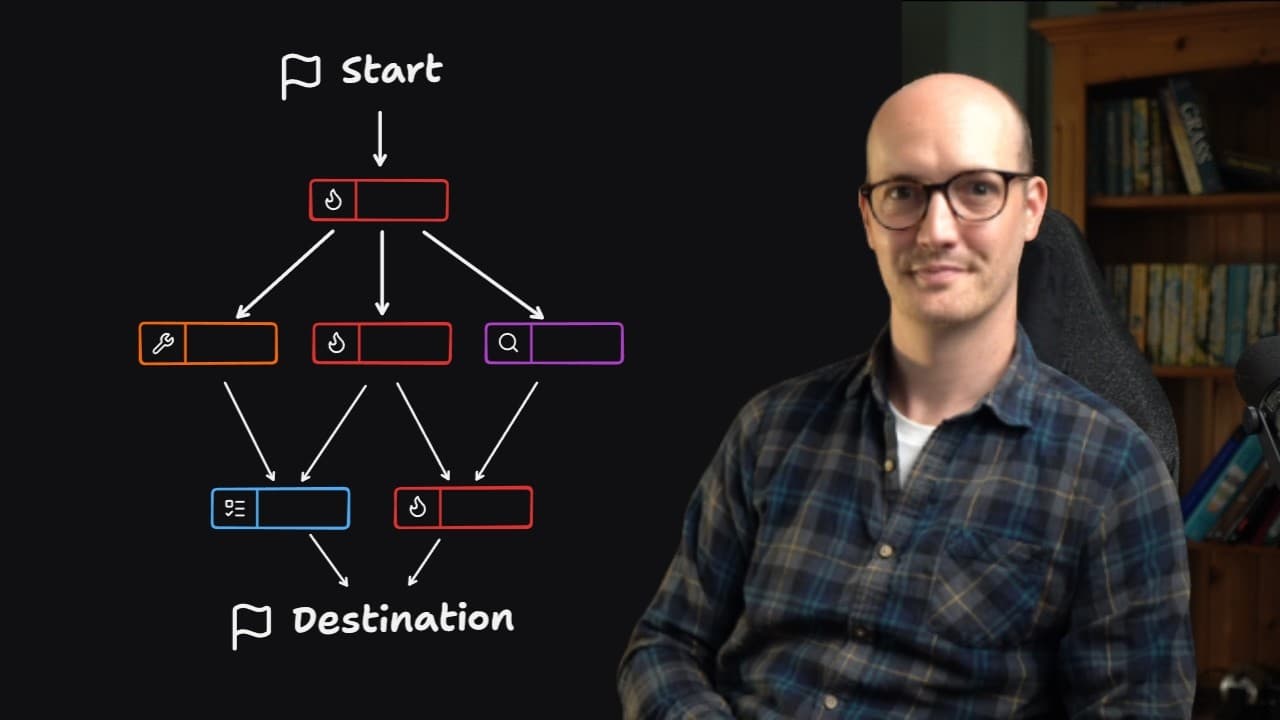
- A Wayfinder map represents the path from a vague starting point to a defined destination. Because the intermediate path is initially uncertain, the map evolves as research, prototypes, discussions, and tasks produce enough information for additional decisions.
- The frontier is the set of tickets that can be addressed with currently available information. Fog represents unresolved areas where a decision cannot yet be made because necessary research, prototyping, discussion, or prerequisite work remains incomplete.
- Each decision ticket receives its own agent session. Users first invoke Wayfinder to establish the destination and chart the map, then open separate sessions and invoke Wayfinder with a specific ticket URL to resolve each actionable item.
- Wayfinder uses four ticket types: research, prototype, grilling, and task. These cover information gathering, tangible experiments, focused discussions, and work that must be completed either by the agent or through action in the real world.
- Prototypes reduce the risk of excessive low-fidelity planning by providing high-fidelity feedback about what is actually being designed. Wayfinder encourages repeated prototyping so that plans can respond to concrete results instead of relying entirely on upfront assumptions.
- Blocking relationships capture the order in which dependent decisions must be resolved. Finishing one ticket may unlock existing tickets, expose new work, or require earlier decisions to be revisited based on what a prototype, skill, or research result reveals.
- The issue tracker is the persistent record for the Wayfinder process. Resolutions from subtasks are written back to the parent map, preserving decisions, prototypes, completed tasks, dependencies, and the evolving frontier across sessions.
Install to Summarize YouTube Videos and Get Transcripts
Explore YouTube Video Summarizer or Get YouTube Transcript Extractor
Questions & Answers
Q: What is Wayfinder for AI project planning?
Wayfinder is a skill for planning large, uncertain projects across multiple AI agent sessions. It converts a vague path toward a desired destination into a persistent map of tickets. The skill coordinates research, prototypes, focused discussions, and tasks while tracking which decisions are actionable, which remain blocked, and what work has already been completed.
Q: How does Wayfinder plan work across multiple agent sessions?
Wayfinder creates a map whose individual tickets are handled in separate agent sessions. The user first invokes the skill with a description of the desired outcome so it can explore the project, ask initial questions, and create tickets. The user then starts new sessions and invokes Wayfinder with each specific ticket URL, gradually resolving the map.
Q: What are the four Wayfinder ticket types?
Wayfinder uses research, prototype, grilling, and task tickets. Research tickets gather missing information, often through a sub-agent. Prototype tickets create concrete versions of ideas for feedback. Grilling tickets support focused discussion about requirements or implementation details. Task tickets represent work that must be performed, including real-world actions the agent cannot complete independently.
Q: What do frontier and fog mean in a Wayfinder map?
The frontier contains tickets that can be addressed immediately using the information currently available. Fog contains unresolved areas where a sound decision is not yet possible. Research, prototypes, additional conversation, or prerequisite tasks can clear that fog. As tickets are completed, the frontier moves and new actionable decisions may become visible on the map.
Q: How does Wayfinder manage dependent decisions?
Wayfinder records blocking relationships between tickets when one decision depends on another. A blocked ticket remains unavailable until its prerequisite work is resolved. Completing a ticket can open other tickets, reveal new ones, or require previous work to be revisited. This allows the plan to evolve according to actual discoveries instead of assuming a clean path from start to finish.
Q: Why does Wayfinder use prototypes during planning?
Prototypes provide high-fidelity feedback about what is actually being planned or built. They help prevent the process from becoming a large amount of low-fidelity upfront planning. By creating tangible versions of uncertain ideas, users can inspect real behavior or structure, make better decisions, and revise the wider map based on concrete results.
Q: How does Wayfinder store decisions and project progress?
Wayfinder stores its maps in an issue tracker. A parent issue represents the overall map, while sub-issues represent decision tickets and other work. When a ticket is resolved, its outcome is recorded in that ticket and summarized in the parent map. This preserves decisions, prototypes, tasks, dependencies, and progress between otherwise separate agent sessions.
Q: Which issue trackers can Wayfinder use?
Wayfinder is issue-tracker agnostic. The demonstration uses GitHub issues, where a large parent map contains subtasks or sub-issues for individual decisions. The skill can also be configured for Linear, Jira, or another preferred issue tracker through its map setup process. The important requirement is a persistent system for maps, tickets, resolutions, and relationships.
Summary & Key Takeaways
-
Wayfinder addresses planning work that is too large or uncertain for one agent session. It begins with a destination, then turns the unknown path into a map of decision tickets. Each ticket receives its own session, allowing the project to progress without forcing every question and decision into one context window.
-
Wayfinder distinguishes between the current frontier and the remaining fog. Frontier tickets can be worked on immediately, while fog represents decisions waiting for research, prototypes, discussion, or other dependencies. Completing one ticket can unblock others, reveal new questions, and move the frontier toward the project’s intended destination.
-
Wayfinder records maps, subtasks, dependencies, decisions, prototypes, and completed tasks in an issue tracker. It supports GitHub and can be configured for alternatives such as Linear or Jira. Users invoke Wayfinder once to chart the initial map, then invoke it again with individual ticket URLs to work through the plan.
Read in Other Languages (beta)
Share This Summary 📚
Summarize YouTube Videos and Get Video Transcripts with 1-Click
Try YouTube Summary with ChatGPT & Claude or YouTube Transcript Generator
Explore More Summaries from Matt Pocock 📚


Summarize YouTube Videos and Get Video Transcripts with 1-Click
Try YouTube Summary with ChatGPT & Claude or YouTube Transcript Generator