How to Build a Faster AI Second Brain System
TL;DR
A useful AI second brain should index the workspace so Claude can retrieve files faster while consuming fewer tokens. The demonstrated system maps applications, routines, memory, and skills, while also exposing obsolete automations and risky integrations. In the presenter’s comparison, indexed retrieval used about 30,000 tokens versus 50,000 with default file-search tools, representing roughly 40% reported savings.
Transcript
Claude Fable 5 is the most powerful model in the world. And one of the best things that you can do right now while it's still part of your subscription is to point it to your workspace and have it create for you a proper second brain system. And no, I'm not talking about a simple Obsidian graph that doesn't really do anything except for show. I'm t... Read More
Key Insights
- A functional second brain is an indexed workspace system that improves retrieval, not merely a decorative graph of linked notes. Its usefulness depends on whether an agent can locate relevant documents more quickly and with fewer tokens during normal work.
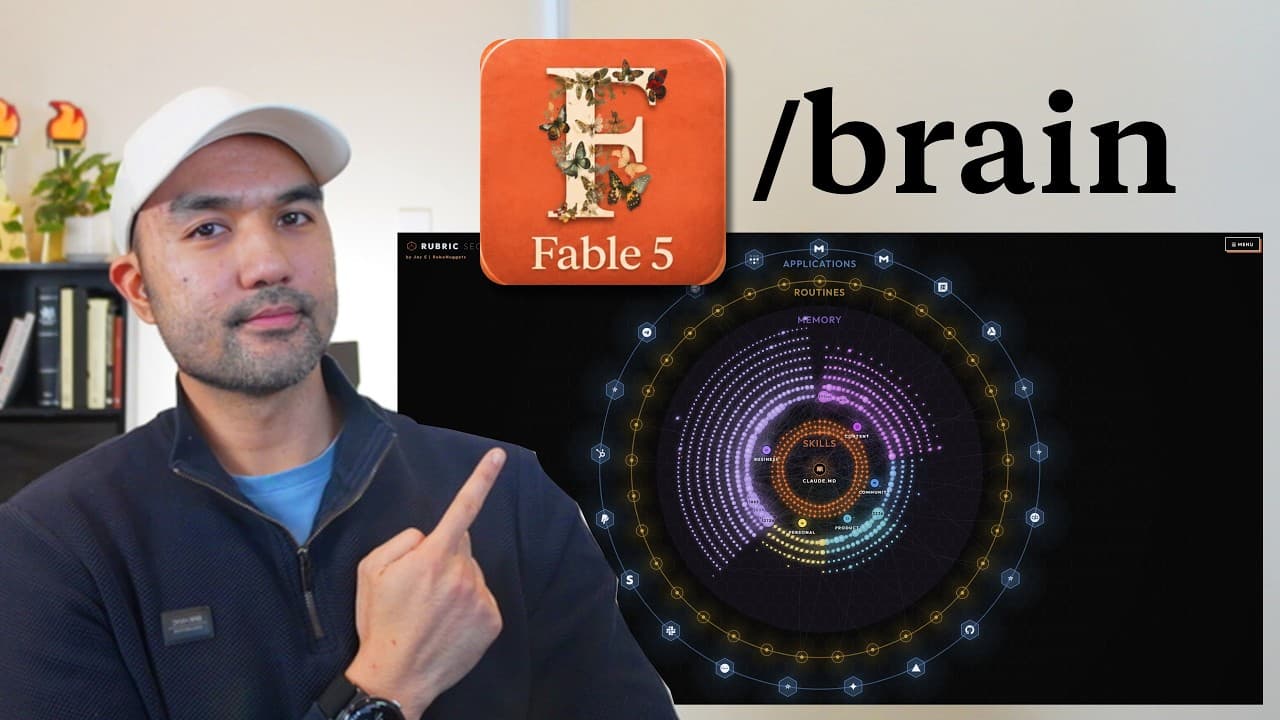
- The ARMS framework consists of applications, routines, memory, and skills. Displaying these four layers together gives users and clients a consolidated view of the connections, automations, accumulated context, and reusable instructions that make up an agentic operating system.
- The applications layer is a map of services connected through MCP connectors, APIs, or command-line tools. Missing frequently used services can reveal automation opportunities, while unused connections can identify permissions that may be worth removing from Claude Code.
- Application access creates both capability and risk. A connection that gives Claude Code control over a HubSpot workspace could potentially allow it to send emails or marketing campaigns, so every integration should be evaluated according to its usefulness, required trust, and possible consequences.
- Routines are scheduled tasks that operate in the background. A large routine collection can indicate substantial automation and time savings, but forgotten or unnecessary routines create clutter and should be reviewed for possible retirement.
- The memory layer can map accumulated workspace context at large scale. The presenter’s workspace contained roughly 35,466 files, and the generated system established relationships among its nodes so documents and known filenames could be found and opened from the visual interface.
- Skills are reusable components that can be inspected alongside the routines and files connected to them. This relationship view helps explain how an automated workflow operates and makes an agentic system easier to communicate to a business or client.
- Retrieval performance is the primary test of a second brain’s value. In the presenter’s comparison, the indexed system used about 30,000 message tokens, while default Claude Code used about 50,000, producing roughly 40% reported savings and a faster answer.
Install to Summarize YouTube Videos and Get Transcripts
Explore YouTube Video Summarizer or Get YouTube Transcript Extractor
Questions & Answers
Q: What is an AI second brain for Claude Code?
An AI second brain is a structured system that maps workspace files and connects them with applications, routines, memory, and skills. Unlike a graph created mainly for visual effect, the described system is intended to help Claude Code retrieve documents faster, reduce token consumption, expose relationships among workspace components, and open relevant local files directly from its interface.
Q: What is the ARMS framework for an agentic operating system?
The ARMS framework organizes an agentic operating system into applications, routines, memory, and skills. Applications are connected external services, routines are scheduled background tasks, memory is the context accumulated in workspace files, and skills are reusable instructions or capabilities. Viewing all four layers together reveals how an automated workspace operates and where its components connect.
Q: How does a second brain reduce Claude Code token usage?
The demonstrated second brain uses a mapped workspace to guide document retrieval instead of relying only on default file-search behavior. In the presenter’s simultaneous comparison, the indexed session consumed about 30,000 message tokens, while default Claude Code consumed about 50,000 using tools such as Grep and Glob. The presenter characterized that difference as roughly 40% savings.
Q: How can an AI second brain help users find files faster?
The system maps folders, files, nodes, and relationships across the workspace, allowing a user to navigate departments and search for a specific document from one interface. If the filename is already known, the user can locate and open the file directly without asking Claude to reason through the search. The presenter reports that this indexed approach answered faster than default retrieval.
Q: Why should Claude Code application connections be audited?
Application connections determine both what Claude Code can automate and what it may be trusted to control. The graph can expose frequently used services that have not been connected, as well as old integrations that are no longer necessary. Removing unused access reduces avoidable exposure, especially when an integration can perform consequential actions such as sending HubSpot emails or marketing campaigns.
Q: What are routines in an AI second brain?
Routines are scheduled tasks that run in the background as part of the agentic workspace. Many routines may indicate extensive automation and potential time savings. However, the system can also reveal tasks that the user no longer remembers creating or no longer needs. Those unnecessary automations can then be reviewed and retired instead of continuing without clear value.
Q: Why is visualization only part of a useful second brain?
The presenter estimates that visualization represents about 30% of the system’s value, because an attractive graph alone does not improve everyday work. The other 70% depends on whether Claude can retrieve information faster and at a lower token cost. A visually impressive system that slows searches or increases consumption would not justify the effort required to maintain it.
Q: How can a second brain explain an AI workspace to clients?
A second-brain graph can present departments, files, applications, routines, memory, and skills in a navigable view instead of exposing clients to a raw folder structure. Users can expand folders, inspect individual skills, follow their relationships to routines and files, and open relevant items. This makes the structure and operation of an agentic workspace easier to demonstrate clearly.
Summary & Key Takeaways
-
The second brain organizes a workspace into departments such as business, content, personal work, and community activities. Its interactive graph exposes files and relationships while presenting four parts of an agentic operating system: applications, routines, memory, and skills. Users can explore folders, inspect connected components, and open local files directly.
-
The applications layer identifies services connected to Claude Code through MCP connectors, APIs, or command-line tools. It can reveal useful applications that remain unconnected and integrations that should be removed. Because connected agents may control consequential functions, including HubSpot email campaigns, the graph also provides a practical view of permissions, trust, and risk.
-
The presenter argues that visualization provides only about 30% of the system’s value, while daily retrieval performance provides the remaining 70%. In a simultaneous comparison, the indexed system answered first and reportedly consumed about 30,000 tokens. Default Claude Code used tools such as Grep and Glob and consumed approximately 50,000 tokens.
Read in Other Languages (beta)
Share This Summary 📚
Summarize YouTube Videos and Get Video Transcripts with 1-Click
Try YouTube Summary with ChatGPT & Claude or YouTube Transcript Generator
Explore More Summaries from Jay E | RoboNuggets 📚



Summarize YouTube Videos and Get Video Transcripts with 1-Click
Try YouTube Summary with ChatGPT & Claude or YouTube Transcript Generator