How to Create Layered Motion Effects in Figma
TL;DR
Build sophisticated Figma Motion animations by combining small, reusable nested components, then add shaders, styles, and library assets to develop the final look. Complex movement can also be generated with the Figma agent by refining a prompt instead of manually adjusting every keyframe, making ideas tangible even when the exact animation technique is unclear.
Transcript
In this episode, I'll take you inside the files of actual Figma motion designers to see how they're making things like these. Welcome to Show Your Work, the series where motion designers geek out and show you how we're using Figma. I've collected some of my favorite Figma motion examples from fellow Figmates. They sent me their files, tips, and thi... Read More
Key Insights
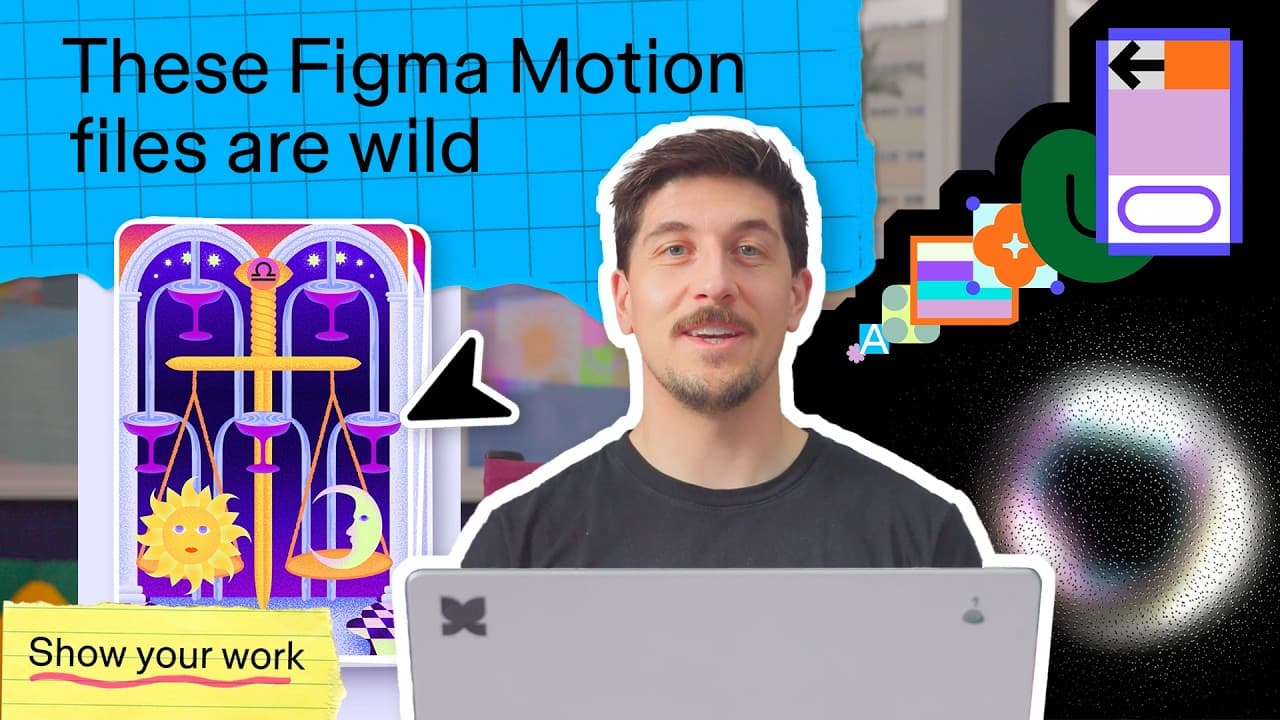
- Nested components are a practical way to construct complex animations piece by piece. Fabian’s tarot card scene divides cups, waterfalls, water ripples, vectors, and trim paths into smaller nested elements before combining them into one coordinated composition.
- A trim path can turn a simple shape into part of a convincing animated waterfall. The tarot card example demonstrates that an elaborate scene may result from layering straightforward shapes and component-based effects rather than building one monolithic animation.
- Brett McMillan’s spectral signal begins with a simple ring component that rotates 360 degrees with easing. Three concentric instances at different sizes receive independently generated rotation keyframes, showing how a limited motion foundation can support a much richer result.
- Shaders create visual complexity when they are layered over basic motion. Color ramps, lens distortion, light bloom, and glass texture collectively transform rotating circles, while removing those treatments reveals that the underlying animation remains comparatively simple.
- Glass texture can visually respond to underlying movement like an illuminated surface. Brett’s key discovery occurred when motion beneath the shader appeared to act as a light source for the texture’s bumps, adding depth to the effect.
- Canvas organization makes a motion system easier to understand. Jill arranged individual brand illustrations and reusable motion elements next to each other, providing an overview of how separate components connect and combine into a larger branded composition.
- Styles and published libraries provide easy access to reusable brand elements. Applying library colors to individual animated components helps maintain a consistent visual identity while allowing those elements to be plugged into different compositions.
- The Figma agent can create coordinated movement from a written prompt when the designer has a clear vision but lacks the technique to animate it. Fabian generated a complex, bouncy menu interaction without manually adjusting its many keyframes.
Install to Summarize YouTube Videos and Get Transcripts
Explore YouTube Video Summarizer or Get YouTube Transcript Extractor
Questions & Answers
Q: How do nested components simplify Figma Motion animations?
Nested components simplify complex animation by dividing a scene into small, manageable pieces that can be created and animated separately. Fabian’s tarot card example builds water ripples, cups, waterfalls, vectors, and trim paths as layered elements. These components are then nested together to form the complete composition, making the construction of the scene easier to inspect and understand.
Q: How was the animated waterfall in the tarot card scene created?
The waterfall was built from relatively simple elements rather than one complicated object. The file shows a basic shape combined with a trim path, then placed among nested components containing the other parts of the tarot card scene. Cups, waterfalls, and additional visual elements are assembled piece by piece until they produce the complete layered animation.
Q: How was the spectral signal effect built in Figma Motion?
The spectral signal effect started with a simple ring component animated through a 360-degree rotation with easing. Three concentric instances were created at different sizes, and the Figma agent generated random sets of rotation keyframes for the instances independently. Color ramps, lens distortion, light bloom, and glass texture were then layered over the moving rings to create the finished effect.
Q: Why should shaders be layered over simple animations?
Shaders can make a basic animation appear substantially more detailed without requiring equally complicated keyframes. In Brett McMillan’s example, the underlying movement consists primarily of rotating rings. Layered color ramps, lens distortion, light bloom, and glass texture produce the overlapping spectral appearance. Turning off those shaders reveals how simple the original animated structure actually is.
Q: What role does glass texture play in the spectral signal animation?
The glass texture sits above the other animated and shader layers in the spectral signal composition. Brett identified an important result when the movement underneath appeared to act as a light source for bumps in the glass texture shader. This interaction helped the simple rotating rings produce a deeper and more visually complex animated surface.
Q: How can Figma styles and libraries improve branded motion design?
Styles and published libraries make brand colors and reusable visual elements easy to access while building animations. Jill used individual animated illustrations and brand elements that could be combined into a larger composition or plugged into other work. Keeping these assets reusable supports consistency, while applying library brand colors reduces the effort required to style each component.
Q: Why should motion elements be arranged together on the canvas?
Placing motion elements next to one another on the canvas provides a clear overview of how the pieces connect. Jill used this arrangement while recreating Figma brand animation from individually animated illustrations and reusable elements. Seeing all components together makes it easier to understand their relationships, evaluate the system, and combine them into a unified brand composition.
Q: How can the Figma agent help create complex animations?
The Figma agent can translate a written description of an intended motion concept into animated output. Fabian used it for a bouncy menu animation involving many small shapes, dots, and coordinated reactions. He had a vision but did not know how to animate it manually, so he refined the prompt instead of creating or adjusting all the keyframes himself.
Summary & Key Takeaways
-
Nested components make complex scenes manageable by dividing them into smaller animated pieces. Fabian’s tarot card scene combines cups, waterfalls, water ripples, vectors, and trim paths through multiple component layers, allowing each element to be developed separately before all the pieces are assembled into the complete animation.
-
Shaders can transform simple motion into a visually complex effect. Brett McMillan began with a ring component rotating 360 degrees with easing, created three concentric instances at different sizes, generated independent rotation keyframes with the agent, and layered color ramps, lens distortion, light bloom, and glass texture over them.
-
Reusable brand motion becomes easier to understand and scale when individual elements are animated side by side on the canvas. Styles and published libraries provide convenient access to brand colors and assets, while the Figma agent can translate a described idea into coordinated motion without requiring manual editing of every keyframe.
Read in Other Languages (beta)
Share This Summary 📚
Summarize YouTube Videos and Get Video Transcripts with 1-Click
Try YouTube Summary with ChatGPT & Claude or YouTube Transcript Generator
Explore More Summaries from Figma 📚



![How to Create a Responsive Button in Figma, Figma Design for Beginners [6 of 13] thumbnail](/_next/image?url=https%3A%2F%2Fi.ytimg.com%2Fvi%2FPZaBmmI0s4M%2Fhqdefault.jpg&w=750&q=75)
Summarize YouTube Videos and Get Video Transcripts with 1-Click
Try YouTube Summary with ChatGPT & Claude or YouTube Transcript Generator