How Well Can Gemini 3 Design Apps and Websites?
TL;DR
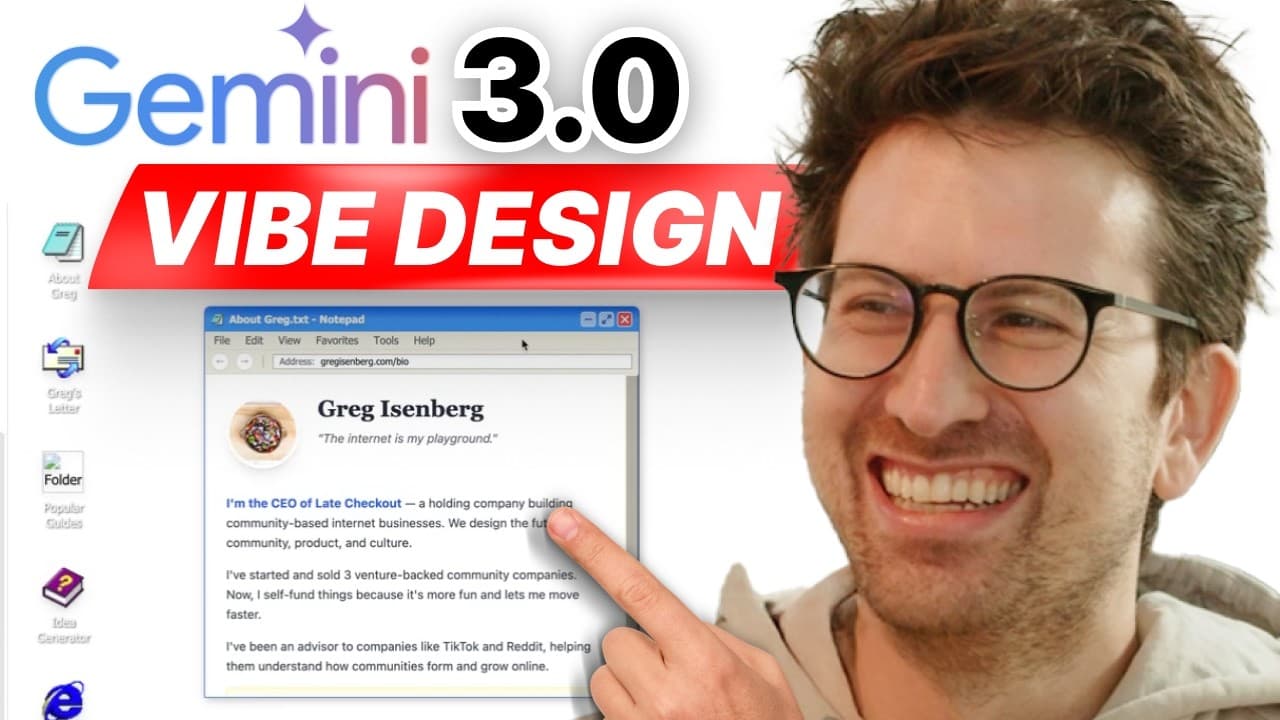
Gemini 3.0 can generate distinctive, functional interfaces when it receives a clear concept, relevant content, and strong visual references. Tests involving a Windows XP-inspired personal site, a restaurant analytics dashboard, and a workout app show that screenshots, annotations, and iterative feedback help it move beyond generic layouts and respond to specific design direction.
Transcript
Today we're going to test how good of a designer is Gemini 3.0 within Google AI Studio. So we're going to actually design a personal website. We're going to design a SAS app. We're going to design a mobile app. And we're going to find out by the end of this episode how awesome is it. Is it a 6 on 10? Is it an 8 on 10? Is it a 10 on 10? And to be ho... Read More
Key Insights
- Gemini 3.0 is capable of generating styled web and mobile interfaces, not merely code or generic layouts. The episode evaluates that capability through a personal website, a restaurant analytics SaaS dashboard, and a workout application, giving the model several distinct design problems.
- The personal website redesign is based on a screenshot, content from gregisenberg.com, and a brief request for a Microsoft XP-inspired experience. Gemini turns those inputs into an operating-system-style site with windows, applications, guides, newsletter access, and other content drawn from the existing website.
- The generated personal site is responsive enough to work on mobile despite its desktop-inspired interface. Its navigation, guide listings, application windows, icons, and content make it more than a static visual mockup, although one popular-guides section briefly displays incorrectly after an update.
- Visual annotation is a direct method for refining generated interfaces inside Google AI Studio. Users can draw, add arrows or rectangles, and attach comments to specific preview areas, allowing feedback such as replacing a boring white background without requiring formal design terminology.
- Reference images are important inputs for achieving a specific visual direction. The episode argues that these platforms generally perform better when users provide stronger and more numerous references, because images communicate desired aesthetics more concretely than broad text instructions alone.
- Gemini 3.0 can respond to iterative design criticism. When the initial application icons do not resemble convincing Windows or Mac icons, a follow-up request produces a substantial improvement across most of the interface, demonstrating that the first generation does not need to be final.
- Chef OS is a restaurant analytics SaaS dashboard shaped by combining Dribbble examples with Teenage Engineering hardware references. That pairing steers Gemini toward a tactile interface with controls that feel more like physical buttons than a conventional generic software dashboard.
- Gains is a workout mobile app inspired by the product pattern of the Brain Rot app. The experiment demonstrates how an existing interaction concept can be supplied as a reference and remixed for a different behavior, product category, and user experience.
Install to Summarize YouTube Videos and Get Transcripts
Explore YouTube Video Summarizer or Get YouTube Transcript Extractor
Questions & Answers
Q: How good is Gemini 3.0 at designing interfaces?
Gemini 3.0 can produce distinctive, styled, and functional interfaces across personal websites, SaaS dashboards, and mobile applications. Its strongest results come from a combination of a clear concept, existing content, screenshots, and iterative feedback. The tests show that it can move beyond generic purple Tailwind-style layouts, build responsive experiences, and revise visual details when the user identifies specific weaknesses.
Q: How can Gemini 3.0 redesign a personal website?
A personal website can be redesigned by supplying Gemini 3.0 with a screenshot of the existing page, a source for its content, and a clear stylistic concept. In the test, a short request for a Microsoft XP-inspired experience led to an operating-system-style website containing application windows, personal information, a newsletter, guides, portfolio content, and links based on the original site.
Q: How do visual annotations work in Google AI Studio?
Visual annotations let users communicate changes directly on an application preview. The interface supports comments, arrows, rectangles, sketches, and highlighted components, which can then be added to the Gemini chat as contextual feedback. In the demonstrated workflow, the white background was marked and described as inconsistent with the requested Microsoft XP atmosphere, prompting Gemini to adjust the design.
Q: Why are reference images useful for AI interface design?
Reference images give an AI system concrete visual evidence of the desired style, components, texture, and overall direction. The episode notes that these design platforms generally produce better results when they receive stronger references. Screenshots helped shape the personal site, while Dribbble examples and Teenage Engineering hardware influenced the restaurant dashboard toward a more tactile and less generic interface.
Q: Can Gemini 3.0 improve a design after receiving feedback?
Gemini 3.0 can revise an existing generation in response to focused feedback. When the first personal website used application icons that did not feel like convincing Windows or Mac icons, a written request asked for more realistic alternatives. Gemini updated them successfully across most of the interface, although the popular-guides area briefly developed a display problem during the revision.
Q: What is Chef OS in the Gemini 3.0 design test?
Chef OS is the restaurant analytics SaaS dashboard created as one of the episode's design tests. Its direction combines Dribbble shots with references to Teenage Engineering hardware. This mixture encourages Gemini to generate controls with a tactile, physical-button quality, illustrating how references from outside conventional software design can influence the visual language and interaction character of a dashboard.
Q: What is the Gains workout app design experiment?
Gains is a workout mobile application created with inspiration from the Brain Rot app. The test examines whether Gemini can take an existing product pattern and adapt it to a different behavior and category rather than simply producing an unrelated mobile layout. It serves as the mobile-app portion of the broader comparison alongside the personal site and Chef OS dashboard.
Q: How can users avoid generic AI-generated app designs?
Users can reduce generic results by giving Gemini a distinctive concept, relevant screenshots, useful reference images, and precise follow-up feedback. The personal website used a Microsoft XP theme, while Chef OS combined dashboard examples with hardware references. Visual annotations also helped identify exact areas needing change. Together, these methods provided clearer direction than a broad request to make an interface look better.
Summary & Key Takeaways
-
Gemini 3.0 was tested as a designer across three interface types: a personal website, a restaurant analytics SaaS dashboard, and a workout mobile app. The goal was to evaluate whether Google AI Studio could produce distinctive visual work rather than the generic purple, Tailwind-style layouts often associated with vibe-coded applications.
-
The personal website test began with a screenshot, the existing domain, and a request for a Microsoft XP-inspired experience. Gemini reused site content, created an operating-system-style interface, and produced responsive pages. Follow-up instructions improved the application icons, while visual annotations communicated a requested background change directly on the preview.
-
The later tests used outside design references to guide a restaurant dashboard called Chef OS and a workout app called Gains. Across the experiments, the central lesson was that clear concepts, reference images, and precise feedback substantially improve results. Gemini also demonstrated an ability to revise interfaces after receiving written or visual direction.
Read in Other Languages (beta)
Share This Summary 📚
Summarize YouTube Videos and Get Video Transcripts with 1-Click
Try YouTube Summary with ChatGPT & Claude or YouTube Transcript Generator
Explore More Summaries from Greg Isenberg 📚




Summarize YouTube Videos and Get Video Transcripts with 1-Click
Try YouTube Summary with ChatGPT & Claude or YouTube Transcript Generator