How to Format Strings in Python
TL;DR
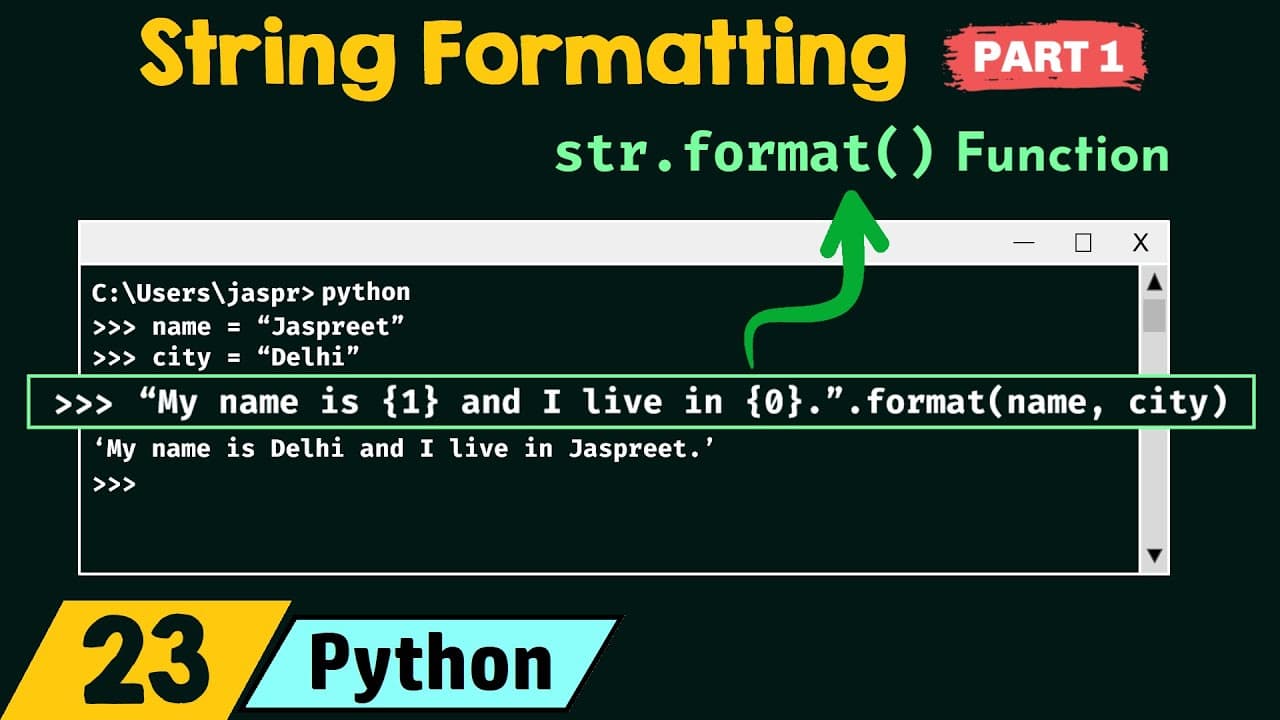
String formatting in Python involves inserting objects into predefined strings, known as string interpolation. This video covers three main techniques: basic string formatting, percentage formatting, and the str.format() function. Each method offers unique ways to include variables within strings, enhancing readability and flexibility in Python programming.
Transcript
foreign we will understand string formatting in details this is part one of string formatting in this presentation we will discuss a total of three topics let's see what are those topics the first topic is string formatting the second topic is percentage formatting and the third topic is Str dot format function we will understand these topics in de... Read More
Key Insights
- String formatting is the process of inserting an object into a predefined string, also known as string interpolation.
- Percentage formatting is one of the oldest techniques to format strings in Python, using placeholders like %s for strings.
- The str.format() function uses curly braces as placeholders, allowing for more readable and flexible string formatting.
- Indexing in str.format() allows variables to be referenced by position, providing flexibility in the order of variable insertion.
- Keywords can be used in str.format() to improve the readability of the code, making it clearer what each placeholder represents.
- Format specifiers like %f for floats, %d for integers, and %b for binary can be used with str.format() for precise formatting.
- Python automatically converts integers to floats if a float format specifier is used, but strings cannot be implicitly converted.
- The length of values after the decimal point can be controlled using format specifiers like .2f in the str.format() function.
Install to Summarize YouTube Videos and Get Transcripts
Explore YouTube Video Summarizer or Get YouTube Transcript Extractor
Questions & Answers
Q: What is string formatting in Python?
String formatting in Python is the process of inserting objects into predefined strings, also known as string interpolation. It allows developers to include variables within strings, making it easier to construct dynamic text outputs. Techniques include basic string formatting, percentage formatting, and the str.format() function, each offering unique ways to enhance readability and flexibility in code.
Q: How does percentage formatting work in Python?
Percentage formatting in Python uses placeholders such as %s for strings, %d for integers, and %f for floats to insert variables into strings. It is one of the oldest methods of string interpolation, allowing multiple variables to be included by specifying their placeholders within a string. The variables are then provided after the string, separated by a percentage sign.
Q: What is the str.format() function in Python?
The str.format() function in Python is a method used for string formatting, replacing placeholders with curly braces. It allows for more readable and flexible string formatting by supporting indexing and keyword usage. This function enables developers to reference variables by position or name, and it supports format specifiers for precise control over the output format.
Q: How can indexing be used in str.format()?
Indexing in str.format() allows variables to be referenced by their position within the format method. Each variable is assigned an index starting from 0, and these indices can be used within curly braces to specify which variable should replace each placeholder. This provides flexibility in the order of variable insertion, enabling developers to rearrange output easily.
Q: What are format specifiers in Python string formatting?
Format specifiers in Python string formatting are symbols used to define the type of data being formatted. Common specifiers include %f for floating-point numbers, %d for integers, and %b for binary. With the str.format() function, these specifiers can be used to control the appearance of the output, such as the number of decimal places displayed for a float.
Q: Can Python automatically convert data types in string formatting?
Python can automatically convert certain data types during string formatting. For example, if a float format specifier is used, an integer can be implicitly converted to a float. However, Python does not implicitly convert strings to other types, such as floats or integers, which can result in errors if attempted without explicit conversion.
Q: How can the length of decimal values be controlled in Python?
The length of decimal values in Python string formatting can be controlled using format specifiers like .2f. This specifies that only two decimal places should be displayed for a floating-point number. By adjusting the number after the period, developers can control how many digits appear after the decimal point, providing precise control over numerical output.
Q: What is the benefit of using keywords in str.format()?
Using keywords in str.format() enhances the readability of the code by allowing developers to assign meaningful names to placeholders. Instead of referencing variables by position, keywords can be used to clearly indicate what each placeholder represents, making the code more understandable and maintainable. This is particularly useful in complex strings with multiple variables.
Summary & Key Takeaways
-
String formatting in Python allows inserting objects into predefined strings, known as string interpolation. Techniques include basic string formatting, percentage formatting, and the str.format() function, each offering unique ways to include variables within strings.
-
Percentage formatting uses placeholders like %s for strings, %d for integers, and %f for floats. It is one of the oldest methods for string formatting in Python, allowing multiple variables to be inserted into a string.
-
The str.format() function in Python replaces placeholders with curly braces, allowing for more readable and flexible string formatting. It supports indexing, keyword usage, and format specifiers for precise control over string output.
Read in Other Languages (beta)
Share This Summary 📚
Summarize YouTube Videos and Get Video Transcripts with 1-Click
Try YouTube Summary with ChatGPT & Claude or YouTube Transcript Generator
Explore More Summaries from Neso Academy 📚
Summarize YouTube Videos and Get Video Transcripts with 1-Click
Try YouTube Summary with ChatGPT & Claude or YouTube Transcript Generator