How to use NotebookLM video overviews feature
TL;DR
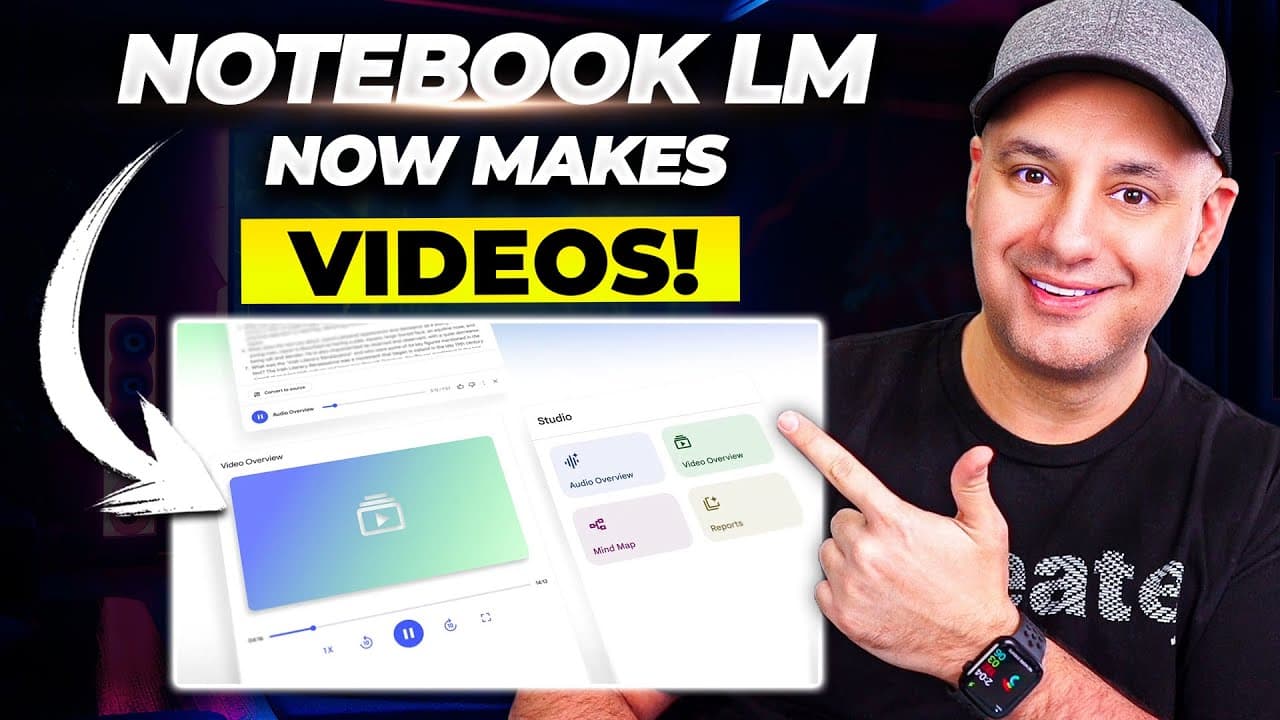
Video Overviews in NotebookLM automatically generates a narrated video and slides from your sources. It pairs an AI narrated presentation with customizable audience and structure, plus an updated Studio Panel to organize mind maps and audio. This makes turning research into shareable visuals easy for marketing, education, and analysis.
Transcript
Notebook LM just introduced one of the most impressive updates that I've seen inside of Notebook LM and inside of pretty much any AI app. I think you're really going to like this one. Okay, right now this is getting rolled out. I have it in my free Notebook LM accounts. I don't have it in my paid Notebook LM accounts. And they did refresh the entir... Read More
Key Insights
- Video Overviews generate not only audio but a video and structured slides from your sources.
- The feature allows customization by target audience, specific source, and talking point structure.
- The Studio Panel refresh centralizes creation tools like mind maps and audio for easier workflow.
- NotebookLM supports diverse sources such as YouTube videos and PDFs in notebooks.
- The Discover tab provides a source-driven way to find materials without manual adding.
- Audio overview and video overview elements work together to produce narrated content.
- Two AI voices can be used in video overviews to diversify presentation styles.
- Generated videos can be started from scratch or with guided prompts for structure.
Install to Summarize YouTube Videos and Get Transcripts
Explore YouTube Video Summarizer or Get YouTube Transcript Extractor
Questions & Answers
Q: How to enable video overviews in NotebookLM and what can it generate?
Video Overviews in NotebookLM can generate a narrated video with accompanying slides from the sources you add to a notebook. It creates a PowerPoint style visual along with audio narration, and you can tailor the output by describing the target audience, picking a specific source, and outlining a talking point structure. This enables turning research into a shareable, storyline driven presentation with minimal manual assembly.
Q: What customization options are available for video overviews?
You can customize the video overview by specifying the target audience you want to focus on, selecting a particular source if you have many, and describing the structure or talking points you want the presentation to cover. These controls help tailor the generated video to a specific use case, making the output more relevant and easier to present.
Q: What is the Studio Panel and how does it relate to video overviews?
The Studio Panel is a refreshed UI area that helps you create and organize content like mind maps, audio, and other elements in NotebookLM. It complements video overviews by giving a centralized workspace for assembling the visuals, notes, and narration that feed into the final video output, improving workflow efficiency.
Q: What can be included as sources for NotebookLM notebooks?
NotebookLM notebooks can include a variety of sources such as YouTube videos and PDFs, and have a source limit depending on account type. Free accounts support up to 50 sources per notebook, while paid accounts allow up to 300 sources, enabling comprehensive research compilation for video overviews and other analyses.
Q: How does audio overview relate to video overview in NotebookLM?
Audio overview creates a podcast style narration from your sources, and video overview builds on this by adding a visual presentation to accompany the audio. The combination allows you to produce both an audio narrative and a video presentation from the same set of sources, enhancing both listening and viewing experiences.
Q: Can video overviews be generated from scratch or require prompts?
Video overviews can be generated from scratch by simply initiating the generate action, but you can also customize with prompts, such as target audience, specific sources, and structure, to shape the content before generation. This flexibility helps ensure the final output aligns with the intended message and audience.
Q: What kinds of audiences or topics is the video overview intended for?
The video overview is designed for marketing, education, and analysis contexts where turning research into presentable visuals is valuable. By adjusting the audience target and structure, you can align the presentation with business goals, classroom needs, or analytical reporting, making complex topics more accessible and engaging.
Q: Are there any related features to enhance presentation quality in NotebookLM?
Related features include the updated Discover tab to find sources directly within NotebookLM and the ability to generate audio, video, and slides from various sources. The combination of these tools provides a cohesive workflow for researching, annotating, and producing polished, consumable content without switching between multiple apps.
Summary & Key Takeaways
-
NotebookLM now offers Video Overviews that create a video with images and narration from your sources, plus highlight slides.
-
The Studio Panel has been refreshed to help organize mind maps, audio, and other elements in one place.
-
Video Overviews can be customized by audience, source, and structure to fit specific presentation goals.
Read in Other Languages (beta)
Share This Summary 📚
Summarize YouTube Videos and Get Video Transcripts with 1-Click
Try YouTube Summary with ChatGPT & Claude or YouTube Transcript Generator
Explore More Summaries from Skill Leap AI 📚





Summarize YouTube Videos and Get Video Transcripts with 1-Click
Try YouTube Summary with ChatGPT & Claude or YouTube Transcript Generator