How to Create Faceless YouTube Videos with AI
TL;DR
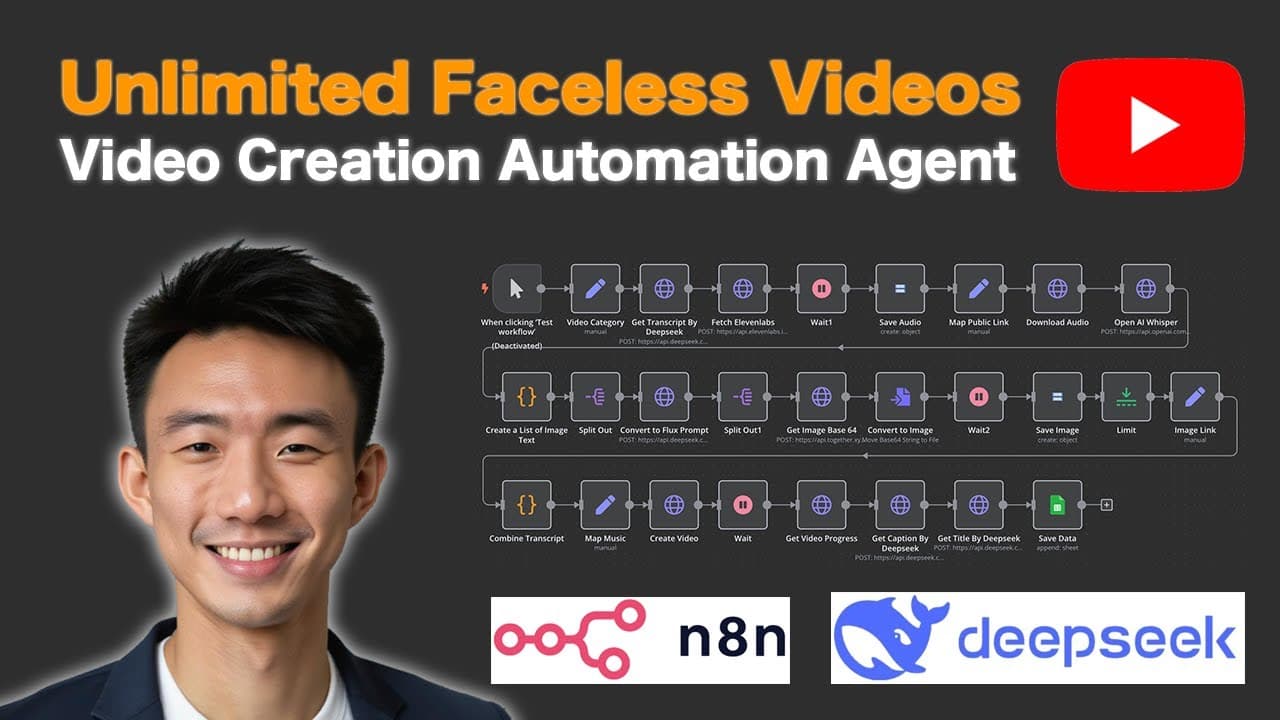
Automate the creation of faceless YouTube videos using AI and no-code tools. This tutorial guides you through workflows that generate audio, images, and videos, as well as uploading to YouTube while managing status updates via Google Sheets.
Transcript
hi in today's video we'll talk about how you can create a YouTube faceless video with our AI agent so we are going to teach you how you can create a an N workflow to do this so this is the video that we can output in this workflow in the vast Savannah a young elephant named kbo struggled to keep up with the herd his legs were weak a... Read More
Key Insights
- The tutorial demonstrates creating faceless YouTube videos using AI agents and no-code workflows, integrating tools like ElevenLabs, OpenAI, and Google Cloud.
- Key steps include automating transcript retrieval, converting it into audio, and generating visuals from text prompts for seamless video production.
- The workflow involves using ElevenLabs for audio generation, Flux AI for image creation, and Google Cloud Storage for managing assets.
- The process combines transcripts, music, and visuals using the andynocode API to produce engaging faceless videos.
- Videos are uploaded to YouTube, with their status tracked via Google Sheets, ensuring a smooth content management process.
- The tutorial covers setting up API credentials for Deepseek, ElevenLabs, Google Cloud, and YouTube to facilitate seamless integration.
- The video showcases two main workflows: one for faceless video production and another for uploading the videos to YouTube.
- The tutorial emphasizes the importance of proper API setup and configuration to ensure the automation process runs smoothly.
Install to Summarize YouTube Videos and Get Transcripts
Explore YouTube Video Summarizer or Get YouTube Transcript Extractor
Questions & Answers
Q: How does the AI agent automate faceless video creation?
The AI agent automates faceless video creation by integrating various tools and APIs. It retrieves transcripts, converts them into audio using ElevenLabs, generates visuals from text prompts with Flux AI, and combines these elements using the andynocode API to produce videos. This automation streamlines the entire video production process without requiring manual intervention.
Q: What tools are used in the no-code workflow for video production?
The no-code workflow for video production utilizes several tools, including ElevenLabs for audio generation, OpenAI for text processing, Flux AI for visual creation, and Google Cloud Storage for managing assets. These tools work in conjunction to automate various aspects of video production, making it possible to create engaging faceless videos efficiently.
Q: How does the workflow manage video uploads to YouTube?
The workflow manages video uploads to YouTube by integrating with the YouTube API. It retrieves video data from Google Sheets, downloads the video, and uploads it to YouTube. The process also updates the video's status in Google Sheets, providing a seamless way to track and manage video uploads without manual intervention.
Q: What steps are involved in setting up the API credentials?
Setting up API credentials involves accessing each service's platform, such as Deepseek, ElevenLabs, Google Cloud, and YouTube. Users need to create API keys, configure OAuth settings, and ensure proper authorization. This setup is crucial for enabling seamless integration and automation within the no-code workflow, allowing the AI agent to access and utilize each service effectively.
Q: How does the workflow ensure seamless content management?
The workflow ensures seamless content management by automating the entire video production and upload process. It utilizes Google Sheets to track video status, updates, and manages video uploads to YouTube. This integration provides a centralized way to monitor and control video production and distribution, reducing the need for manual oversight and intervention.
Q: What are the benefits of using a no-code approach for video creation?
Using a no-code approach for video creation offers several benefits, including ease of use, reduced complexity, and faster implementation. It allows users without programming skills to automate video production processes, saving time and resources. This approach also enables quick adaptation to changes and scalability, making it ideal for rapidly producing content.
Q: How does the workflow handle transcript and audio synchronization?
The workflow handles transcript and audio synchronization by labeling each word with starting and ending times during the transcript processing stage. This labeling allows the system to align audio with corresponding visuals accurately, ensuring that the final video output is synchronized and cohesive, enhancing the viewer's experience.
Q: What role does Google Cloud Storage play in the workflow?
Google Cloud Storage plays a critical role in the workflow by acting as a repository for managing and storing assets such as audio files, images, and videos. It facilitates seamless access and retrieval of these assets during the video production process, ensuring efficient handling and management of content, which is crucial for automating video creation and distribution.
Summary & Key Takeaways
-
This tutorial explains how to create faceless YouTube videos using AI and no-code tools. It covers setting up workflows that automate audio generation, visual creation, and video assembly using ElevenLabs, OpenAI, and Google Cloud Storage.
-
The video demonstrates two main workflows: producing faceless videos by combining transcripts, music, and visuals, and uploading videos to YouTube while tracking their status via Google Sheets.
-
Viewers learn to set up API credentials for Deepseek, ElevenLabs, Google Cloud, and YouTube, ensuring seamless integration and automation for effortless content creation and management.
Read in Other Languages (beta)
Share This Summary 📚
Summarize YouTube Videos and Get Video Transcripts with 1-Click
Try YouTube Summary with ChatGPT & Claude or YouTube Transcript Generator
Explore More Summaries from Andy Lo 📚


Summarize YouTube Videos and Get Video Transcripts with 1-Click
Try YouTube Summary with ChatGPT & Claude or YouTube Transcript Generator