How to Create AI Agents in n8n Instantly
TL;DR
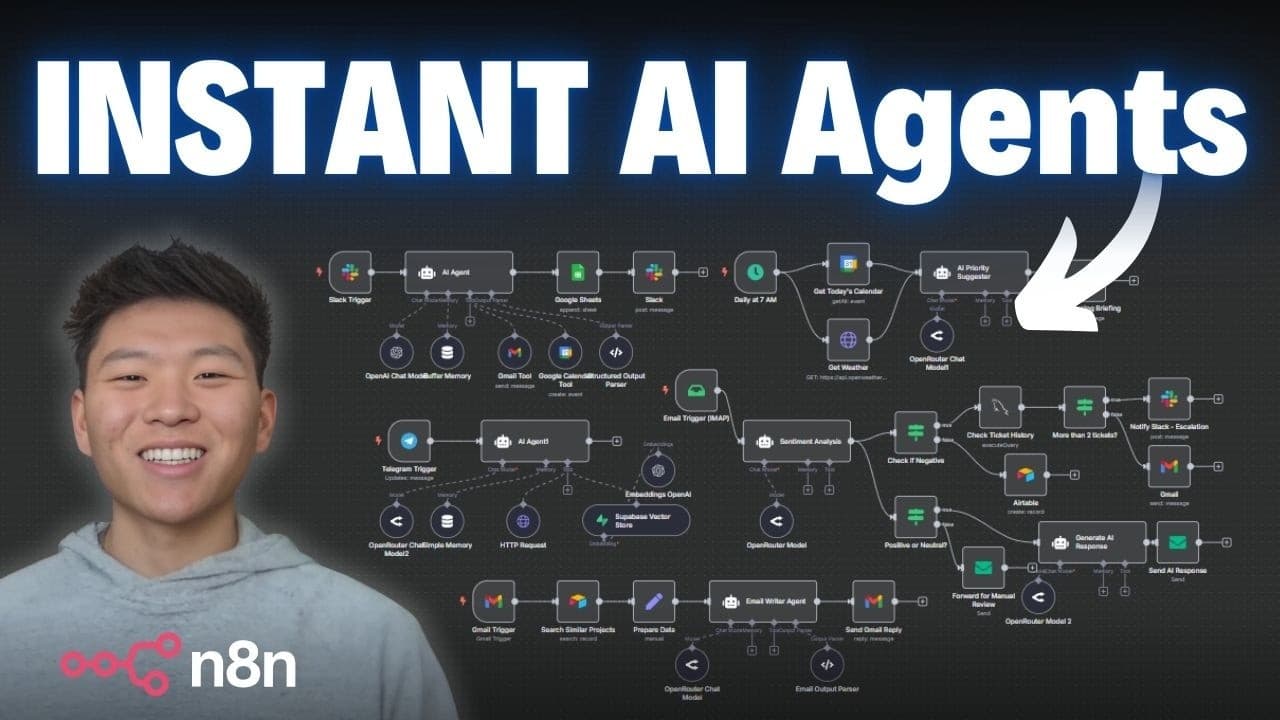
Build a no-code AI agent in n8n that automates workflow creation by interpreting plain English instructions. The system generates a fully functional workflow and provides a direct link and setup guide. Ideal for beginners and automation experts, this method eliminates the need for coding and simplifies the creation of custom AI agents.
Transcript
All right, so here we have our NEN developer AI agent and I'm just going to open up a chat, send off this message which says, "Build me an AI agent that will receive a message in Slack, interpret the message, and decide if it needs to use its calendar or its Gmail tool, then log the results in Google Sheets, and send us a message back in Slack." So... Read More
Key Insights
- n8n is a no-code platform that allows users to build AI agents capable of creating other agents.
- The AI agent interprets plain English instructions to generate a functional n8n workflow.
- The system provides a direct link to the workflow and a step-by-step setup guide.
- The AI agent uses tools like Slack triggers, Gmail, Google Sheets, and structured output parsers.
- Users must configure credentials and set up necessary integrations like Slack and Google Sheets.
- The system utilizes Claude Opus 4's chat model to enable 'thinking' and generate workflows.
- Users can download and import JSON files into n8n for easy workflow setup.
- The approach reduces the complexity and cost of creating AI workflows by minimizing context data.
Install to Summarize YouTube Videos and Get Transcripts
Explore YouTube Video Summarizer or Get YouTube Transcript Extractor
Questions & Answers
Q: How to build an AI agent in n8n?
To build an AI agent in n8n, you start by using the platform's no-code interface to create workflows. The AI agent interprets plain English commands to generate workflows, using tools like Slack triggers, Gmail, and Google Sheets. Users must configure credentials and set up integrations to ensure functionality. The system provides a direct link and setup guide for ease of use.
Q: What tools does the AI agent in n8n use?
The AI agent in n8n utilizes several tools including Slack triggers, Gmail, Google Sheets, and structured output parsers. These tools help the agent interpret messages, perform actions like sending emails or creating calendar events, log results, and send responses back to Slack. Proper configuration of these tools is essential for the agent's functionality.
Q: How does the AI agent interpret instructions in n8n?
The AI agent in n8n interprets instructions using Claude Opus 4's chat model, which enables it to 'think' and generate workflows based on plain English commands. The model processes the instructions to determine the necessary actions and tools, then constructs a workflow in n8n that can be executed to perform the desired tasks.
Q: What is required to set up the AI agent in n8n?
Setting up the AI agent in n8n requires configuring credentials for tools like Slack and Google Sheets, setting up integrations, and ensuring that all necessary components are properly connected. Users must also download and import JSON files to establish the workflow structure. The system provides a setup guide to assist with these configurations.
Q: How does the AI agent handle workflow creation in n8n?
The AI agent handles workflow creation by interpreting plain English instructions and using them to generate a functional workflow in n8n. It utilizes various tools and models to perform tasks such as sending emails, creating calendar events, and logging actions. The agent provides a direct link and setup guide for easy implementation and testing.
Q: What are the benefits of using n8n for AI agent creation?
Using n8n for AI agent creation offers several benefits, including a no-code interface that simplifies the process, the ability to interpret plain English instructions, and the use of powerful tools like Slack triggers and Google Sheets. This approach reduces the need for coding, making it accessible to users of all skill levels, and provides a robust framework for building custom AI agents.
Q: How does Claude Opus 4 enhance the AI agent's capabilities in n8n?
Claude Opus 4 enhances the AI agent's capabilities in n8n by enabling 'thinking,' which allows the agent to process and interpret complex instructions. This chat model facilitates the generation of workflows by understanding the user's intent and determining the appropriate actions and tools needed to achieve the desired outcome. It enhances the agent's efficiency and accuracy in workflow creation.
Q: What challenges might users face when creating AI agents in n8n?
Users might face challenges such as configuring credentials and integrations correctly, understanding how to set up and test workflows, and making necessary adjustments to ensure the agent functions as intended. While the system provides a setup guide, users may need to troubleshoot issues related to tool configurations and workflow logic to achieve optimal performance.
Summary & Key Takeaways
-
The video demonstrates how to build a no-code AI agent in n8n that can create other AI agents based on plain English instructions. The system generates a workflow and provides a direct link and setup guide, making it accessible for both beginners and automation experts. This method eliminates the need for coding, simplifying the creation of custom AI agents.
-
Key components of the system include Slack triggers, Gmail, Google Sheets, and structured output parsers. Users must configure credentials and set up necessary integrations to ensure the workflow functions correctly. The AI agent leverages Claude Opus 4's chat model to enable 'thinking' and generate workflows efficiently.
-
The approach minimizes the complexity and cost of creating AI workflows by reducing context data. Users can download and import JSON files into n8n for easy workflow setup. This method provides a robust framework for building and customizing AI agents without requiring extensive coding knowledge.
Read in Other Languages (beta)
Share This Summary 📚
Summarize YouTube Videos and Get Video Transcripts with 1-Click
Try YouTube Summary with ChatGPT & Claude or YouTube Transcript Generator
Explore More Summaries from Nate Herk | AI Automation 📚
Summarize YouTube Videos and Get Video Transcripts with 1-Click
Try YouTube Summary with ChatGPT & Claude or YouTube Transcript Generator