How to Build One App for All Your AI Agents
TL;DR
Build a unified agent workspace by organizing agents into categories, giving each agent separate terminal tabs, and connecting those sessions to command-line runtimes. Starting from an open-source agentic development environment can accelerate the process, while iterative prompts and interface feedback can turn an early mockup into a working Mac application that supports local repositories and existing GitHub projects.
Transcript
AI agents are everywhere. But there are two problems. First, pick one and you're stuck with it inside their model or inside their platform. Second, it is complete chaos. You might have a pile of chat windows inside different apps like Telegram and Slack, different repos inside Cloud Code and Codeex, and absolutely no system to any of it. If you're ... Read More
Key Insights
- AI agent fragmentation is a productivity problem because agents may be distributed across model platforms, messaging applications, repositories, and separate chat windows. A unified harness addresses that fragmentation by giving users one organized place to access their agents and the different sessions associated with each agent.
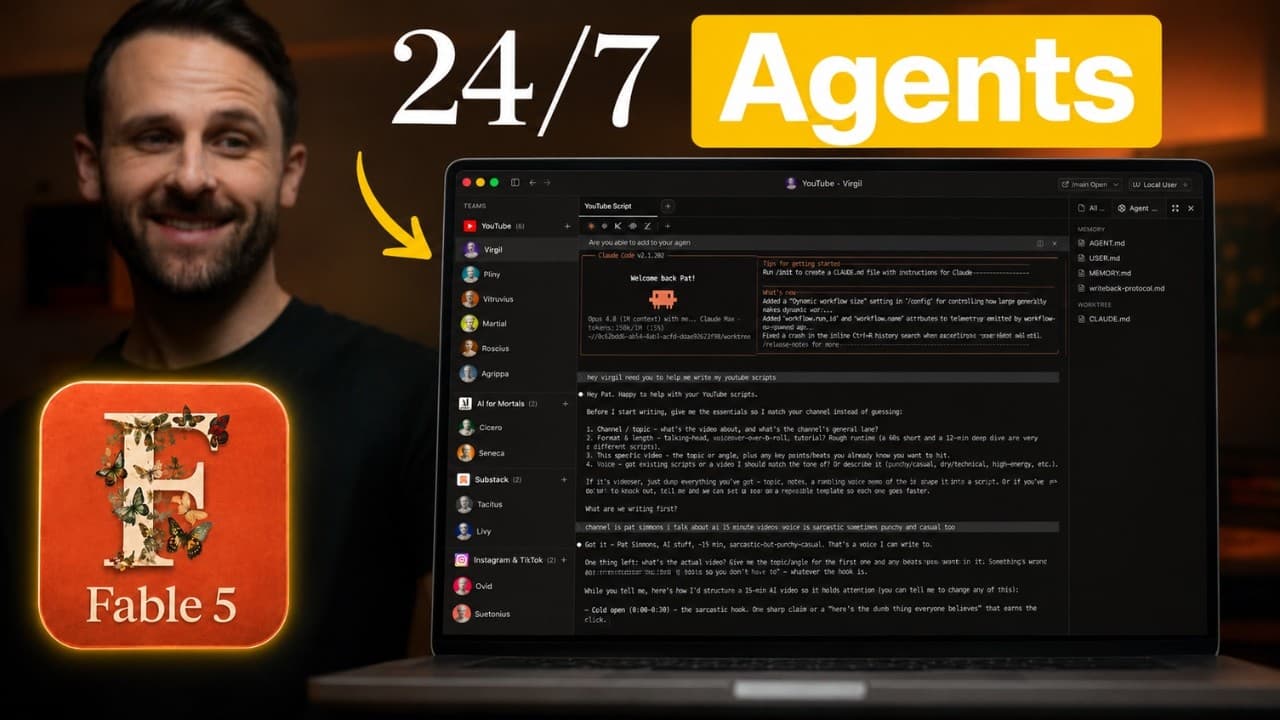
- The proposed interface is organized around categories, individual agents, and terminal tabs. Categories represent areas such as YouTube, agents handle specialized responsibilities such as scriptwriting or analytics, and tabs let one agent maintain several simultaneous sessions or projects without mixing their working contexts.
- An agentic development environment can serve as the architectural starting point for a broader agent workspace. Existing examples demonstrate useful patterns such as agents in a left rail and sessions across the top, but the proposed application extends beyond coding agents to writing, content, motion graphics, and analytics work.
- Open-source software is useful for rapid agent application development because its interface and repository can be adapted. The build shifts from Conductor to Superset after determining that Conductor is not open source, allowing the creator to combine existing patterns with a customized workflow and visual organization.
- Effective prompting for an application build includes the intended users, interface structure, repository behavior, onboarding flow, and visual references. The initial prompt describes the desired agent categories, terminal tabs, workspaces, and onboarding, while screenshots help Fable 5 reproduce the general layout of an existing interface.
- Iterative feedback is necessary because a visually convincing mockup may not implement the required behavior. The first version creates categories and agents, but its custom interface does not expose a real terminal, prompting a revision that connects sessions directly to command-line tools and removes extraneous controls.
- Damon is a Mac application built to house organized teams of agents. Its demonstrated workflow creates a YouTube category, adds a scriptwriting agent, assigns a profile image and Claude runtime, creates a local repository folder, and opens Claude within that folder as a trusted working session.
- Repository support gives each agent a defined workspace instead of leaving its files and context scattered across unrelated applications. Damon can create a new empty local repository or accept the URL of an existing GitHub repository, making it possible to bring previously created agents into the same organized interface.
Install to Summarize YouTube Videos and Get Transcripts
Explore YouTube Video Summarizer or Get YouTube Transcript Extractor
Questions & Answers
Q: How can I organize multiple AI agents in one app?
Organize agents with a three-level interface: categories for broad areas of work, named agents for specialized responsibilities, and tabs for separate sessions handled by each agent. In the demonstrated design, a YouTube category can contain agents for scriptwriting, motion graphics, and analytics, while terminal tabs let each agent work on several projects without mixing their sessions.
Q: What problem does a unified AI agent harness solve?
A unified harness reduces the fragmentation created when agents are spread across model platforms, messaging applications, coding environments, repositories, and independent chat windows. Instead of repeatedly switching tools and searching through an increasingly long list of projects, users can access categorized agents and their active sessions from a single application with a consistent interface.
Q: What interface layout works for managing many AI agents?
The proposed layout places categories and their assigned agents in a rail on the left, then places session tabs across the top of the main workspace. Selecting an agent reveals terminal sessions associated with that agent. This arrangement remains easier to navigate when the user has many agents because related specialists stay grouped under recognizable areas of work.
Q: How was Fable 5 prompted to build the agent workspace?
The initial prompt described an agentic development environment for writing, content, and coding agents, then specified interface rails, terminal tabs, repository-based workspaces, and a simple onboarding process. It also referenced existing products and included screenshots of a preferred interface. A separate orchestration skill based on Anthropic prompting documentation was used to structure the work performed by Fable 5.
Q: Why start an AI agent app from an open-source project?
An open-source project provides an existing codebase and interface pattern that can be customized instead of requiring every component to be built from nothing. The creator initially considered Conductor, then switched to Superset after finding that Conductor was not open source. Superset offered a similar foundation whose repository could be adapted to the desired agent workflow.
Q: Why must agent sessions connect to a real terminal?
A real terminal connection allows each session to run directly through a command-line interface rather than merely imitating an agent chat inside a custom visual panel. The first mockup looked appropriate and could create categories and agents, but it lacked this underlying terminal behavior. The next revision therefore prioritized CLI connections and removed interface elements that were not needed.
Q: How does Damon create and launch a new agent?
The demonstrated process creates a team or category, uploads an image, names the category, and then adds an agent beneath it. The user assigns the agent a name, profile image, and runtime. Choosing a new empty repository creates a local folder and worktree, after which Claude opens in that folder and can begin a trusted working session.
Q: Can an existing agent repository be added to Damon?
Damon includes an option to provide the URL of an existing GitHub repository instead of creating a new empty repository. This supports agents that already live in repositories or agents whose files are moved to GitHub before import. The application can clone the repository and make it available within the organized agent workspace alongside newly created local agents.
Summary & Key Takeaways
-
The proposed agent harness solves fragmentation by placing agents, models, repositories, and concurrent sessions inside one application. Its interface uses categories and agents in a left rail, with terminal tabs across the top. This structure is intended to reduce the context switching caused by scattered chat windows, coding tools, and agent platforms.
-
The build begins with a hand-drawn interface concept, examples from existing agentic development environments, screenshots, and a detailed prompt for Fable 5. An open-source project called Superset provides a starting point. Iterative feedback removes unnecessary interface elements, replaces emojis with profile images, and requires genuine command-line terminal connections for agent sessions.
-
The resulting Mac application, named Damon, can create teams or categories, add agents, upload profile images, and launch Claude inside locally created worktree folders. Each agent can open additional tabs for separate sessions. The interface can also accept an existing GitHub repository URL or create a new empty local repository for an agent.
Read in Other Languages (beta)
Share This Summary 📚
Summarize YouTube Videos and Get Video Transcripts with 1-Click
Try YouTube Summary with ChatGPT & Claude or YouTube Transcript Generator
Explore More Summaries from Pat Simmons 📚

Summarize YouTube Videos and Get Video Transcripts with 1-Click
Try YouTube Summary with ChatGPT & Claude or YouTube Transcript Generator