How to connect Astra to Premiere Pro for AI editing
TL;DR
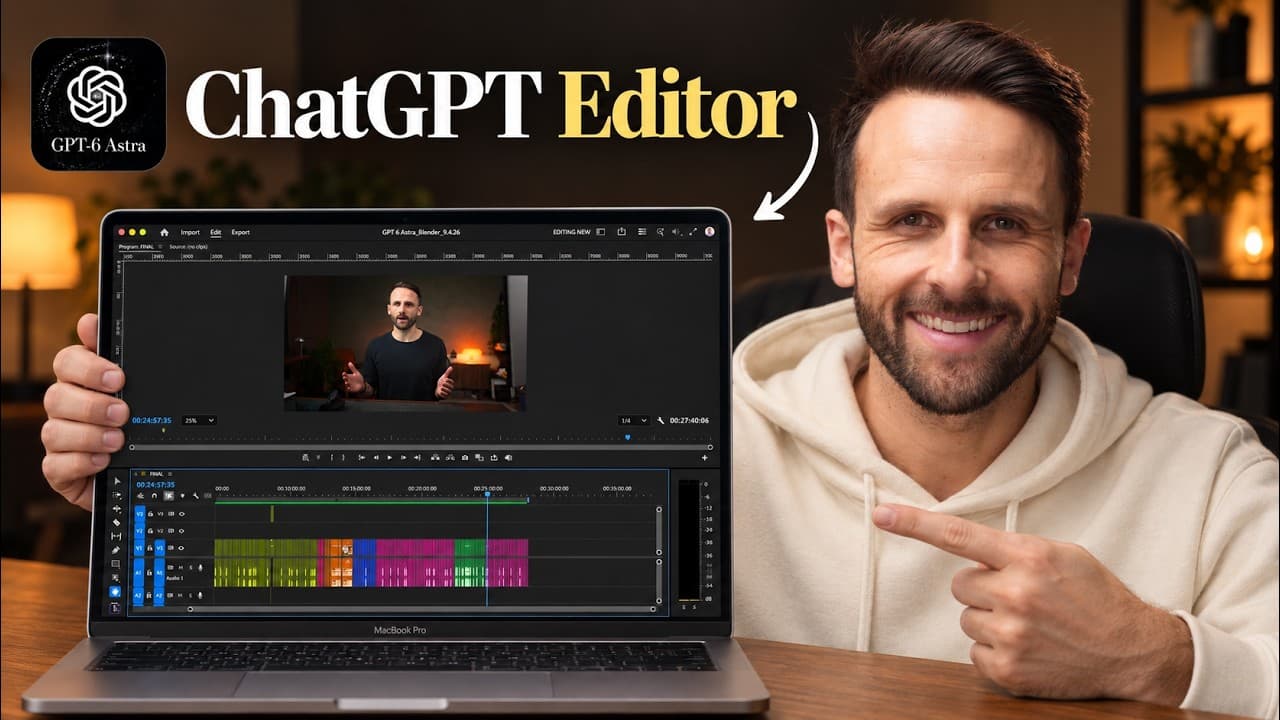
Astra is trained to drive Premiere Pro using computer control and the accessibility tree, enabling end-to-end editing from a folder of raw clips. The workflow starts with setup, then driving basic operations, mapping keyboard and UI controls, and finally executing a full edit with pauses, bad takes, and push-ins. The video ends with tips and a ready-to-use skill resource.
Transcript
So, what you're looking at here is GBT6 Astra editing this video inside of Premiere Pro. It's cutting out all my pauses, all my bad takes. It's adding push-ins, text animations, and it's even overlaying B-roll when necessary, all while I sit here and just let it work. Now, you've probably seen a video like this before where somebody has AI edit som... Read More
Key Insights
- Astra edits in Premiere Pro by combining computer control with the accessibility tree to access UI elements.
- The editing workflow is broken into setup, driving, mapping controls, and documenting the skill for future automation.
- Textbased editing is used to transcribe footage and identify pauses for clean cuts.
- Pauses are removed by toggling textbased editing filters and deleting identified pauses, iterating until no pauses remain.
- A complete end-to-end edit includes removing bad takes, adding jump cuts, and easing push-ins to improve pacing.
- B-roll is added after the primary edit to enrich the narrative and maintain viewer engagement.
- The skill is built incrementally, testing each capability before expanding to the next, to ensure reliability.
- Caveats include potential limitations of the accessibility tree and the need for manual adjustments in some cases.
Install to Summarize YouTube Videos and Get Transcripts
Explore YouTube Video Summarizer or Get YouTube Transcript Extractor
Questions & Answers
Q: How does Astra control Premiere Pro in this workflow?
Astra uses computer control to interact with Premiere Pro, navigating the UI to open projects, create bins and sequences, and perform edits. It can also access the accessibility tree to reference menus and panels, combining these inputs with a defined workflow to emulate a human editor performing a sequence of actions from setup to final cut.
Q: What is the first step shown for getting Astra editing?
The initial step is to set up a Premiere Pro editing skill, understand how to drive the application, and document accessibility tree access. This involves teaching Astra to open a project, move around the UI, and perform a single cut on the timeline, establishing a foundation for more complex tasks.
Q: How are pauses identified and removed in the edits?
Pauses are identified using Premiere Pro textbased editing. The transcript is generated, then a filter labeled pauses is applied. The system deletes these pauses, repeating the process until no results remain, ensuring a smoother flow and fewer long pauses in the final cut.
Q: What is the role of the accessibility tree in this process?
The accessibility tree provides a text-based map of the UI elements that can be accessed by Astra, such as menus and panel names. It helps Astra operate more efficiently by reducing reliance on slower, full UI exploration, while recognizing its limits where some elements are not exposed.
Q: What comes after the initial pause cuts in the workflow?
After cutting pauses, the workflow proceeds to cutting bad takes, implementing jump cuts as needed, and then adding eased push-ins and text animations. This sequence refines pacing and visual engagement before including B-roll for a complete final edit.
Q: How is media organized for editing in Premiere Pro according to the video?
Media is numbered in sequence, bins are created to group clips, and a new sequence is generated for the current edit. This organization supports a clean, repeatable workflow, making it easier to manage multiple takes and ensure consistent labeling throughout the end-to-end process.
Q: What does the creator offer at the end of the video?
The creator offers the skill used to automate Premiere Pro editing, links to the Premiere Skill resource, and suggests applying the same approach to other editing workflows. They emphasize testing capabilities incrementally and refining the skill based on real footage to achieve reliable full-video edits.
Q: What caveats are mentioned regarding Astra’s editing capability?
Caveats include potential limitations of the accessibility tree exposure and the slower nature of computer use. The video notes that some tasks may still require manual adjustments, and that improving efficiency relies on refining prompts, documenting workflow steps, and careful testing before full automation.
Summary & Key Takeaways
-
Astra is shown controlling Premiere Pro through computer use and accessibility tree to perform human-like edits, including navigation, cuts, and sequencing.
-
The workflow demonstrated starts with organizing media into bins, creating sequences, and using Premiere Pro textbased editing to identify pauses for cutting.
-
The creator shares steps to capture, refine, and export a complete end-to-end edit, along with caveats and a link to the skill resource for replication.
Read in Other Languages (beta)
Share This Summary 📚
Summarize YouTube Videos and Get Video Transcripts with 1-Click
Try YouTube Summary with ChatGPT & Claude or YouTube Transcript Generator
Explore More Summaries from Pat Simmons 📚
Summarize YouTube Videos and Get Video Transcripts with 1-Click
Try YouTube Summary with ChatGPT & Claude or YouTube Transcript Generator