How to Create Animated Maps with AfterEffects
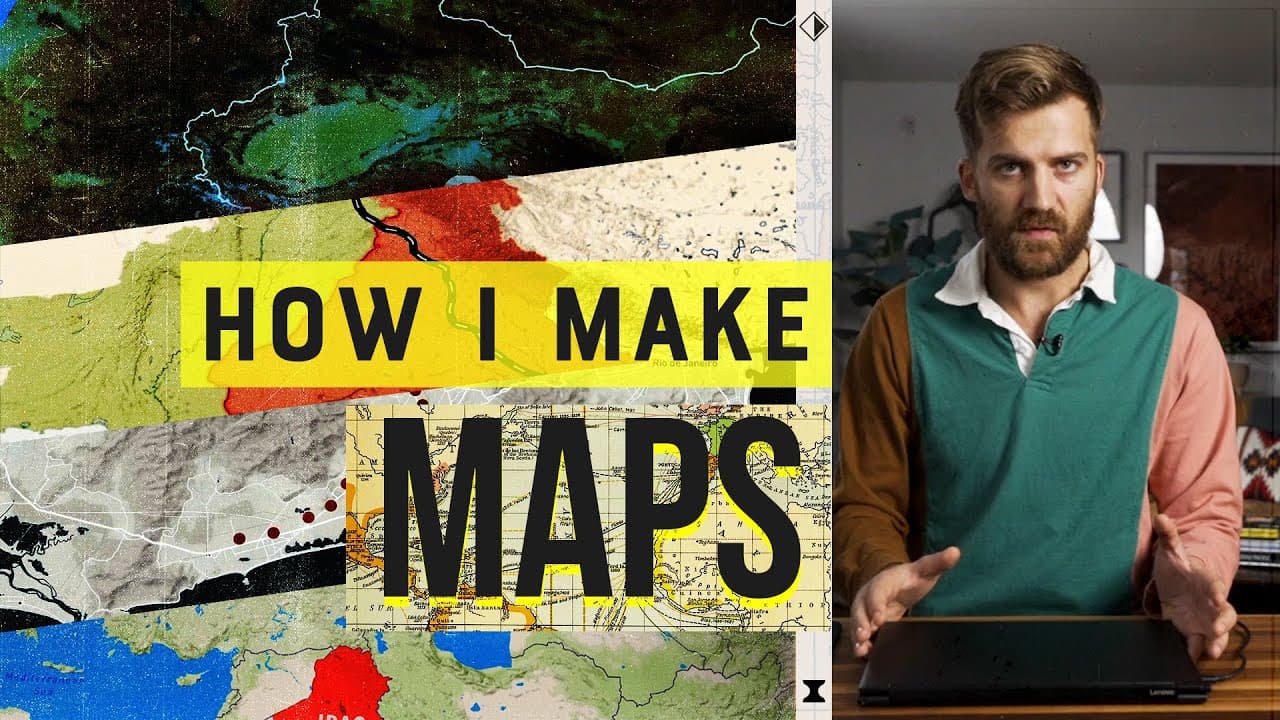
TL;DR
Create animated maps in AfterEffects with either Johnny Harris’s original plugin-free workflow or his newer GEOlayers workflow. The original method uses a high-resolution Illustrator file called Jenkins, a null layer for controlling movement, and position and scale keyframes for animation; GEOlayers costs $200 but provides a more powerful workflow. Read on for the specific setup, zoom, highlighting, and styling techniques shown.
Transcript
(clock ticks) - I wanna share with you how I make my maps. (smooth music) Okay, I know all those clips are super fancy, but I need to tell you it wasn't always this way. I used to be very not good at making maps. Like, look at this first map I ever made back in 2012. A foreign service officer in the field. It pains me to look at that and to hear my... Read More
Key Insights
- Johnny Harris improved his map-making skills over years, starting from basic maps.
- AfterEffects is a key software used for creating animated maps.
- Two workflows are presented: one with a $200 plugin and a more accessible method.
- Intel's 11th gen Evo processor enhances map-making efficiency and speed.
- GEOlayers is a powerful plugin for advanced map animation.
- Mapbox Studio allows customization of map styles for GEOlayers.
- The Intel processor enables smooth handling of complex workflows on a lightweight laptop.
- Efficient rendering times allow for iterative map design and adjustments.
Install to Summarize YouTube Videos and Get Transcripts
Explore YouTube Video Summarizer or Get YouTube Transcript Extractor
Questions & Answers
Q: How do you create animated maps with AfterEffects?
Johnny Harris demonstrates two workflows: a plugin-free method built around AfterEffects and an Illustrator file called Jenkins, and a more powerful method using the $200 GEOlayers plugin. In the original workflow, he imports the map, parents its elements to a null controller, and animates position and scale with keyframes.
Q: How does the plugin-free AfterEffects map workflow work?
Import the Jenkins Illustrator file into AfterEffects as footage, place it in a new 1920-by-1080 composition, and enable the setting that keeps the vector map sharp while zooming. Create a null layer as the controller, parent the map to it, then animate the controller’s position and scale.
Q: What is the Jenkins map file?
Jenkins is a high-resolution Illustrator file that Johnny Harris refined for years. It contains many of the world’s countries on separate layers, allowing borders and fills to be edited and the map to remain detailed when imported into AfterEffects.
Q: How do you keep an animated map clear while zooming in?
The Jenkins map is vector artwork, so it can remain sharp at high zoom levels. In AfterEffects, Harris enables the layer option represented by a small sunshine-like icon so the artwork stays high resolution as the controller scales it.
Q: How do you highlight a country such as Iraq in AfterEffects?
Create a new colored solid, copy Iraq’s shape from Illustrator, and paste it onto the selected solid in AfterEffects to form a mask. Parent that highlighted layer to the same null controller as the map, then animate its opacity from zero to 100 so it appears during the move.
Q: Why does Johnny Harris use GEOlayers for map animation?
Harris describes GEOlayers as expensive but incredibly useful and says it provides a much more powerful workflow than his original method. His GEOlayers process covers styling a map, linking that styling into GEOlayers, moving map elements, and adding labels, though he directs viewers to GEOlayers tutorials for the fundamentals.
Q: How did Johnny Harris develop his map-making workflow?
Harris made his first map in 2012 and then poured himself into learning AfterEffects. He refined his workflow at a Washington, DC think tank and later at Vox, eventually upgrading it while working on Borders India and translating physical maps of India’s partition into digital form.
Q: What role does Intel’s 11th-gen Evo processor play in the workflow?
Harris tests both map-making workflows on a lightweight laptop Intel sent him with an 11th-gen Evo processor. He reports fast Illustrator selections and smooth performance during this heavy workflow, noting that the small computer sometimes outpaced the large machines he was accustomed to using.
Summary & Key Takeaways
-
Johnny Harris shares his evolution in map-making, highlighting two workflows using AfterEffects. One workflow requires a $200 plugin, while the other is more accessible. Both methods benefit from Intel's 11th gen Evo processor, which enhances speed and efficiency. The video provides a detailed guide for creating animated maps for storytelling.
-
The video emphasizes the importance of Intel's 11th gen Evo processor in handling complex map-making workflows. Harris demonstrates how GEOlayers and Mapbox Studio can be used to create detailed maps, offering a powerful toolset for filmmakers and storytellers. The processor's capabilities enable smooth rendering and efficient map animation.
-
Harris discusses his journey from creating basic maps to mastering AfterEffects and GEOlayers. He illustrates two workflows for animated map-making, showcasing the power of Intel's 11th gen Evo processor in enhancing efficiency. The video serves as a comprehensive guide for those looking to create detailed, animated maps for storytelling purposes.
Read in Other Languages (beta)
Share This Summary 📚
Summarize YouTube Videos and Get Video Transcripts with 1-Click
Try YouTube Summary with ChatGPT & Claude or YouTube Transcript Generator
Explore More Summaries from Johnny Harris 📚



Summarize YouTube Videos and Get Video Transcripts with 1-Click
Try YouTube Summary with ChatGPT & Claude or YouTube Transcript Generator