How to Automate AI Shorts with n8n
TL;DR
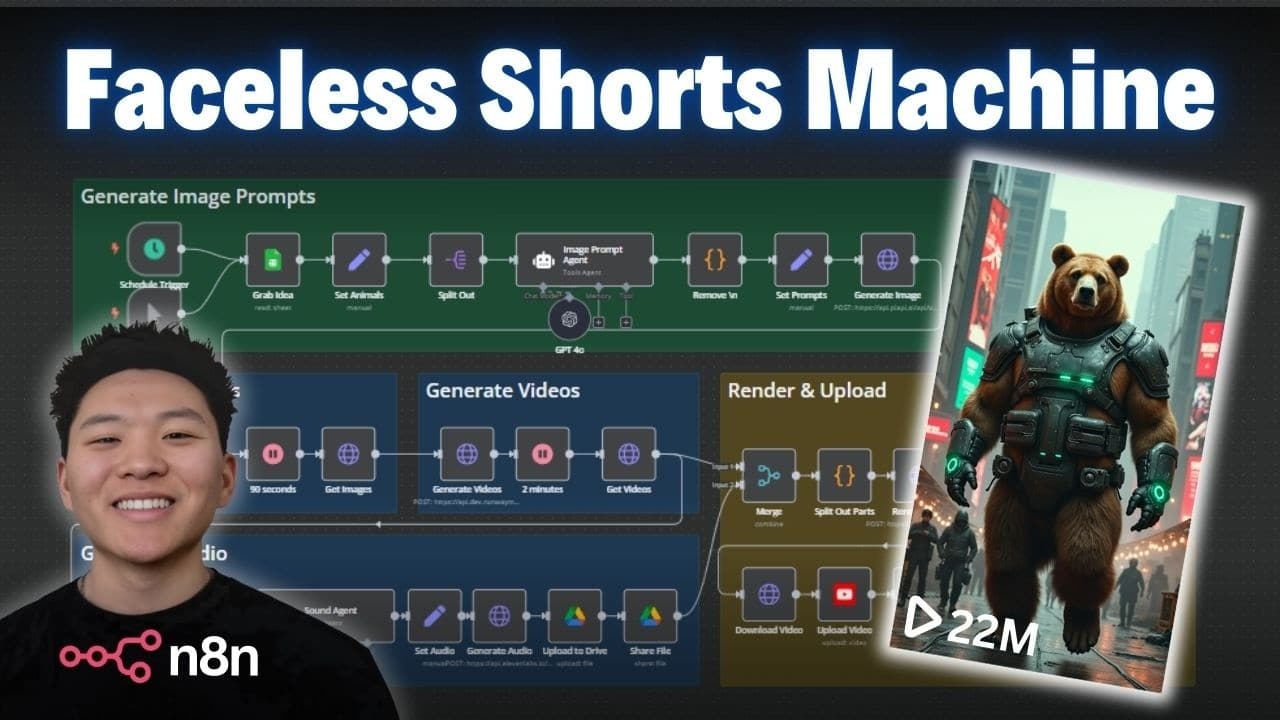
Automate the creation of faceless AI-generated shorts using n8n. By setting up a workflow that includes generating images, converting them into videos, and adding sound, you can effortlessly produce and upload content to YouTube. This process allows for continuous content creation, helping grow a YouTube channel with minimal manual effort.
Transcript
today I'm really excited to share this end workflow that I built with you guys that's going to help you generate and publish faceless AI shorts on autopilot once you have this thing up and running you can generate as many shorts as you want per day so you're basically going to be able to grow a YouTube channel while you sleep and the best part abou... Read More
Key Insights
- n8n is a powerful tool for automating workflows, including content creation for YouTube.
- The workflow involves generating AI images, converting them into videos, and adding audio.
- Google Sheets is used to manage content ideas and track the status of video creation.
- PiAPI and Runway are utilized for image and video generation, offering flexibility in models.
- 11 Labs provides sound generation, which is integrated into the video creation process.
- The workflow can be scheduled to run automatically, allowing for content creation while you sleep.
- Cost considerations include API usage fees, with video generation being the most expensive.
- The process is customizable, allowing for changes in prompt generation, video length, and sound design.
Install to Summarize YouTube Videos and Get Transcripts
Explore YouTube Video Summarizer or Get YouTube Transcript Extractor
Questions & Answers
Q: How to automate YouTube shorts creation with n8n?
To automate YouTube shorts creation with n8n, set up a workflow that generates AI images, converts them into videos, and adds audio. Use Google Sheets to manage video ideas, and schedule the workflow to run automatically. This setup allows for continuous content creation with minimal manual intervention, helping grow a YouTube channel efficiently.
Q: What tools are used in the n8n automated shorts workflow?
The n8n automated shorts workflow utilizes several tools: PiAPI for generating AI images, Runway for converting images into videos, and 11 Labs for creating audio. Google Sheets is used to manage video ideas and track progress. These tools work together to automate the content creation process, making it efficient and scalable.
Q: Why use Google Sheets in the n8n workflow?
Google Sheets is used in the n8n workflow to manage and organize content ideas for YouTube shorts. It helps track the status of each video, from idea generation to publication. This integration allows for easy updates and ensures that the workflow runs smoothly, pulling in new ideas and updating statuses as videos are created and uploaded.
Q: What are the cost considerations for automating shorts with n8n?
Cost considerations for automating shorts with n8n include API usage fees from services like PiAPI, Runway, and 11 Labs. Video generation, particularly with Runway, tends to be the most expensive part of the process. Users should monitor their API usage and consider subscription plans that fit their content creation needs and budget.
Q: How can the n8n workflow be customized?
The n8n workflow can be customized in several ways: adjusting prompt generation for images, changing video length, and modifying sound design. Users can also experiment with different AI models for image and video creation, or automate idea generation in Google Sheets. This flexibility allows creators to tailor the workflow to their specific content needs.
Q: What is the role of 11 Labs in the n8n workflow?
In the n8n workflow, 11 Labs is used for generating sound effects that are integrated into the videos. It creates audio tracks based on style prompts, enhancing the overall quality and engagement of the AI-generated shorts. This step is crucial for adding auditory elements that complement the visuals and improve viewer experience.
Q: How does scheduling work in the n8n shorts workflow?
Scheduling in the n8n shorts workflow allows the process to run automatically at set intervals, such as multiple times a day. This feature enables continuous content creation without manual intervention, helping to grow a YouTube channel efficiently. Users can configure the schedule to suit their content strategy and production goals.
Q: What flexibility does Runway offer in video creation?
Runway offers flexibility in video creation by allowing users to choose different models and settings for generating videos from images. It supports customizable video durations and aspect ratios, enabling creators to produce content that meets specific requirements. Runway's integration with n8n streamlines the video creation process, making it efficient and versatile.
Summary & Key Takeaways
-
Automate the creation of faceless AI-generated shorts using n8n. The workflow includes generating images, converting them into videos, and adding sound. This process allows for continuous content creation, helping grow a YouTube channel with minimal manual effort.
-
The workflow utilizes tools like PiAPI for image generation, Runway for video creation, and 11 Labs for audio. Google Sheets manages video ideas and tracks progress. The setup can be scheduled to run automatically, offering flexibility and ease.
-
Cost considerations involve API usage fees, especially for video generation. The process is highly customizable, enabling adjustments in prompts, video length, and sound design to suit specific content needs.
Read in Other Languages (beta)
Share This Summary 📚
Summarize YouTube Videos and Get Video Transcripts with 1-Click
Try YouTube Summary with ChatGPT & Claude or YouTube Transcript Generator
Explore More Summaries from Nate Herk | AI Automation 📚






Summarize YouTube Videos and Get Video Transcripts with 1-Click
Try YouTube Summary with ChatGPT & Claude or YouTube Transcript Generator