How Do MAC Addresses Work on Local Networks?
TL;DR
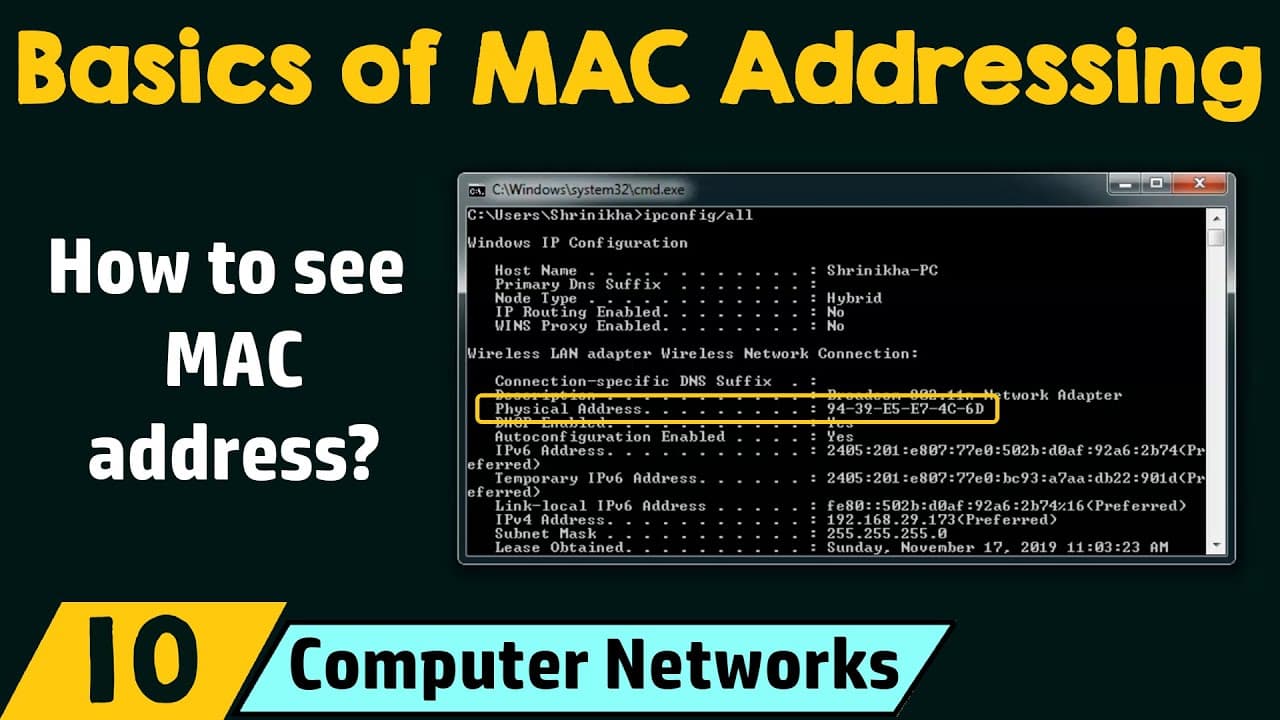
MAC addresses identify nodes within a local area network and help switches deliver data to the correct destination. A MAC address is a 48-bit physical or hardware address represented in hexadecimal, while an IP address is a 32-bit logical address represented in decimal. On Windows, the MAC address appears as the physical address in the output of the ipconfig/all command.
Transcript
Hello everyone, welcome to the next lecture in the computer network series. And today we will see the basics of MAC addressing. Before we start, we will see the outcomes of today's session. In today's session, we have three outcomes - Outcome number 1: We will understand the basics of MAC addressing. Outcome number 2: We will understand the differe... Read More
Key Insights
- MAC stands for Media Access Control, and a MAC address identifies each node within a local area network. The address is used when data must be delivered to the correct destination device on that local network.
- An IP address is compared to a person’s location because it can change when the person moves, while a MAC address is compared to the person’s name because it remains associated with the device regardless of location.
- Routers make forwarding decisions based on IP addresses. When a router receives a packet, it examines the IP address to determine how the data should move toward its intended destination.
- Switches forward data based on MAC addresses. After data reaches a switch, the switch uses the destination MAC address to deliver it to the correct device within the local area network.
- A switch maintains a MAC address table that helps it determine which computer corresponds to a particular MAC address. This table supports forwarding data to the appropriate device instead of treating every connected computer as the destination.
- A MAC address is a 48-bit physical or hardware address represented in hexadecimal. The example 70-20-84-00-ED-FC demonstrates the address format, including hexadecimal groups and separators.
- MAC address separators can be hyphens, periods, or colons. The transcript states that the manufacturer determines which separator is used when representing the address.
- The ipconfig/all command displays MAC address information on a Windows device. The relevant adapter entry labels the MAC address as the physical address, and separate Ethernet and Wi-Fi adapters can have their own displayed details.
Install to Summarize YouTube Videos and Get Transcripts
Explore YouTube Video Summarizer or Get YouTube Transcript Extractor
Questions & Answers
Q: What is a MAC address in computer networking?
A MAC address is a Media Access Control address used to identify a node within a local area network. It is also called a physical address or hardware address. The address is assigned by the manufacturer, is described as normally unique throughout the world, contains 48 bits, and is represented using hexadecimal characters separated by hyphens, periods, or colons.
Q: What is the difference between an IP address and a MAC address?
An IP address is a logical address that can change, while a MAC address is a physical or hardware address assigned by the manufacturer. The lesson compares an IP address to a person’s location and a MAC address to the person’s name. It also describes IP addresses as 32-bit decimal addresses and MAC addresses as 48-bit hexadecimal addresses.
Q: Why do switches need MAC addresses?
Switches need MAC addresses to deliver data to the correct destination within a local area network. When data reaches a switch, the switch examines the destination MAC address and determines which connected computer should receive it. This makes MAC addresses switch-friendly addresses and allows local data delivery even when many devices are connected through the same network equipment.
Q: Why do routers use IP addresses instead of MAC addresses?
Routers use IP addresses to make forwarding decisions as data travels from a source toward a destination. When a router receives a packet, it examines the included IP address to decide where the packet should go next. The lesson therefore calls IP addresses router-friendly addresses, while MAC addresses are used by switches for delivery within a local area network.
Q: What information does a switch store in its MAC address table?
A switch maintains a MAC address table so it can determine which computer corresponds to a particular MAC address. This information tells the switch where it should forward data when a destination MAC address is present. The table supports delivery to the correct computer within the local area network rather than confusing the destination with other connected devices.
Q: How is a MAC address formatted and represented?
A MAC address is a 48-bit address represented in hexadecimal. The lesson gives 70-20-84-00-ED-FC as an example. Groups within the address can use hyphens, periods, or colons as separators, and the manufacturer determines the separator used for its representation. This differs from the example IP address, 10.10.23.56, which uses decimal numbers and periods.
Q: How can I find a MAC address on a Windows computer?
Open the command prompt by typing cmd into the search bar, then run the command ipconfig/all. The output lists network adapter details, including the physical address, which is the MAC address. Check the adapter used for the current local network connection, such as the Wi-Fi adapter when the computer is connected through Wi-Fi rather than an Ethernet cable.
Q: How does a Wi-Fi router identify the correct receiving computer?
A Wi-Fi router can use the destination computer’s MAC address to deliver received data to that specific computer within the local area network. This matters when many devices are connected to the same Wi-Fi router. Data leaving the computer uses its MAC address as the source MAC address, while replies identify that computer through its destination MAC address.
Summary & Key Takeaways
-
A MAC address stands for Media Access Control address and identifies a node within a local area network. It is also called a physical or hardware address. The lesson describes it as a normally worldwide-unique, manufacturer-assigned address that does not change when a device moves between locations or networks.
-
IP and MAC addresses serve different forwarding roles during communication. Routers make forwarding decisions using IP addresses, while switches use MAC addresses to deliver data to the correct device within a local network. Switches maintain MAC address tables that associate individual MAC addresses with the computers to which data should be forwarded.
-
A MAC address contains 48 bits and is represented with hexadecimal characters, while the described IP address contains 32 bits and uses decimal numbers. MAC address groups may be separated by hyphens, periods, or colons. On Windows, running ipconfig/all displays each network adapter’s MAC address as its physical address.
Read in Other Languages (beta)
Share This Summary 📚
Summarize YouTube Videos and Get Video Transcripts with 1-Click
Try YouTube Summary with ChatGPT & Claude or YouTube Transcript Generator
Explore More Summaries from Neso Academy 📚




Summarize YouTube Videos and Get Video Transcripts with 1-Click
Try YouTube Summary with ChatGPT & Claude or YouTube Transcript Generator