Why You Should Switch to RustDesk for Remote Access
TL;DR
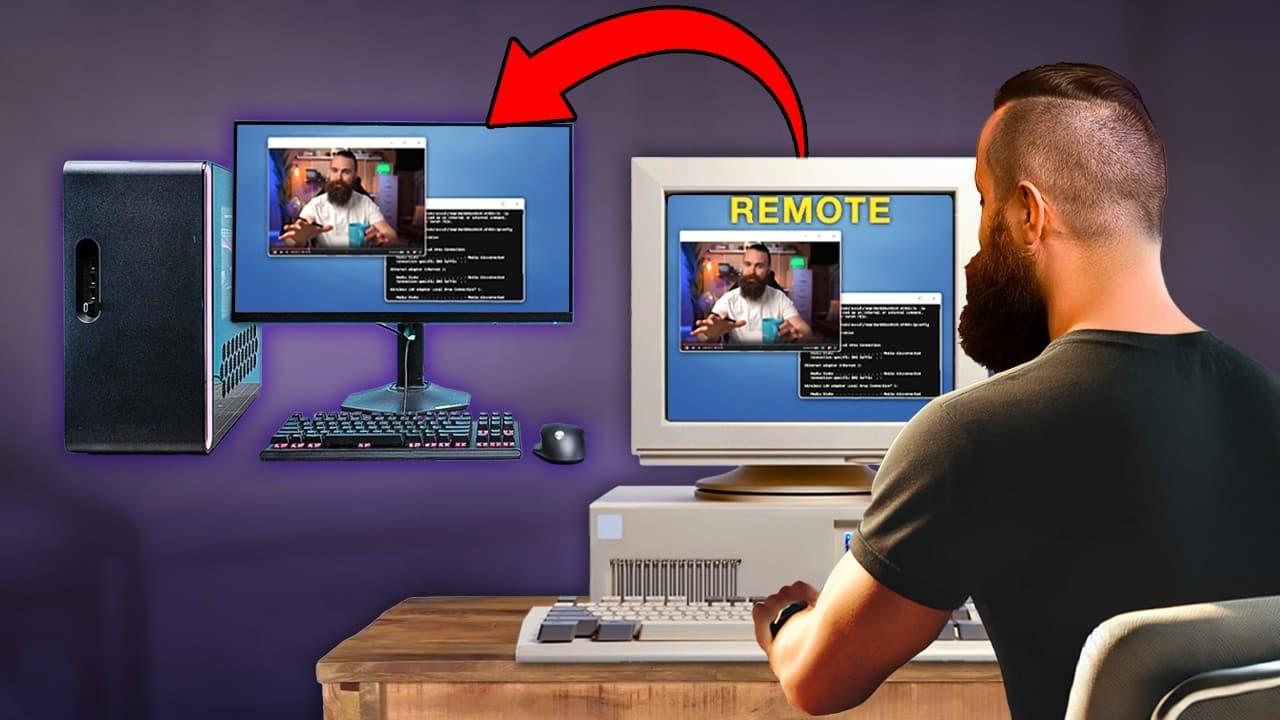
RustDesk is a fantastic free and open-source remote desktop solution that operates seamlessly across Windows, Mac, and Linux. It allows users to host their own servers either locally or in the cloud, eliminating the need for costly Windows Pro features while providing secure, direct connections for efficient remote access.
Transcript
remote desktop one computer remotely accessing another computer we use it all the time it's required in it and you know what I found a new solution that I love Windows Mac Linux doesn't matter from any computer including my where's my phone there it is including my phone it's free open source I can host it myself tha... Read More
Key Insights
- RustDesk is a free, open-source remote desktop solution that works seamlessly across Windows, Mac, and Linux, eliminating the need for Windows Pro.
- The video discusses the limitations of traditional remote desktop solutions like Windows RDP, which requires Windows Pro for hosting remote connections.
- RustDesk allows users to host their own server locally or in the cloud, providing full control over remote access without relying on third-party servers.
- The setup process for RustDesk involves installing Docker and using Docker Compose to run a RustDesk server, which can be done on a local machine or in the cloud.
- TwinGate is recommended as a zero-trust network access solution that enhances RustDesk by providing secure access from anywhere.
- RustDesk supports GPU acceleration and offers a native client experience, making it suitable for tasks requiring high performance, such as video editing.
- The video highlights RustDesk's ability to provide direct and encrypted connections, ensuring secure and efficient remote access.
- RustDesk's flexibility allows for both local network connections and remote access through a relay server, offering versatility for various use cases.
Install to Summarize YouTube Videos and Get Transcripts
Explore YouTube Video Summarizer or Get YouTube Transcript Extractor
Questions & Answers
Q: What is RustDesk, and why is it recommended as a remote desktop solution?
RustDesk is a free, open-source remote desktop solution that works across Windows, Mac, and Linux. It is recommended because it eliminates the need for Windows Pro, provides a seamless experience for remote access, and allows users to host their own server locally or in the cloud, offering full control over their remote connections.
Q: What are the limitations of traditional remote desktop solutions like Windows RDP?
Traditional remote desktop solutions like Windows RDP require Windows Pro for hosting remote connections, which can be costly. They also have limitations in terms of network requirements, as they often require the devices to be on the same network. Additionally, they may lack features like GPU acceleration and native client support, which are important for tasks requiring high performance.
Q: How does RustDesk enhance remote desktop performance and security?
RustDesk enhances performance by providing GPU acceleration and offering a native client experience, making it suitable for high-performance tasks like video editing. Security is improved through direct and encrypted connections, ensuring secure and efficient remote access. Users can also host their own server, giving them full control over their remote connections without relying on third-party servers.
Q: What role does TwinGate play in the RustDesk setup?
TwinGate is recommended as a zero-trust network access solution that complements RustDesk by providing secure access from anywhere. It allows users to access their devices securely without relying on traditional VPNs, offering fine control over who has access to what. This enhances the security and flexibility of the RustDesk remote desktop solution.
Q: How is RustDesk set up using Docker?
Setting up RustDesk using Docker involves installing Docker and using Docker Compose to run a RustDesk server. This can be done on a local machine or in the cloud. The process involves creating a Docker Compose file with the necessary configurations and using the 'docker-compose up' command to start the server. This setup allows users to host their own server and have full control over their remote access.
Q: What are the benefits of hosting your own RustDesk server?
Hosting your own RustDesk server provides several benefits, including full control over your remote connections, enhanced security by eliminating reliance on third-party servers, and the ability to tailor the server setup to your specific needs. It also ensures privacy and allows for customization of the server environment, offering a more personalized and secure remote desktop experience.
Q: What features does RustDesk offer for remote desktop access?
RustDesk offers several features for remote desktop access, including GPU acceleration, native client support, and the ability to host your own server. It supports direct and encrypted connections, ensuring secure and efficient remote access. RustDesk also provides flexibility for both local network connections and remote access through a relay server, making it suitable for various use cases.
Q: How does RustDesk compare to other remote desktop solutions like TeamViewer and AnyDesk?
RustDesk compares favorably to other remote desktop solutions like TeamViewer and AnyDesk by being free and open-source, allowing users to host their own server, and offering GPU acceleration and native client support. Unlike TeamViewer, RustDesk does not rely on third-party servers, providing enhanced security and privacy. It also offers a more seamless and efficient remote desktop experience across all major operating systems.
Summary & Key Takeaways
-
RustDesk is introduced as a superior alternative to traditional remote desktop solutions, offering free and open-source access across all major operating systems. It eliminates the need for Windows Pro and provides a seamless experience for remote access.
-
The video explains the limitations of existing remote desktop solutions like Windows RDP, which requires Windows Pro, and highlights the advantages of RustDesk, including its open-source nature and ability to host servers locally or in the cloud.
-
Viewers are guided through the setup process for RustDesk, which involves installing Docker and using Docker Compose to run a RustDesk server. TwinGate is recommended for secure access, and RustDesk's performance and flexibility are emphasized.
Read in Other Languages (beta)
Share This Summary 📚
Summarize YouTube Videos and Get Video Transcripts with 1-Click
Try YouTube Summary with ChatGPT & Claude or YouTube Transcript Generator
Explore More Summaries from NetworkChuck 📚

Summarize YouTube Videos and Get Video Transcripts with 1-Click
Try YouTube Summary with ChatGPT & Claude or YouTube Transcript Generator