How does a packet travel through OSI TCP layers?
TL;DR
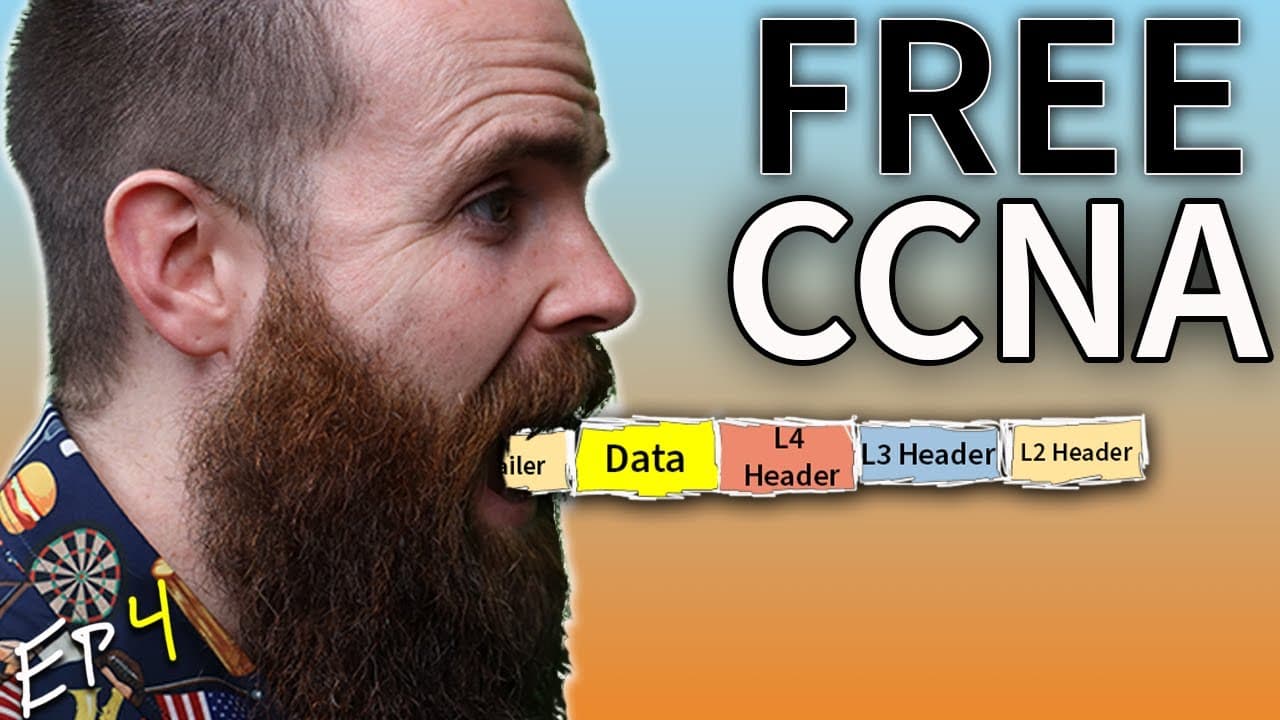
A packet is formed by layering data through the OSI and TCP/IP models, starting at the application layer and encapsulating down to the physical layer. Each layer adds its own header or trailer, creating a stacked envelope that is eventually de-encapsulated at the destination. The video illustrates encapsulation, de-encapsulation, and how frames, packets, and segments move across a network.
Transcript
this is episode four of my free ccna course and a huge shout out to bozon software the official sponsor of this ccna course they are the reason this can be made available for free so i highly encourage you to go check them out they have the absolute best ccna ccnp labs and practice exams tcp and osi networking models that define how we connect our ... Read More
Key Insights
- The seven OSI layers provide a framework for understanding data flow, with the application layer handling user requests and protocols like HTTP or HTTPS.
- Encapsulation is the process of wrapping data with headers and trailers as it moves down the stack, forming a segment at layer 4 and leading to a frame at layer 2.
- The transport layer offers TCP or UDP as options, with TCP providing reliability and error handling to ensure data delivery.
- Layer 3 uses IP addressing to route packets from source to destination across networks via routers.
- Layer 2 handles MAC addresses and switches, delivering frames within the local network segment.
- De-encapsulation is the reverse process, where each layer is peeled away at the destination to reveal the original data.
- Frames travel across the physical medium, and switches read MAC addresses to forward frames to the correct next hop.
- Although the OSI model is referenced for teaching, the real-world example uses TCP/IP concepts to illustrate practical networking.
Install to Summarize YouTube Videos and Get Transcripts
Explore YouTube Video Summarizer or Get YouTube Transcript Extractor
Questions & Answers
Q: How does encapsulation create a packet as it moves down the OSI TCP stack?
Encapsulation starts when the application data is wrapped with an application layer header, then moved to the transport layer where a transport header is added to form a segment. This process continues at the network layer with an IP header, and at the data link layer with a MAC header and trailer, producing a complete frame for transmission. Each added header carries addressing and control information, enabling proper delivery through the network. This stacking of headers creates the packet that travels through the network to its destination.
Q: What is the role of the transport layer in this example, and what are the two main options?
The transport layer is responsible for moving data reliably or efficiently between endpoints. The two main options are TCP and UDP. TCP provides reliability through error checking and retransmission if necessary, ensuring data arrives intact. UDP is faster and lighter weight but does not guarantee delivery. In the video, the Port 443 is noted for HTTPS traffic, illustrating how transport layer concepts map to real world services.
Q: What happens at layer 3 during packet routing in the video?
At layer 3, the network layer, the packet carries IP addressing information including a source IP and a destination IP. Routers read this header to determine the next hop toward the destination. The router uses its routing table to forward the packet toward networkchuck.coffee, effectively directing traffic through interconnected networks until it reaches the server.
Q: How do MAC addresses and switches fit into the data link layer?
In the data link layer, MAC addresses are used to identify devices on the local network. The switch uses its CAM table to map MAC addresses to specific ports and forwards frames accordingly. The video demonstrates how frames travel from Johnny’s laptop to the router by using source and destination MAC addresses, with the switch handling local delivery before the packet is escalated to higher layers.
Q: What is the difference between a frame, a packet, and a segment as described in the video?
A segment is the transport layer unit containing the application data plus a layer 4 header. A packet refers to the unit at the network layer with a layer 3 header. A frame is the data link layer unit that includes layer 2 headers and trailers. The video emphasizes that encapsulation produces these layered constructs, and de-encapsulation removes them at the destination in reverse order.
Q: Why is the OSI model still useful even when TCP/IP is used in real networks?
The OSI model provides a clear, abstract framework for understanding how data moves between devices, with seven distinct layers that help organize concepts like encapsulation, addressing, and switching. Even though TCP/IP is commonly used in practice, the OSI layers help learners visualize how each protocol and function contributes to end-to-end communication, making troubleshooting and design more systematic.
Q: What analogy does the video use to explain encapsulation, and what does it illustrate about data flow?
The video uses the analogy of letters inside envelopes, where data is wrapped in successive headers at each layer to form nested envelopes. This illustrates encapsulation by showing how the original message is progressively wrapped as it moves down the stack, and de-encapsulated as it traverses back up the stack at the destination, revealing the original data once all headers are removed.
Q: How does the video illustrate the role of a server and a client in a typical web access scenario?
The video presents a client scenario where Johnny’s computer accesses a website. The client’s browser sends an HTTP/HTTPS request to the server, initiating a sequence of encapsulation and routing steps through multiple layers. The server responds, and the data path demonstrates how the request travels across the network, through switches and routers, to arrive at the destination server and return the response to the client.
Summary & Key Takeaways
-
The video traces how a data request travels from the application down to the physical layer, showing encapsulation at each step and how headers are added to create a frame that can be transmitted over a network.
-
It explains the difference between the OSI seven layer model and the TCP/IP model, noting that real networks use TCP/IP while still referencing the seven layers for clarity.
-
A practical walkthrough uses a coffee order example to demonstrate how a packet is processed by the application, transport, network, and data link layers, including address information and port usage.
Read in Other Languages (beta)
Share This Summary 📚
Summarize YouTube Videos and Get Video Transcripts with 1-Click
Try YouTube Summary with ChatGPT & Claude or YouTube Transcript Generator
Explore More Summaries from NetworkChuck 📚



Summarize YouTube Videos and Get Video Transcripts with 1-Click
Try YouTube Summary with ChatGPT & Claude or YouTube Transcript Generator