How to write effective work emails for new hires
TL;DR
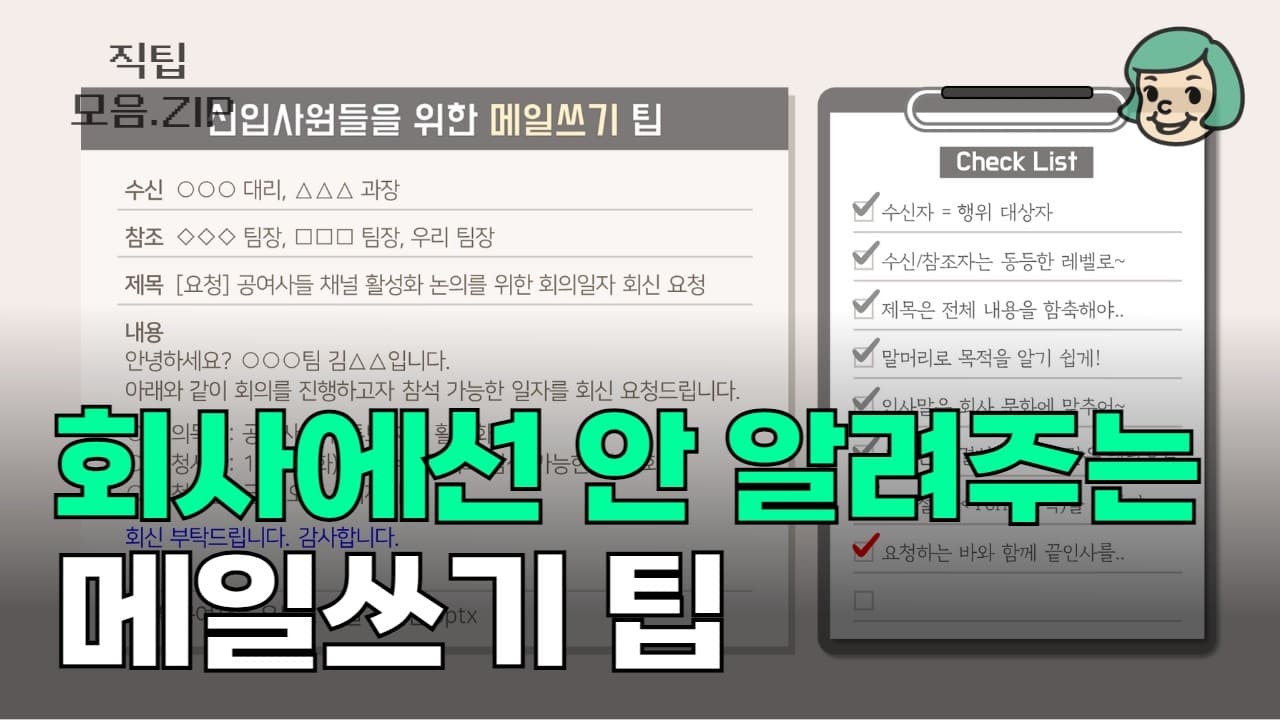
The video teaches a practical email checklist for new employees. It emphasizes sending messages to the right recipients, using a proper CC, and writing clear subject lines and concise bodies. It also recommends greetings, mentioning attachments, and using templates to avoid rambling and miscommunication.
Transcript
Hello. Women who majored in engineering . I'm Manager Kim of "Gong-Yeo-Sa." Today, I’ve prepared some email tips for new employees that nobody tells you about when starting work. It applies to experienced people like me, but for new employees, it is especially important to center your work around emails. It’s great for learning tasks by loo... Read More
Key Insights
- Emails should target the correct recipients and include the appropriate CC to ensure everyone involved is informed and no one is left out of the loop.
- Subject lines must encapsulate the message content and, for important emails, use prefixes to help recipients identify priority and context at a glance.
- Begin emails with a greeting and a brief self introduction when necessary, so the recipient understands the sender without needing to check the sender field repeatedly.
- Keep the first sentence after the greeting concise and aligned with the subject to avoid long rambling explanations that reduce readability and cause confusion.
- Mention any attachments in the body of the email to prevent someone missing important files and to set expectations for what the recipient should review.
- If there is a deadline, place it in parentheses at the end of the subject line to grab attention and improve timely replies.
- Highlight key requests or dates using color, bold, or underlining to improve skim readability for busy recipients who read subject lines first.
- Using templates can make writing easier for newcomers and standardize professional tone across emails, reducing mistakes and miscommunication.
Install to Summarize YouTube Videos and Get Transcripts
Explore YouTube Video Summarizer or Get YouTube Transcript Extractor
Questions & Answers
Q: What is the first step to improve a new hire email before sending it?
The first step is to ensure the recipient list is correct, including only those who need to take action, and to adjust the CC so that all relevant people are informed without over sharing. This prevents confusion about who should respond and keeps the email focused on action.
Q: Why should you introduce yourself in the email body?
Introducing yourself in the body helps the recipient understand who you are without checking the sender field, especially when the email has been forwarded or seen by someone who does not know you. It enhances professionalism and makes the message easier to connect with.
Q: How should the subject line be crafted according to the guide?
The subject line should encapsulate the entire content and ideally reflect the meeting or action requested. If it is long, use prefixes to highlight importance and ensure the topic is immediately clear to the recipient.
Q: What role do greetings play in the email, and when might they be skipped?
Greetings set a respectful tone and contribute to perceived competence. They should be included for new hires and in most company contexts, but some workplaces may not require formal greetings, so observe and adapt to your company norms.
Q: What is advised about the body length and content after the greeting?
Keep the sentence after the greeting concise and focused on the topic. A long, rambling opening can confuse the reader and obscure the main request. Use a clear topic sentence that mirrors the subject line.
Q: Why is mentioning attachments in the email important?
Mentioning attachments in the body ensures recipients know to review them and reduces the chance that files are overlooked. It also signals that the email contains actionable material that requires attention.
Q: What is the benefit of using templates in email writing for new employees?
Templates help overcome writing difficulties for newcomers, provide a clear structure, and ensure consistency in tone and format. This makes emails easier to read and increases the likelihood of a timely and accurate response.
Q: How can you make important parts of the email stand out without sacrificing readability?
Use color, bold text, or underlining for key points to draw attention to requests or deadlines. This helps readers quickly identify what is expected of them, improving comprehension and response rates.
Summary & Key Takeaways
-
A new-hire email guide emphasizes correct recipient and CC practice, clear subject lines, and proper greetings, helping your messages read as professional and action oriented.
-
The checklist covers mentioning attachments, keeping sentences short, and using templates to improve readability and efficiency in business communication.
-
Followers learn to tailor emails to company norms, balance hierarchy in recipients, and wrap up with courteous closings to project competence and reliability.
Read in Other Languages (beta)
Share This Summary 📚
Summarize YouTube Videos and Get Video Transcripts with 1-Click
Try YouTube Summary with ChatGPT & Claude or YouTube Transcript Generator
Explore More Summaries from 공여사들 📚

Summarize YouTube Videos and Get Video Transcripts with 1-Click
Try YouTube Summary with ChatGPT & Claude or YouTube Transcript Generator