How to Prototype and Build Agents with Claude Code
TL;DR
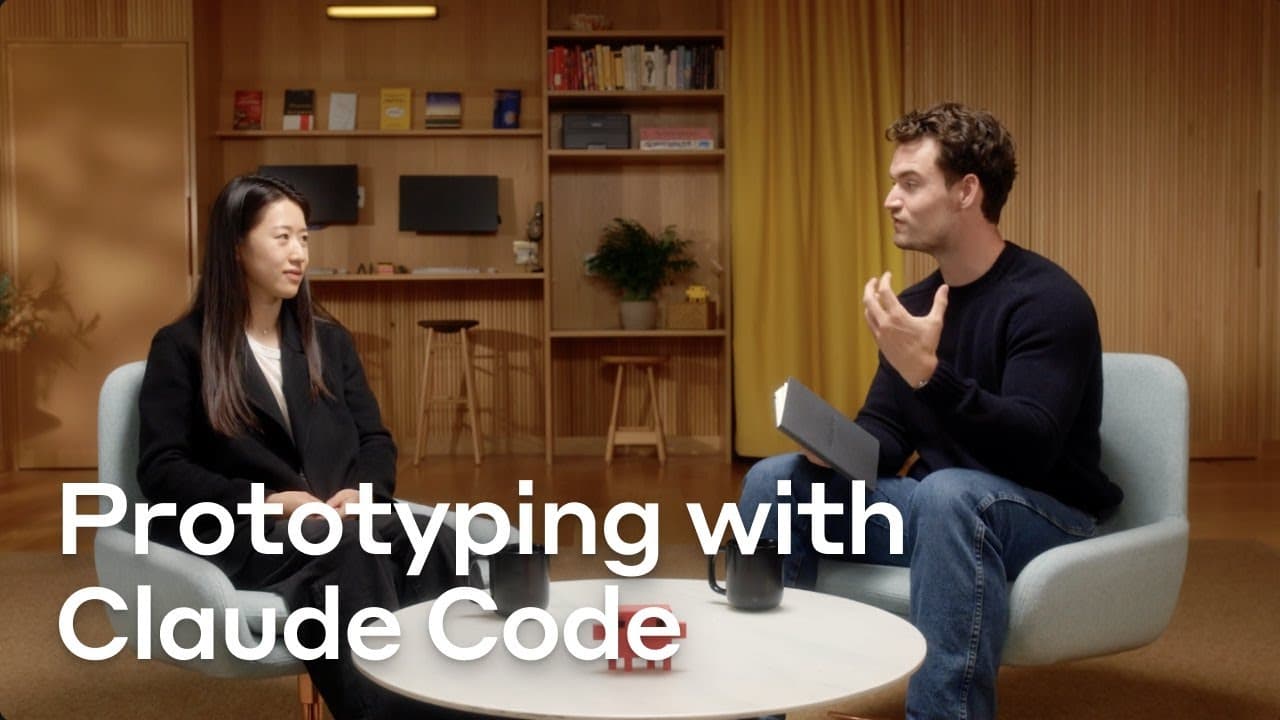
Prototype working features before writing extensive design documents, test them internally, and use real adoption to decide what ships. Claude Code supports this workflow through terminal-based customization, CLAUDE.md memory, reusable slash commands, hooks, plan mode, parallel sessions, and an SDK that provides an agentic loop, permissions, tool execution, API handling, and prompt caching.
Transcript
- These developers tend to like to run multiple Claude sessions at once, and they've started calling this multi-Clauding. So you might see sessions where people have like six Claudes open on their computer at the same time. - Hey, I'm Alex. I lead Claude Relations here at Anthropic. Today we're gonna be talking about Claude Code, and I'm joined by ... Read More
Key Insights
- Working prototypes are the Claude Code team’s primary method for evaluating product ideas. Engineers commonly build a feature for themselves, release it internally to Anthropic employees, and treat enthusiastic internal adoption as a strong signal that external developers may value it too.
- Dogfooding is essential because developer workflows are highly varied. Even when a goal such as an IDE integration is clear, several implementations may be plausible, so testing prototypes in real workflows helps the team determine which version feels useful enough to ship.
- The terminal is a familiar and extensible foundation for Claude Code. Existing primitives such as slash commands make features easier to add, while hooks use ordinary scripts to introduce deterministic actions around events without requiring developers to learn a separate customization technology.
- Claude Code works with minimal initial configuration after installation. Access to local files and tools gives developers a clear model of its capabilities, whether they work independently, at a smaller company, or within a large enterprise environment.
- Multi-Clauding is a common workflow in which developers operate several Claude sessions simultaneously. Sessions may use separate Git workspaces or repository copies, and developers can assign distinct roles, such as keeping one instance read-only for questions while another edits code.
- Plan mode is designed for difficult or complex changes. It directs Claude Code to pause, explore the codebase, understand the architecture, and produce an engineering plan before implementation, a pattern that the team frequently observes among engineers at larger companies.
- CLAUDE.md is Claude Code’s memory mechanism for team-specific context. Recording goals, architecture, codebase pitfalls, and best practices there can substantially improve output quality, while checked-in custom slash commands allow teams to share frequently reused prompts.
- The Claude Code SDK provides reusable foundations for general agents. It handles conversation turns, tool-call execution, permissions, API interaction, error backoff, and prompt caching, while allowing developers to supply their own system prompts, tools, file-editing behavior, and other implementations.
Install to Summarize YouTube Videos and Get Transcripts
Explore YouTube Video Summarizer or Get YouTube Transcript Extractor
Questions & Answers
Q: How does Anthropic prototype features with Claude Code?
Anthropic’s Claude Code engineers often skip an initial design document and build a working version of a desired feature directly. They release the prototype internally to Anthropic employees, called “Ants,” and observe whether people actually use and value it. Strong internal reception supports an external release, while weaker adoption sends the feature back for adjustment and further experimentation.
Q: Why does Claude Code rely heavily on internal dogfooding?
Internal dogfooding reveals how features behave inside real developer workflows, which are too varied to predict reliably through theory alone. A team may know it wants a capability such as an IDE integration but still face several possible implementations. By prototyping and using each approach internally, the team can feel how it works in practice and select the version worth shipping.
Q: What is multi-Clauding and how do developers use it?
Multi-Clauding is the practice of running several Claude Code sessions at the same time. Developers may place sessions in different Git workspaces or separate copies of a repository, monitor their progress, and provide feedback when one pauses. They can also divide responsibilities, keeping one session for questions without code edits while another session modifies the same repository.
Q: When should developers use Claude Code plan mode?
Plan mode is useful for difficult tasks and complex changes that require architectural understanding before implementation. It instructs Claude Code to pause, explore the codebase, learn how the system is organized, and create an engineering plan before changing code. The discussion identifies this as a particularly common pattern among engineers working at larger companies.
Q: How can teams customize Claude Code for their codebase?
Teams can place their goals, architectural details, codebase pitfalls, and development best practices in CLAUDE.md, which serves as Claude Code’s memory. They can also turn repeated prompts into custom slash commands and check those commands into the repository for shared use. Hooks add scripted actions around events, such as running lint checks before a commit or sending a Slack notification after work finishes.
Q: What are Claude Code hooks used for?
Claude Code hooks add deterministic scripted behavior around Claude Code events. Because a hook is fundamentally a script, developers can use skills they already have instead of learning a new customization system. Examples from the discussion include running linters before Claude makes a commit and sending a Slack notification whenever Claude completes its assigned work.
Q: What does the Claude Code SDK provide for agent builders?
The Claude Code SDK supplies the central components needed to build an agent, including an agentic loop, user-turn handling, tool-call execution, an existing permission system, and communication with the underlying API. It also manages backoff after API errors and aggressively uses prompt caching for token efficiency. Developers can add custom system prompts and tools without rebuilding these foundations.
Q: What kinds of agents can be built with the Claude Code SDK?
The SDK is intended for general agent development rather than coding tasks alone. The discussion cites security, site reliability engineering, incident response, legal, and compliance agents as examples. Developers can use built-in capabilities such as to-do lists and file editing, remove components they do not need, or replace default behavior with their own tools and implementations.
Summary & Key Takeaways
-
Anthropic’s Claude Code team often turns product ideas directly into working prototypes instead of beginning with design documents. Employees test these features internally, and strong reception becomes the main signal for an external release. Features that receive limited use are revised, while hands-on dogfooding helps the team choose among possible implementations.
-
Claude Code usage differs across organizations and tasks. Smaller-company engineers often use auto-accept mode and operate several parallel sessions in separate workspaces or repository copies. Larger-company engineers favor plan mode for complex changes because it asks Claude to inspect the codebase, understand its architecture, and prepare an engineering plan before editing files.
-
Teams improve Claude Code by documenting architecture, goals, conventions, and pitfalls in CLAUDE.md, then adding reusable slash commands and event-driven hooks. The Claude Code SDK extends these capabilities to custom agents by supplying the agentic loop, permissions, tool execution, API interaction, error backoff, and prompt caching while allowing components to be replaced.
Read in Other Languages (beta)
Share This Summary 📚
Summarize YouTube Videos and Get Video Transcripts with 1-Click
Try YouTube Summary with ChatGPT & Claude or YouTube Transcript Generator
Explore More Summaries from Anthropic 📚

Summarize YouTube Videos and Get Video Transcripts with 1-Click
Try YouTube Summary with ChatGPT & Claude or YouTube Transcript Generator