How to start a productive Claude.ai chat session
TL;DR
Claude is an AI collaborator that acts like a coworker to amplify your work. Start with a clear prompt, set your role and objectives, define the task and rules, and choose the right Claude model. Use features like web search, document upload, and persistent context to tailor responses.
Transcript
Imagine this. You're looking at a blank page, wrestling with a big complex project, and not sure where to start. What if you had a partner who could help you break it down? Claude is a powerful, intelligent collaborator that amplifies your capabilities across all of your work. Claude brings AI intelligence, but you bring the context and expertise t... Read More
Key Insights
- Claude is a cooperative AI assistant that enhances human work by sharing context and following user-provided instructions.
- Every Claude interaction starts with a prompt and context that shape the response, making setup crucial for usefulness.
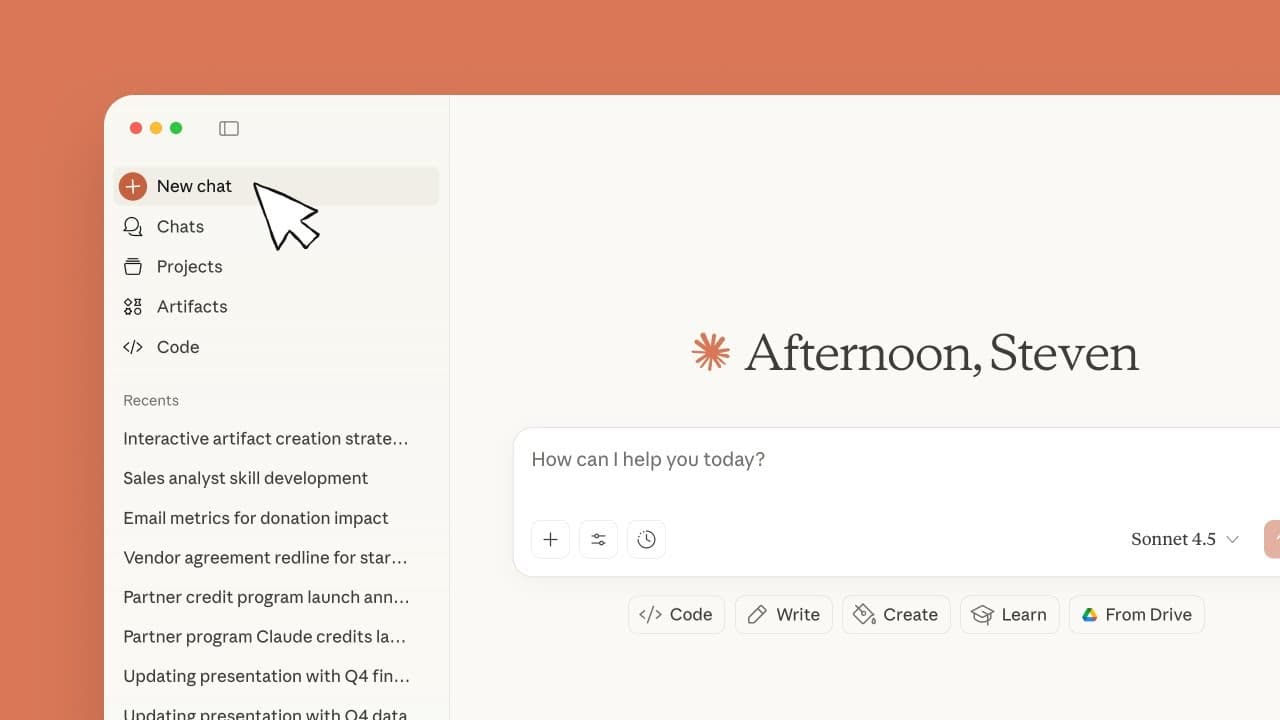
- The interface includes a sidebar for creating new chats and jumping to old ones, plus projects that preserve context across conversations.
- Artifacts allow turning ideas into sharable apps, tools, or content, expanding practical outputs beyond chat.
- Setting the stage is essential: define your role and objectives so Claude knows the purpose of the task.
- Defining the task and specifying rules guide Claude on what actions to take and what style to use.
- Model selection is available and impacts performance; think mode and extended thinking can increase depth at the cost of speed.
- Research mode enables Claude to gather and cite information from many sources for complex analyses.
Install to Summarize YouTube Videos and Get Transcripts
Explore YouTube Video Summarizer or Get YouTube Transcript Extractor
Questions & Answers
Q: A real search query question about Claude start up
What is the recommended first step to get productive results when starting with Claude AI, and why does the initial prompt matter for guiding the assistant's behavior? The initial prompt sets the stage by defining your role, objectives, and context, which fundamentally shapes how Claude analyzes the task, gathers relevant information, and constructs a useful, aligned response. Proper prompts help Claude understand constraints and desired outcomes, reducing back-and-forth and increasing efficiency.
Q: How do you organize work with Claude using projects and artifacts
How can projects and artifacts improve Claude AI workflows, and what should you expect when using them for ongoing work? Projects provide persistent context across chats, enabling Claude to reference prior decisions, while artifacts allow turning ideas into sharable tools or content, extending the utility of Claude beyond plain text responses and facilitating collaboration.
Q: What does it mean to set the stage for Claude
What does setting the stage involve when preparing to chat with Claude, and how does it affect results? Setting the stage means clarifying your role, objectives, and any relevant work context. This information helps Claude tailor its responses to your goals, align with your constraints, and deliver outcomes that fit the intended purpose, such as an investor pitch or technical plan.
Q: How should you define the task and rules in Claude prompts
Why is it important to define the task and specify rules in Claude prompts, and what examples illustrate effective use? Defining the task tells Claude what to do, whether writing, analyzing, or building, while rules dictate style, tone, and format. Providing examples or templates further guides Claude in producing outputs that meet expectations and consistency.
Q: Which Claude models are discussed and how to choose
Which Claude models are available and how should users choose between them for a given task? Claude offers multiple models, including Sonnet as a balanced default and Opus for complex multi-step analyses. Selection depends on task complexity, desired depth, and cost considerations, with thinking mode adding depth at the expense of latency.
Q: What is the role of web search and real-time data in Claude
How does enabling web search and real-time data access influence Claude's performance, and when is it beneficial to use these features? Web search broadens Claude’s access to current information and external sources, enabling up-to-date insights. Real-time data connections allow Claude to pull in live data, improving relevance for market research or dynamic analyses, while potentially increasing response time.
Q: How does Claude treat uploaded documents and background information
What happens when you upload documents or provide background information to Claude, and how should you prepare them for best results? Uploaded documents become part of Claude’s context, helping it ground responses in your specific materials. Preparing clean, relevant background information reduces misinterpretation and improves accuracy, enabling Claude to reference context accurately in outputs.
Q: What everyday tips improve Claude interactions
What practical tips can make daily interactions with Claude more productive, and how do these tips affect results? Treat Claude like a coworker by speaking concisely, clearly stating tasks, and providing concrete goals. Regularly update context, adjust prompts as needs evolve, and leverage model switching to balance speed and depth for varying tasks.
Summary & Key Takeaways
-
Claude functions as a collaborative AI partner that amplifies your capabilities across projects, adapting to your context and needs.
-
To use Claude effectively, begin with a structured prompt, specify your role, objectives, and task, and attach any relevant context to guide the response.
-
Claude offers tools such as sidebars for new chats and projects for persistent context, plus artifacts to turn ideas into shareable apps or content.
Read in Other Languages (beta)
Share This Summary 📚
Summarize YouTube Videos and Get Video Transcripts with 1-Click
Try YouTube Summary with ChatGPT & Claude or YouTube Transcript Generator
Explore More Summaries from Anthropic 📚

Summarize YouTube Videos and Get Video Transcripts with 1-Click
Try YouTube Summary with ChatGPT & Claude or YouTube Transcript Generator