How to Build an AI Agent from Scratch step by step
TL;DR
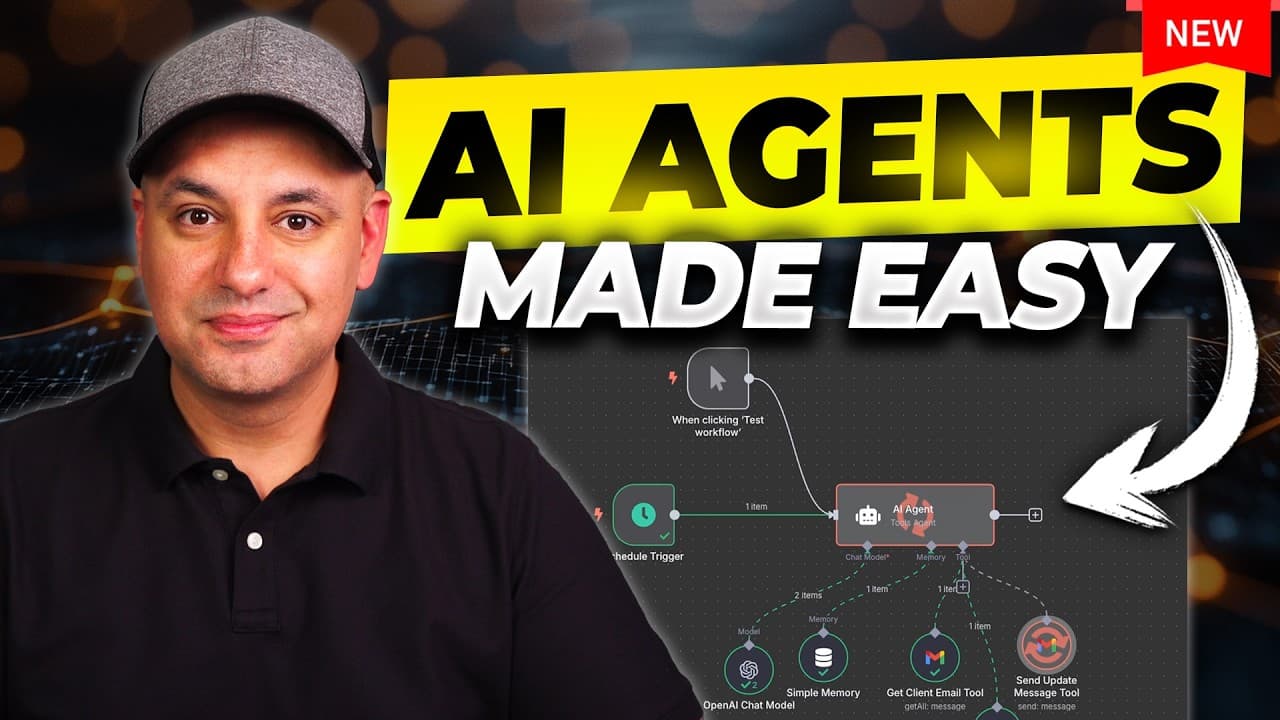
An AI agent is a program that can think, adapt and act autonomously to achieve a goal. The video outlines three core parts: the model powering the agent, memory to remember past interactions, and tools to perform actions. It then demonstrates building an agent with N8N to access calendars, read emails, and propose meeting times, without coding skills required.
Transcript
AI agents are easily one of the most exciting parts of AI right now. And they don't just respond like typical AI chatbots like chat GPT. They could actually take actions for you. And they are getting more powerful every single day. My goal with this video is to explain what AI agents are in the most simple way, even if you're completely non-tec... Read More
Key Insights
- AI agents are autonomous programs that can think, reason, and act to complete goals.
- The core components of an AI agent are the underlying model, memory, and tools.
- Agents can access multiple apps through integrations to perform complex workflows.
- Agents differ from chatbots by both acting on tasks and remembering past interactions.
- Automation tools provide predefined rules, while agents add reasoning and flexibility.
- N8N is highlighted as a user friendly platform with a visual interface for building agents.
- Memory is essential for good agent performance, preventing irrelevant or repetitive responses.
- A practical example is building an AI agent to manage calendars and emails for scheduling proposals.
Install to Summarize YouTube Videos and Get Transcripts
Explore YouTube Video Summarizer or Get YouTube Transcript Extractor
Questions & Answers
Q: How to define an AI agent and what makes it different from a traditional program?
An AI agent is a computer program that can think, reason, and act on its own to complete a task. It is autonomous and can adapt to new information, remember past interactions, and use tools to achieve goals. This contrasts with traditional programs that follow fixed instructions, lack memory, and can only perform predefined steps.
Q: What are the three core parts of an AI agent as described in the video?
The three core parts are the AI model powering the agent, memory to recall past interactions, and tools that allow the agent to perform actions. The model provides reasoning capability, memory enables continuity across tasks, and tools connect the agent to real-world applications like email, calendars, and data stores.
Q: Why is memory important for an AI agent, and how does it affect performance?
Memory is important because it lets the agent recall prior interactions, context, and relevance from past tasks. This continuity improves decision making, prevents repeating steps, and allows the agent to tailor responses and actions based on history, leading to more efficient and accurate task completion.
Q: What roles do tools play in an AI agent, and can you give examples?
Tools enable the agent to perform real actions beyond thinking. Examples include accessing Google Calendar to check events, reading Gmail to process emails, and using data from Notion or web search to gather information. Tools let the agent execute tasks like scheduling meetings or extracting summaries from pages.
Q: How does the video suggest selecting a platform for building an AI agent?
The video favors a visual workflow platform named N8N for its drag and drop interface and broad integrations. It emphasizes ease of use, the ability to connect to multiple apps, and the option to run locally or via a cloud service, making it accessible to non coders.
Q: What are practical use cases for AI agents mentioned in the video?
Practical use cases include a social media content planner that automates posts, a customer service agent that handles FAQs and issues, a personal email assistant that sorts emails and drafts replies, and a lead management agent that tracks leads and sends follow ups. Web page summarizers are also highlighted.
Q: What resources does the video offer to help viewers learn more about AI agents?
The video mentions a free HubSpot resource that includes a 42 page ebook with use cases in marketing, sales and operations, plus a second download called How to Use AI Agents in 2025 which provides a practical checklist for adoption. It also links to an online catalog of examples on N8N.
Q: What is the step by step process to build an AI agent as shown in the video?
First, set a goal for the agent, for example manage a schedule or answer a client question. Second, gather information from accessible data like chat history or order details. Third, the agent reasons and decides the next action. Fourth, execute the action using connected tools such as calendar, email, or CRM. This loop repeats to hit the goal.
Summary & Key Takeaways
-
The video explains that AI agents combine model reasoning, memory and tool access to autonomously complete tasks, unlike traditional chatbots or fixed automations.
-
It demonstrates a practical build using N8N, a visual workflow tool, enabling drag and drop integration with apps like Google Calendar and Gmail to perform real actions.
-
It provides real world use cases such as personal email assistants, lead management agents and web page summarizers, plus a free HubSpot resource and a practical checklist for adopting AI agents in 2025.
Read in Other Languages (beta)
Share This Summary 📚
Summarize YouTube Videos and Get Video Transcripts with 1-Click
Try YouTube Summary with ChatGPT & Claude or YouTube Transcript Generator
Explore More Summaries from Skill Leap AI 📚





Summarize YouTube Videos and Get Video Transcripts with 1-Click
Try YouTube Summary with ChatGPT & Claude or YouTube Transcript Generator